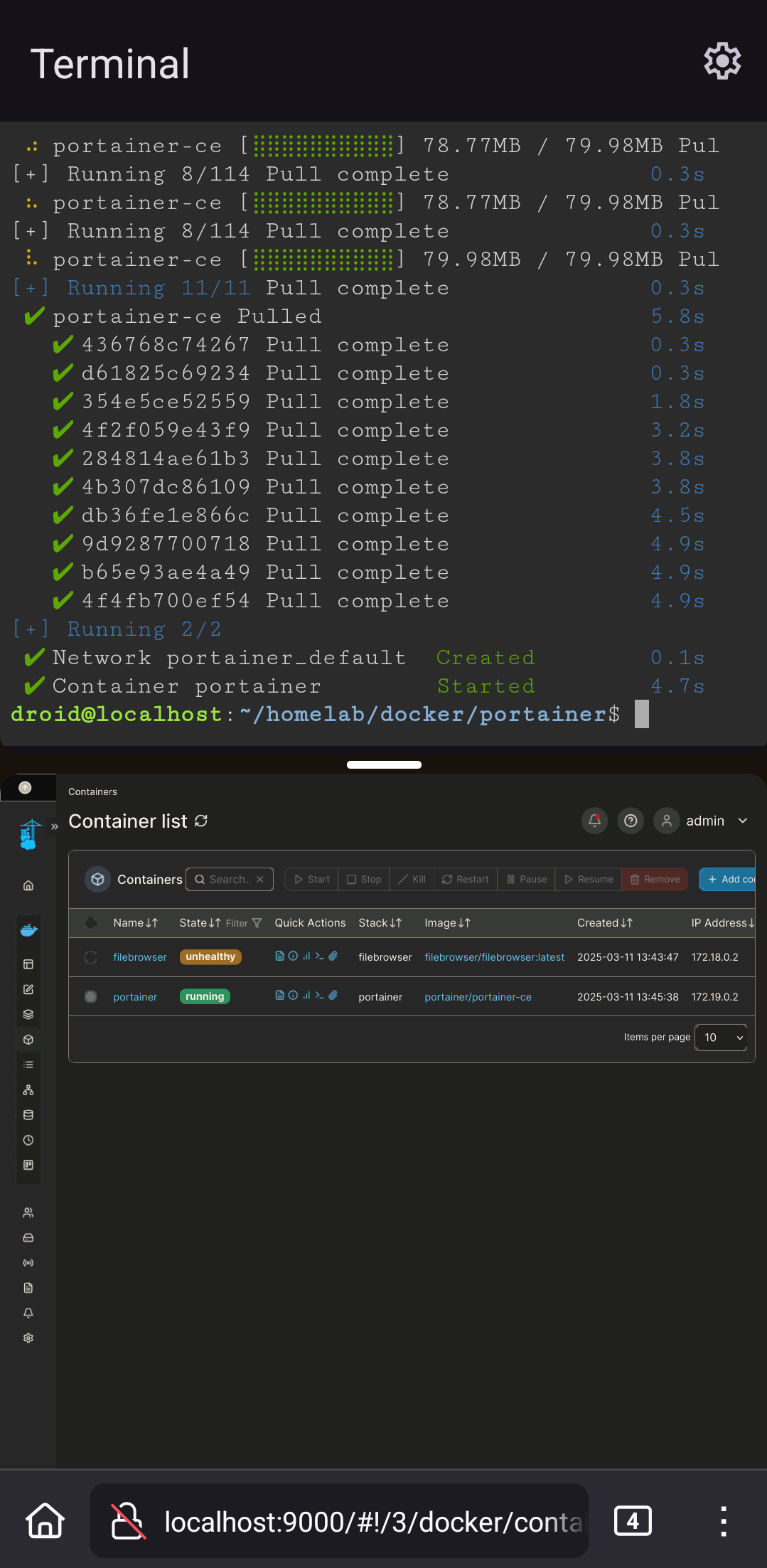
With the latest release of android it now supports some Linux functionality. I got docker installed simply by following Docker’s docs.
Any thoughts or uses for a mobile homelab? What would be useful to have mobile?
You must log in or register to comment.
my friends complaining that my plex server because I left my phone on the bus and it ran out of charge
The lines between mobile device and server get blurred even more.
Tbh a laptop is a “mobile” device
It’s a server with integrated UPS and KVM console.
Except for that time I took out the battery because it was swollen and took the screen off to help with cooling. At least I still have my K and M
This is simultaneously cool and cursed af.
Lmao this is amazing. The future is now…
Impressive! Can you please link the instructions you followed?
Some time ago I was hosting the full ARR suite, bitwarden, AdGuard etc, but it was usually a mess with direct installs. With docker it might be worth revisiting it.
My only advice, buy a usb-ETH dongle, it will make a huge difference in stability
https://docs.docker.com/engine/install/debian/#install-using-the-repository
That’s it lol. To turn on the terminal, it’s a developer option for now, and is very alpha, just search for Linux in settings after turning on dev mode
Just installed arch with chroot on my old rooted phone a week ago.
Seeing this is great because it means there’s no need for complicated workarounds or even root access! Plus the distro runs natively and not with difficulties like with chroot :D
Native in what sense? As I understand it that uses a VM of some sort
You’re right actually it’s not native I don’t know what I’m on about 😅 Still it’s much easier to have a baked in terminal app than having to install proot on top of termux, hopefully it will have less of a performance impact than proot as well.
Oh nice! I’d love to run an ad blocker/dns/reverse proxy on something with a little more beef than the Pi zero I’ve got now.
Jellyfin and or Pi zero does not like streaming through the video.local address I’ve got setup, so i have to use IP address to get anything without stuttering.
pi zero for streaming is insane not gonna lie. What sort of resolution do you stream it at?
A decently newish phone would blow even a pi 5 out of the water I bet. Modern GPU drivers from snapdragon or mediatek plus core designs that arent 7 years old out of the factory would be a godsend for low-watt homelabbers
Dang, I just realized I didn’t explain the setup well enough:
An old laptop runs the Jellyfin server, but the Pi runs the reverse proxy. For some reason, trying to use the reverse proxied address causes problems, but connecting directly to the laptop via IP address and port runs fine.
I tried a Jellyfin server with a pi 2 or 3 and it couldn’t serve more than one client at a time. So i imagine a zero wouldn’t even be able to load the app, much less serve anything :/
My main reason for running my DNS/ad block/nginx through the zero, sometimes the laptop goes down, freezes, or fails to clear the transcodes folder, so having that stuff separate keeps at least part of the network running.
The VM eats through the battery, that’s the only hangup I have with this. Otherwise that’s a fantastic idea.
If I trusted the battery tech more, I would use an old phone. But I’ve had one of those white plastic Mac books hooked up to power so long, the battery swelled out of its enclosure :/
Maybe there’s a way to disconnect the battery, or an app that switches off charging, so it drains enough to keep that from happening
There are root apps that can limit battery charge level. If you have an older phone that’s rootable, I would look into that.
I wish all the logs at my company were as beautiful as these terminal logs
Please no. I can’t grep that. (Nor ingest it to splunk for more powerful searching.)
The day Docker works on Android, I’m settled.
Docker does work on Android. That’s what OP is showing off.
Well, if they manage to get it working on Android I’ll be really impressed.
Maybe one day it’ll even work on Android!
Even better, maybe it will support Docker.
these are the times when I get jealous, as an iOS user
I dont know how you can stand using iOS. Its just so unintuitive, theres no back button and I can’t even figure out copy/paste.
Copy paste is easy. You just tap on the, no wait you tap on the, fuck hold on. You tap, there we are, on the word and hold until it highlights. No wait hold on. Fuck. There we are. Ok now you tap on the highlighted word to copy, fuck wait Ah fuck it just type it again yourself
Haha my feelings exactly, I can work in Linux cli and program rust with ease, but I can’t copy and paste on an iPhone.
I feel this. My work phone is an iPhone 12, and typing is a pain compared to Android.
You’re free to join us
How do we activate this feature? I have it enabled after going into the developer settings menu but nothing seems to happen, I see mentions of an app but idk what the app is. I am on grapheneOS though instead of normal android so there could be something with that here.
Oh nvm I figured it out, it just took a bit for me to realize there was a new terminal app on my phone
That’s cool! I’ve always had the idea of a small k3s cluster on old phones with postmarketOS. I guess it doesn’t work with older phones which don’t have the latest Android Version but given the homelab trend generally goes towards small, low power devices, this could continue the trend with super small and low power phones. Probably in 2 years when current gen phones rotate out of company leasing contracts?
Oh man that’d be super cool. An ARM cluster of androids would be awesome. Battery backups built in!
I can see my 5 year old android mobile struggling being a suitable self hosting machine… (Because of the battery).
But not gonna lie, having it working as a more advanced travel router connect to Tailscale sounds like a neat idea (which I think it is already possible? The other day I saw the client app that supports subnet routers? I just haven’t tried it, and it has a disclaimer that it drains the battery… So I didn’t end up doing that at that moment when I was away).
Debian is supposedly coming to android. That would be cool.
That’s Debian in the screenshot
Oh nice! I can’t see very well on phone.
I’m assuming your phone has to be rooted for this right? Or is docker running without root? I didn’t realize anything like this was possible. This is interesting.
Nipe! Not rooted. In a VM though
I’ve never tried it on Android, but running Docker in rootless mode is doable, and is encouraged for security reasons. https://docs.docker.com/engine/security/rootless/
I dont think I so much want this for my phone as for my homemade AndroidTV boxes. Losing the Linux functionality after switching from Kodi/libreelec had been my biggest pain point.
Can’t wait to see my TV boxes show up in my Beszel dashboard!
Can you tell me more about these homemade android TV boxes? I built a really shitty front end to “turn” my Linux based mini PCs into a media streamer but it lacks things like Chromecast and reliability haha
I have two TV boxes, one is a Raspberry pi 4, the other is a pi 5. I installed KonstaKANG’s android port for the Pi’s. Depending on your familiarity with flashing the Pi’s this video from Explaining Computers offers a way to get Konsta installed through PINN. Once they’re up and running they act just like a cellphone. This remote works really well.
Install f-droid, and/or obtainium, and/or Aurora Store and you can install whatever apps you want on the box.
I don’t personally use Chromecast, so I can’t vouch for that working. Mine is more centered around consuming Jellyfin (jellyfin android tv app), youtube (newpipe), podverse, and Radiodroid
I really liked Kodi, but could never get it to correctly sync across devices so I finally went the android route. I’ve been pretty happy
Feel free to pick my brain if you have more questions