You must log in or register to comment.
Wouldn’t you just use AFS, CEPH, NFS, or 9p?
I really don’t want to be that guy, but isn’t SSHFS (FUSE) actually a terrible option when compared to an actual file-system? MacOS isn’t really missing out on much there.
The most painful part of MacOS (which makes it downright unbearable for me) is that system configuration files are XML. It’s an absolute nightmare.
SSHFS is secure and works well over the internet. If you only want to access it over the LAN, then NFS is a much better option.
For some (most?) of us, we don’t have ssh access open to the world, so everything is over a VPN. So I can just use NFS over WireGuard which afaik is fairly secure, if you trust your endpoints, and works great over the Internet.
I’ve never had good luck with NFS on a high latency connection. SSHFS still works fine even if the server is on the other side of the planet.
SSHFS is very mature. I use it for administering several home servers.
It works so well that they added a mode where some users can have SFTP only access (without SSH shell) so you can set up shared directories. It was easier to set up (for me) than CIFS or NFS.
SSHFS uses SFTP which is built into SSH, so no server to install. Its not as fast as NFS, but requires no setup. For something small like a home lab, that is a big advantage.
This. Surely not the fastest way to get content from/to a remote computer, but it just works as soon as you enable sshd.
Used sshfs at work the other day for SFTP. Wanted to do a recursive search and it didn’t seem possible with filezilla on my Windows laptop. Started my Linux VM and sshfs followed by find/grep to get the info I needed.
WinSCP is a much better client. Also use WSL2 instead of VM.
I do other things with the VM as well, I would rather just use desktop Linux all the time.
I use nfs shares for this use case.
me too but the connection is tunneled in an ssh channel so it’s similar
NFS is insecure out of the box so typically tunnelled over TLS (not seen it done over SSH since why bother if there’s SFTP?).
I’d rather a desktop app or a terminal app for remote file systems than install a kext on a mac. Like, kicking stuff out of the kernel was an excellent idea.
FUSE would knock over my old mac anytime a transfer was longer than an hour or two. Not to mention the vulnerabilities poorly developed or maintained kexts introduce.
for that I then just use VPN/Wireguard if I really need to access my home server remotely off-site.
NFS is insecure out of the box so typically tunnelled over TLS
Set up Kerberos, it will also give you correct file ownership and then you don’t need any additional tunnel.
NFS over TLS exists, but typically you use kerberos for such deployments. Bit too much for home use though…
You’re not running an entire Active Directory domain in your home?
I’m a bit of a casual
Eh, works for me for home use. I just have it running on the same machine as the NFS server. The only thing that bothers me is that I can’t use normal Kerberos for SMB, I’d have to set up Samba AD. Boooo
I even managed to make it work with just mDNS as I’m currently in a horrible network I don’t control.
Windows: ☠️
I’ve used this in the past (on the client side) https://github.com/winfsp/sshfs-win
It’s pretty easy. Just right mouse click the network and Map Network Drive. Follow prompts. Success
Windows does not have native SSHFS support
It doesn’t need it. All NAS systems have samba on by default.
Not everything is prebuilt NAS.
@jaschen @SpaceNoodle or some unknown error only disappearing after reboot (especially with winsshfs/winfsp-like drivers)
Just use samba.
I mean, if your server is using samba to share: net use * \homeserver\share {password} /user: {username} /persistent: yes /savecreds
Windows terminal commands are an abomination before the site of the LORD.
They were wise enough to include a mount alias though so if you pretend you’re on Linux it’ll work well enough.
No idea if it supports SMB or ssh though, but it works with NFS
mount -t nfs3 server:/srv/nfs/exporteddir E:Mounts an NFS export to the E drive.
You can even bypass all that and just mount it in the Explorer GUI.
Running both Linux and macOS on a daily basis… They’re both completely competent, and have basically the same amount of rough edges once you dig in and get your hands dirty. If you find one of them impossibly difficult, it’s a skill issue.
Lol. Yeah.
deleted by creator
fun fact: Windows uses 9p for bridging the Windows and Linux filesystems with WSL2. the devs had excellent taste in protocols.
I use distributed storage for all my files using pirate bay
So you’re storing your shit at my house?
And I am thankful
What are you talking about? SMB on MacOS is crazy reliable!
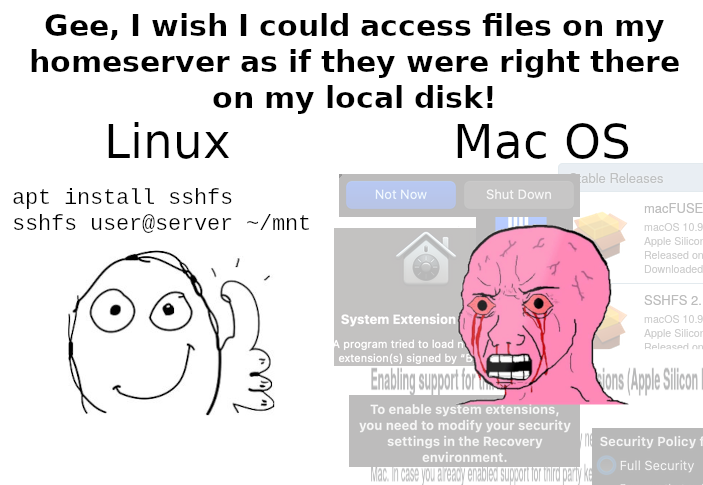
The meme is talking about sshfs.
For smb, the share would need to be created first.
Sshfs is pretty nice because it will give you access to all of the files that on the server that you have permissions to access.
TIL.
Lmfao
I use both of these systems daily. They have some issues but are just fine for me. Honestly, they are just opposite extremes and I respect that. They each chose a side.
Whereas windows makes me scream. It’s absolute horseshit that pretends to claim some middle ground that makes no one happy.
I have a pc I use as a dedicated file server, and a MacBook which connects seamlessly to that file server via my home WiFi, and I stream movies easily. My AppleTV and iPad stream from it too, no problem. I don’t look like that guy on the right. Am I doing something wrong?
Isn’t MacOS based on a Unix kernel? Or did they evolve away from the core principle of treating everything as a file?
Macos kernel is a mix of freebsd and mach. It’s half UNIX from BSD side.
It’s currently growing up like a teen wanting to be business major cause they resent their artist dad for being an artist or a math teacher instead of working in finance.
“Oh what does my dad do for living? He is like that redhat linux, in a way.”
You’re correct. Also you can sync files across all devices, built in. The meme is a bit fart sniffy.
I knew that one was bullshit or probably just simple ignorance. I use ssh and scripting to control my macs. Its easier than using ios depressing GUI tools.
What’s the best way to do the file syncing?
Syncthing
Works flawlessly on every platform (even mobile ones)
TIL about sshfs and life got a little bit nicer
Can you not just
brew install sshfson a mac? (Assuming you’ve already installed Homebrew).No, but you can do this:
brew install macfuse
brew tap gromgit/homebrew-fuse
brew install gromgit/fuse/sshfs
Ah yes… secure shell for fuck’s sake