

I love the specs and the pricing. Will definitely check it out.
The next router I’m getting!
Mmh only two Ethernet ports? I guess it’s for people who use mostly wifi only?
It’s just the router, I guess. Provide your own switch for more ports.
Exactly this. With VLAN tagging you can plug that single 2.5Gb connection into a 48-port managed switch and effectively have up to 47 different NICs if that’s what floats your boat. They’d all share the 2.5Gb but that’s still more than a lot of small networks need.
In a shared 2.5Gb scenario as you describe, would fully pegged upload/download be 1.25Gb each? Could it do 2.5Gb in both directions simultaneously? Assuming no compute bottlenecks.
It’s a router, not a switch.
Well the router I use today has 4 ports (and a built in modem for that matter, but I don’t use that).
I understand I can use a switch, but that means I’ll have to buy a switch in addition to this to replace my router.The audience of this router most likely already has a standalone switch within their network.
I have 3 but they’re not close to the router. (What I’m saying is: I’m likely target audience, but I don’t have an additional switch nearby, since so far any router I had also had a built in switch.)
But yeah, I get it. Modularity makes sense for repairability.
Which is not a bad thing, it’s more unix if you will. Router is a router, switch is a switch.
You provide your own switch and you choose the features: port count, port speed, vlan, etc — or get a 10€ switch if you don’t care. When a port breaks you replace the switch alone.
Multifunction tools are generally a tradeoff where you buy immediate convenience and pay with more ewaste and more money in the long run.
Good point.
I also wanted to chime in with the perennial point that while this device is a pure expression of the OpenWrt project, they also support hundreds of other devices including, amazingly, a number of large switches, so if you wanted to ditch the separate route appliance altogether you could get all the features with only switch hardware.
If only it were a useful hardware configuration.
It’s $90 and for if you want a wifi router. What are you missing?
I would need the WiFi and a 5 port integrated switch (won’t refuse 8 either), and then I’d buy 3 or 4 of them immediately.
Switches are like $15, dude.
…and I knew that already when I wrote what I need.
Ever think before you post?
Yeah this doesn’t hold up against the $200+ options but it’s also not priced that way.
It would be nice if they would make one with 4 or more LAN ports with at least one of them 2.5G and no WiFi. I need multiple access points to get enough coverage. The built in WiFi is useless to me since it won’t integrate nicely with Unifi.
You can hook it to a switch and a Wireless AP… Now your networking is modular.
Turn it off then and use your own APs, it’s what I do in my home. I don’t have this specific router but I have a box with 2 eth ports, one goes to pppoe and the other to my home switch, where my APs are connected.
I still don’t understand why this isn’t a 2.5G WAN and 2.5G LAN. Is it assuming that people are going to be using it as a router on a stick with a 1G WAN?
I can’t tell if WAN is Wireless Area Network or Wide Area Network.
Wide area network. It’s basically the “internet” side of the router.
I know what a Wide Area Network is. I’m just saying the acronym is ambiguous since the advent of WiFi
lan is local area network
wan is wide area network
wlan is wireless local
wwan is wireless wanNot really. WAN has always been WAN. Wireless has always been WLAN.
WAN = Wide Area Network
WLAN = Wireless Area Network*Wireless Local Area Network
*WLAN = Wireless local area network
Given the 2.5Gb port also supports PoE in, I think the idea is that you can plug this into a 2.5Gb PoE port on a seperate managed switch and that’s the only connection you need; that’s certainly how I would use it. WAN connections could be plugged into that switch, along with the APs, user devices, servers, etc, with them seperated using VLANs. Assuming everything was gigabit except for that 2.5Gb link to the OpenWRT Thing™, you’d be hard-pressed to saturate that 2.5Gb port and you’d still have the gigabit port completely free for… whatever.
You want your $90 wi-fi router to do what now?
Nerd here. You confuse me:
WAN is some up-/downstream port connecting intranets remotely in my novice book. The measurement G doesn’t refer to some advertisement-thingy in terms of wireless speed (but Gigabyte) - Maybe it’s some form of Generation; But then I lack everything including my false base knowledge. Additionally I have never encountered “2.5G LAN” ever before: Would you be able to shed light on my shortcomings? 2.5 x 8 is 20 Gbit. I didn’t read about that size yet.
Edit: Thanks guys!
WAN would be the Internet uplink port. A 2.5G WAN port is a 2.5 gigabit Ethernet port. 2.5 gigabit and o a lesser extent 5 gigabit Ethernet are a standard that’s becoming rapidly available on a lot of hardware. OP is stating that for a device shipping near the end of 2024, a new router that is shipping with only 1 GbE instead of 2.5 GbE is a problem.
I have never encountered “2.5G LAN” ever before
https://en.m.wikipedia.org/wiki/2.5GBASE-T_and_5GBASE-T
https://www.tp-link.com/se/business-networking/unmanaged-switch/tl-sg108-m2/
now you have ;)
most likely because this device is mainly for wifi use, and/or limitation of the SoC.
https://lemmy.world/post/22632752?scrollToComments=true
This discussion is still on the front page
Just pulled the trigger, only had European plugs in stock. I’ve got adapters so np. I’m getting it to replace my Raspberry Pi router that I’ve been using for a few years.
*Edit, I should say I’m a huge fan openWRT despite the fact that 15 years ago I managed to brick my linksys router so bad it actually caused sparks to shoot out the ethernet jacks. I flashed the wrong model firmware.
That’s amazing, for software to be able to cause that!
And also highly unlikely in the way described lol
Power over Ethernet is a helluva drug
Of course, I just bought a new router, your all welcome
Thank you for your sacrifice.
Which router did you go for, by the way?
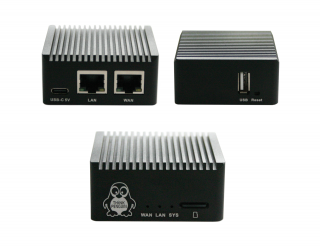
I’m late to the party but please consider this FOSS / liberated hardware option from thinkpenguin. Highly recommended.
Powered by usb-c, runs on librecmc
https://www.thinkpenguin.com/gnu-linux/free-software-gigabit-mini-vpn-router-tpe-r1400
What’s the point of having 1G on WAN and 2.5G on LAN? Traffic won’t hit the LAN port until it’s routed to the Internet, yet the WAN port is the bottleneck.
Edit: Seems like I switch up the port speed but my point still holds as the bittleneck still exist.
Tranfering between devices on the LAN.
Edit: Wait, no, it’s the other way around. 2.5 on WAN, and just a single 1GB LAN port. That absolutely doesn’t make sense.
This is a common setup for WiFi routers, where the idea is that most traffic will be on WiFi.
The LAN and WAN ports aren’t labelled as such on the device and can be configured to do anything. The 2.5Gb port can also be used to take in PoE so for a lot of people - myself included - this will be the only port that’s actually used, or at least the port that will be used the heaviest. The reason, I think, that it’s configured as WAN by default is so that the LAN port can be used to plug a laptop in directly without disconnecting the whole network.
This person knows openwrt haha.
It doesn’t matter. Port configuration can switch around and the bottleneck is still there. Traffic with in the broadcast domain (i.e. subnet) will handled by the switch alone.
There is WiFi onboard so it can have some actual benefits, depending on design and how user access resources, but how likely you’re going to saturate that 1/2.5G link? Not even you stream some 4K movies from Plex to iPhone will does that.
I think you might have missed the point: with a managed switch that 2.5Gb port can be used to handle multiple WAN and LAN connections simultaenously. My home network includes two WANs and six LANs split purely by VLAN tagging and that 2.5Gb connection should handle all of them just fine.
Which I do specified “in the broadcast domain”. Sure you can use it with VLAN but that more than the scenario I’m describing.
Maybe it can be used as a router on a stick.
Could it help with internal tasks, like self-hosted services or a business that transfers files around a lot?
Does it have enough power to handle routing (not just switching) 2.5Gb + 2.5Gb + whatever the WiFi can support? My guess is it cannot and it would have pushed the price up signifcantly to do so.
Does seem counter intuitive to me as this is squarely aimed at enthusiasts who would like to min max their home network.
Local NAS, local security cameras, in-house streaming, LAN multiplayer, local torrent-like data sharing (FYI, Windows Update and more uses the local network to share update between computers by default, so it gets downloaded once and then shared internally)
Then use a switch …
It’s default 2.5G WAN and 1G LAN. It also has wifi to use some of that bandwidth.
This is cool
The fact that this has USB type C as a option for powering it makes me very interested, but the fact that it does not have at least Wi-Fi 6E makes me not interested. So I think I will have to wait for version 2 of this.
In the us at least, you cannot have 6ghz operation and connectorized antennae like this unit has
Oh come on, don’t knock the router for not being the best access point. That’s not what it’s for.
The best routers don’t have any WiFi.
If I remember correctly, Wi-Fi 6E was finalized in like 2021 or 2022, and it’s 2024 and very close to 2025. So it should be about three years that Wi-Fi 6E has been in the wild. I only have 500 MBPS fiber anyway so I wouldn’t saturate the links but I do want the six gigahertz Wi-Fi band because if I’m going to buy a new router I’m going to probably keep it for like 10 years. I think I purchased my previous router in like 2019 and I’m still using it. My router is an appliance that I only replace when the damn thing breaks pretty much.
I’m saying that your router and access point should be separate devices anyway, especially if you don’t want to replace said router.
My router doesn’t have wireless at all. I have a dedicated WiFi 6 access point for that, if I want to go up to a newer standard I just replace the AP.
Yeah, fair enough. I’m kind of an intermediate user, because when I think of Access Point and Router, I think of the same device. But yet, I’m definitely a big advocate of open source software and hardware. But I do not self-host very much.
Turris Omnia & OpenWRT-ONE I wish we had this in Asia
Are you suggesting that AliExpress doesn’t ship to Asia?
Ali Express is not as widely-available as you think in Asia (Political stuff)
So, how is this any better than the Router Mini PCs you can find in Aliexpress (random example)?
Most of those run OpenWrt or PfSense. Assuming the hardware is well-supported by the open source software it runs, there’s a argument to be made that there’s no difference. There’s always the risk of them using some weird chipset that won’t be supported in a year’s time. The only difference is that the OpenWrt One is specifically designed for OpenWrt with well-supported hardware.
how good is openwrt these days? i used it a long time ago on tp link hardware are remember it was not too good…like adding own scripts, addons etc. and then i tried stuff like ipfire,ipcop and pfsense. pfsense was so much better and now opensense is quite good. how does current openwrt compare?
OPNsense is like comparing a bicycle to a car (in Europe) Both will get you there,the first one is more convenient most of the time for most users,but the second one is a whole class of “more powerful”. But it’s far easier to take a shortcut with a bike.
k. thanks. i really was thinking they made hughe progress now that they do dedicated hardware.
They don’t, as others have pointed out. It’s just a standard single board computer with some addons and a case.
I’ve been using it on my last 2 routers, currently the Netgear WAX206 and I’m loving it.
It does what it’s supposed to. No complaints.
WiFi
The very example I provided comes with an mPCI-e slot to install a WiFi card of your choosing.
Also they have SIM card slots so you can install a data SIM card and set-up a fallback configuration that switches to it if your landline internet connection goes down.
Of course. But this one comes with WiFi onboard and a case with antennas if you go for the clothed option.
It’s Open source hardware too
Whilst that’s a nice slogan, in Electronics “open source” doesn’t mean anywhere as much as it does in Software because it’s generally just knowing which components go into the circuit, which is but a fraction of the work (laying out the board is a massive chunk of work, in some cases most of it, and at high enough clock speeds circuit design is an art in itself).
Mind you, I like the Orange Pi and Banana Pi guys, and the idea of an SBC designed for being an open source router is pretty appealing, though nowadays maybe pfSense would be a better choice than OpenWrt.
Finally this thing having only 2 ethernet ports + WiFi makes it little more than a regular $70+ SBC board + a box - something easy enough to put together by any technically inclined person - which isn’t exactly exciting.
pfSense would be a better choice than OpenWrt
I heard pfSense had a hard time with wireless radios, and that’s where OpenWrt shines comparably. Is that not true?
Open hardware (by oshwa definition) would include the board layout