These controllers were all working on SteamOS before as far as I know, so I’m interested to see what this changes. My understanding is that previously their controllers just show up as generic xbox controllers, and now they will be properly recognized. We’ll see if this has any other benefits like custom bindings for back buttons and things like that.
That’s cool to see but I’ve gone through about 3 8bitdo controllers (gave the last one to my partner). I like them but I wish there triggers were not the rubber magnetic pads. I’m a bit heavy handed when using the triggers and it eventually crushes the pads to not work. Other than that great controller.
Upside, usually the controllers are extremely easy to fix. I’m not sure if they give free replacement pads still, but they used to if you asked support.
I’ve had other problems than shoulders on my pros, and never with the ultimate one I got, those seem to have a pretty solid build.
I took apart the first one and had to order the pads. They were cheap and available. I sent the second one back to be replaced because disconnecting the board from the controls stripped the connection. It was easy and had it back fast.
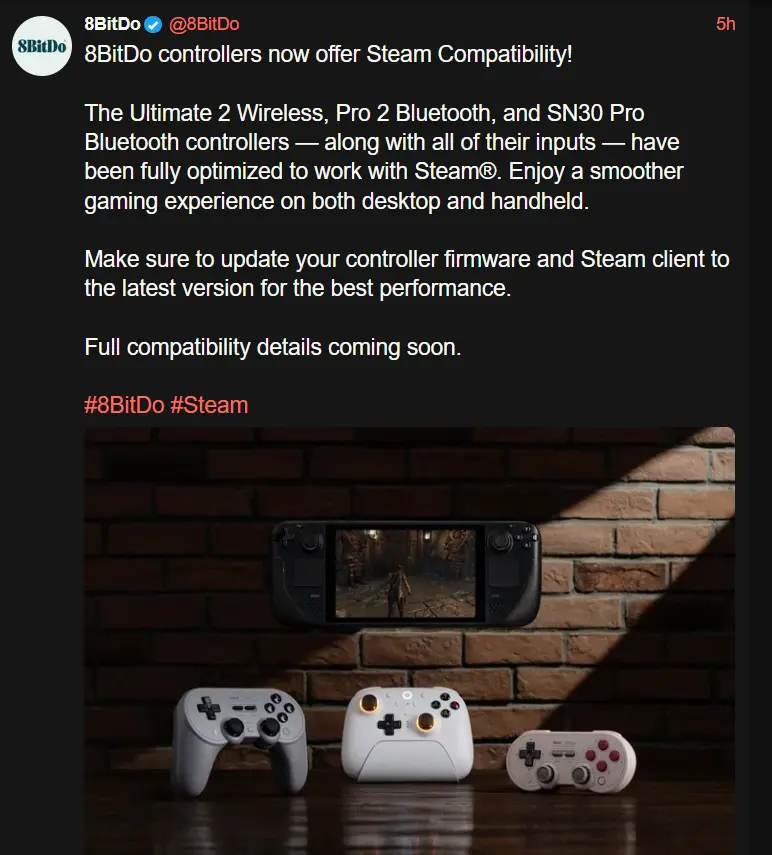
8bitdo controllers now offer Steam compatibility!
Full compatibility details coming soon.
What a non-announcement announcment.
It sounds like they have to wait for support to move from the Steam Client Beta to mainline. That happens on Valve Time, so they genuinely do not know.
Then they shouldn’t say anything.
So how do you update firmware with just a Steamdeck? 8bitdo does not seem to supply Linux software support anymore, so it feels a bit hilarious that they support SteamOS without any official way of updating controllers there.
I found the fwupd tool on github, but it seems a hacky way that cannot update everything. Can the 8bitdo tool be run via proton/wine?
Isn’t fwupd already included in SteamOS? Or is there a specific 8bitdo fwupd tool?
maybe it is (don’t have my deck with me to check) but even so, it is not an officially supported tool and I can see from issues on Github that people cannot find their controllers on there. not sure if that’s very old or very new ones.
https://fwupd.org/lvfs/devices/
In the devices list of lvfs/fwupd there’s a bunch of controllers supported. But it seems like it’s mostly their retro controllers. XBox-style controllers like their Ultimate C etc. are not supported.
We call this marketing bullshit.
Tried it, not it cannot
I really wish you could swap the buttons easily to match the system. The 8-bitdo controllers tend to have the Nintendo layout which kind of sucks because most games don’t support that they use Xbox. And then of course if you get into emulation nothing will match the PlayStation so I either need several controllers around or to memorize locations
You can! They have replacement buttons for whichever layout you want for fairly cheap. I’m using the original ultimate Bluetooth with an Xbox layout.
Wait what? Do you have a link for this?
If you don’t care about what the physical button shows, steam has an option the swap the layout of the face buttons from Nintendo to xbox in the input settings.
I wish so many games didn’t default to the Xbox layout with no option to change it. Having grown up with the SNES layout, the prompts fuck me up every time.
How can it be so hard for devs to just include some additional sets of glyphs and allow the player to switch manually? Then nobody would have this problem.
It isn’t, and many now do.
Autosetting the glyphs correctly is actually one of the requirements for a Steam Deck Verified badge and Steam supplies a library that has them all, so modern games are pretty good at it. And if you implement that, you might as well add a menu option to change “Auto” to “Switch” or “Playstation”.There just was a quite long period where majority of games used Xinput thanks to Microsoft, basically only working with Xbox controllers, and as a response a whole bunch of controllers identify as Xbox controllers when plugged in. Therefore, xbox icons were the only thing they were “designed” to ever work with.
Has anyone gotten this to work? I have both the SN30 Pro and the Pro 2, both display the latest firmware update as 2.06 which just lists Switch 2 compatibility. Steam doesnt seem to recognize the back buttons on the Pro 2 either.
Instead of pressing the L+R buttons press the button with the 8bitdo logo while in the change grip/order menu.
I love these controllers. Side note Everyone please don’t stop signing EU: https://eci.ec.europa.eu/045/public/#/screen/home UK: https://petition.parliament.uk/petitions/702074/
I’ve been using these for years, including with my docked steam deck, and they already work great.
I also wonder what they could’ve changed.
My Ultimate 2 wireless lets me bind the extra buttons to any command as well as detect and configure the gyro controls. This is with Steam Input; so you can bind those buttons to keyboard and mouse inputs.
The back buttons didn’t work with Steam Input (and still don’t with the v1’s).
The issue is that the back paddles weren’t unique buttons. You could configure them to press existing buttons, (like telling it to press A when you hit the right paddle,) but they weren’t listed as individual inputs. Now they are, so you can actually map unique actions to L4, R4, etc… This is particularly important for games that have a lot of unique inputs. Plenty of games are optimized for controller, but lots still rely on having more buttons (on a keyboard) than what a traditional controller has.
Honestly I’d love to see more of this. Wheels and panels as well, not just gamepads. I’ve always wished for fully assignable controller support where the icon and HUDs etc change, ETS2 is looks so much better now that the icons don’t flicker twice per second because of my hodgepodge DS4Windows control scheme anymore. And with multi-button combinations and stuff making more things doable from the controller.
I do kind of wish Steam Input was a separate piece of software though, sort of like Xpadder back in the day. Some kind of open button-mapping standard with an API and everything.
How do you make them work?
I just connect with Bluetooth like normal, and then in steam you can tell it to treat it like whatever type of controller layout you want: switch, xbox, playstation, etc.
switch, xbox, playstation, etc.
That’s probably what they’re talking about. Instead of emulating another controller you have 1st party support.
Came here to say exactly this ¯\_(ツ)_/¯
Friendly marketing reminder to those who haven’t bought one…
Pretty much. Maybe someone at the 8bitdo HQ got an SD and discovered that the controllers all worked great?
I can get this to work on my steam deck. Back buttons and gyro.
But on my PC, it doesn’t work. Does anyone know what the requirements for this to work are? Do I need a specific Bluetooth version?
I have a Pro 2 and my only complaint with it with “SteamOS” (Bazzite) is that the back paddles don’t actually work with Steam Input directly. You can program them with the Ultimate Software, but that means they’re stuck only repeating the input of another button on the controller. So if this update brings full Steam Input support that would be awesome, as it would mean you can set all kinds of other functions to them. Plus not having to use a seperate software, and controller-based profiles, would be awesome.
So if this update brings full Steam Input support that would be awesome
It does!
Fluff yeah!!
This is my main complaint about my 8bitdo pro controller. Shame this seems to be only for the newer generation 😔
I have a Pro 2 too and switched from Xinput to Dinput at the back of the controller and my Steam Deck now identifies the back buttons like L4/R4 (but with the name PL/PR) and I can map it to anything I want
I’ve been using DS3 controllers for over a decade, but they are starting to wear. The drift isn’t bad at all, but it’s there, although I suspect it’s mostly a few rubbers that’d need replacing, I have heard great things about 8BitDo, especially their Hall Effect controllers. Very reasonably priced as well.
So this announcement is just the kick in the butt I needed to get a Pro 2 Hall Effect one.Ive been waiting for this. Which one is the best one to get for both my Steam Deck and desktop?
Ultimate 2. It’s got a gyroscope and back paddles.
I love the trigger locks for Switch 2 use as well. It’s nice to have a controller I can go between both systems with.
Is there a symmetrical version, like a PS controller, or just the Xbox-like layout?
Pro 2 is symmetrical. Looks like a SNES controller with handles. The ergonomics of it are very different between it and the ultimate, and I prefer the pro 2 by a lot, but they are both good controllers.
I’m personally a fan of the pro 2. I find it to be the most comfortable controller I own. Their QC does seem lacking for the hall effect sensor version though, I had to set up a small dead zone because it idled with a little bit of input. Still a smaller deadzone than a non hall effect, but I wanted to make note of it.
How have I never seen these before? When my ps4 controller dies I know what I’m getting next now
I’m still holding out on the next generation of steam controller for playing games ony deck while docked. Until then, my 8bitdo pro 1 has been wonderful.
Months back, I submitted a support ticket asking if they had any plans to support a d-input mode with both analog triggers and gyroscope inputs enabled, like the steam-licensed controller that just came out at the time did. They said they had no plans, but they’d forward the question. I wonder if this is a result of that. Would be cool if they also started reporting the back paddles as separate inputs as well, but I didn’t include that in the ticket.
It sounds like back paddles will be treated as separate inputs, I found where some people got to try out beta firmware for some of the 8bitdo controllers some months back, and that was specifically mentioned as some of the new functionality.
I got the 8bitdo Ultimate 2 wireless controller with the latest firmware update, and can confirm dinput mode lets me map the back buttons and extra bumpers to different inputs through Steam Input. Analog triggers and gyro work too.
How do I update my controller on my steam deck when the update software is only on windows?

So it’s just bullshit marketing. Got it thank you
You can update via Android or iOS I believe
Unfortunately not the SN30 Pro, only Pro 2 and newer.