I’ve been a Windows user all my life and had dabbled in the Apple ecosystem for a bit. With the upcoming end of support for Windows 10 in Oct 2025, I figured I’d put myself through a huge challenge of cutting over completely to LInux without a secondary backup drive with Win 10 on it. If I could survive the struggles for a few months, I’d be golden, and if I couldn’t, then I could switch to Windows 10 LTSC and be good until 2029. The intention was to completely force myself in without a backup plan - the only way out would be to install a new Windows OS. I chose Linux Mint after careful consideration, especially considering that there’s tons of resources and help with this distro, and it’s a great onboarding ramp for Windows users. I need the familiarity since I’m in tech full time and just don’t have the energy to hassle with my PC after a long stressful day at work.
I also used this as a good excuse to upgrade my PC a bit, too. 😀
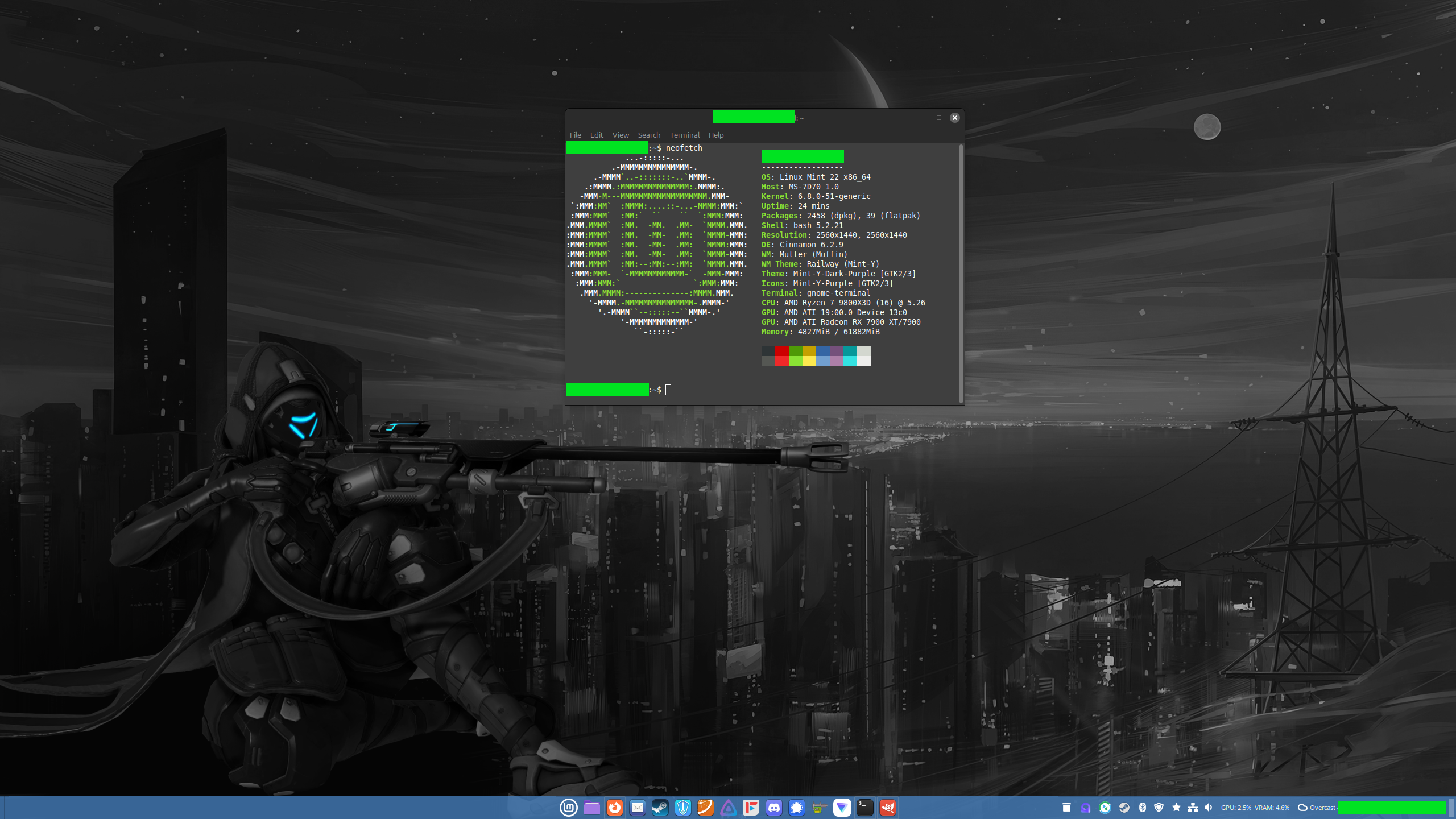
After switching in mid December, I’m happy to report that I’m still alive after 30 days. My computer hasn’t killed me. And I’ve been able to do work and game on my PC without too many hiccups. Marvel Rivals still crashes ever since the Season 1 update. Overwatch works perfect. My other games, on both Steam and GOG, work perfectly fine. But I haven’t been able to test every game out there, but I know I can use Proton DB if needed.
I even edited this screenshot in GIMP after being forged in the fires of Macromedia Fireworks and Photoshop all my life! I even stripped exif data using command line tools! I even installed this cool neofetch thing that I always saw in people screenshots of their PC or whatever, every time I saw someone’s Linux build with their thigh high socks and neofetch on the terminal!
But so far, switching to Linux Mint has been great! I’m excited to deep dive more!
Note:
- I backed up all my data from Windows into a USB drive. I’m slowly bringing all that stuff over to my Linux Mint computer and rebuilding my music, video, photos, etc. Lot of work, but it’s so cool feeling so liberated!
- I may also want help from you Linux nerds from time to time. I’ll make posts/memes begging for help when I get desperate. But so far, almost every issue I’ve had has been resolved via an internet search!
- I pray that I won’t come crawling back to Windows. I don’t expect that to happen with how great my experience has been thus far.
Specs:
- Linux Mint 22
- Ryzen 7 9800x3d
- Thermalright Phantom Spirit
- MSI X670e Carbon WiFi
- Sapphire Nitro+ RX7900 XTX
- Corsair Vegeance 64 GB DDR5-7200
- Gen 5 Crucial T700 (?) M.2 x 2
- Corsair 5000d
- Noctua case fans (Lian Li too problematic on Linux based on all the research I did in advance)
- Seasonic Focus Gold 1000W
Old Specs Everything the same as above apart from:
- Windows 10 Pro
- Intel i7-12700k
- Noctua NH-U12A
- MSI Pro Z690-A
- MSI RTX 3080 Gaming Z Trio
- Samsung Gen 3/4 M.2
- Corsair Vengeance Pro 32 GB DDR4-3600
- Lian Li AL120 case fans
Bro thank you from the bottom of my heart for the type up. I’ve been contemplating this for months and this very may well be the final tipping point for me to make the plunge. I’m in pretty much the same boat, tech savvy but don’t want to deal with shit I dont have to which has been my main reason for not diving in yet. I’ve thought of doing exactly what you described as I do love a little challenge, which I get contradicts what I just typed. Anyway, yeah, thanks again for the post! Will be doing my own switch here in the near future.
Happy to post this! I wish you good luck with your switch!
My approach was of course to backup all my personal files to a large backup drive. I exported as many as configurations for my programs as I could - like for Handbrake and FreeTube as an example. I backed up those configs so that on my Linux OS I could just import them and have all my programs configured the way I wanted. Before I pulled the plug on my windows, I also wrote down every program I used and saved it into a simple list, so that I can hunt for alternatives.
That approach I think was great for me since I spent a lot of time planning and carefully backing everything up.
It’s been very smooth for me with minor hiccups when I first cutover to Linux Mint, but I’m damn happy with how well things have gone.
Take your time to methodically prepare and I’m sure you’ll do well when you’re ready to commit.
You have the option of trying without installing. Lots of Linux distros can run straight from DVD or USB without having to be installed. This way you can rest assure that it will either work for you once installed or you can just eject the media without altering or touching anything on your drive.
Sexy!!
Don’t make me blush bro
I figured I’d put myself through a huge challenge of cutting over completely to LInux without a secondary backup drive with Win 10 on it.
Exactly how I did it coming up on a year ago. Still going strong!
Seriously glad to hear that. It just sounded like the best way to go into this. It was very scary at first because I encountered a few hiccups that I had to do a lot of research to figure it out, but so far I’ve been great.
I did the same thing right around the same time as you, still loving it :)
Apes together strong
Same, did a rebuild of my PC when I cannibalized my old one into a media server (really only kept the drives, so not really more like just built a new one…), bought two nvme drives for it with the intent to put Linux on the first and Windows on the second, but held off on putting Windows onto it to force myself to stick with it until I got a real sense for what I’d need it for…
A couple months later I decided I’d just use that second drive for more storage. Hasn’t run Windows once in over ten months of use and I’ve yet to miss it.
Only took me sixteen or eighteen years of saying I’m going to switch to actually do it…
Yep, that was pretty much me. In my case, I bought a new PC, and I decided I just didn’t want to put windows on it. I’ve been on linux ever since. And yeah, that was after a couple of decades of trying to do that and failing :)
“You” nerds? It’s “we” nerds now, nerd.
NOOOOOs very darth vader-y
And I would have gotten away with it, if it wasn’t for your meddling logic.
Welcome to the fucking Linux Thunderdome
Nerd
Now they can join in on the fights about which distro is best, get long socks, and post to unixsocks.
The answer is Debian, jsyk
I use Nobara byw.
As a fellow Debian (and Mint) enjoyer, I agree.
The nerd team!
When there’s a call for action, Avengers assemble, do nerds compile?
One of us! One of us!
It might not be a feature you’re interested in re: your music (or photo) collection, but one thing I missed when switching from Windows was the folder previews showing album cover art. I’ve been using Cover Thumbnailer (on Linux Mint 21.3) and it’s been working great.
Ooh that sounds cool! I’ll check that out!
I don’t think you can jump to Linux. Don’t you have to strut there wearing sexy tights?
Not sure I’m hot enough to pull that look off
It is not the man or woman behind the socks that is hot. It is the socks that make the man or woman hot.
9800x3d gang say wooooo
Heck yeah, and I got it for retail price! Best gaming CPU, and my first AMD since like… Athlon days.
Same here! I’ve been cheering on Zen for a while. Glad to finally be back aboard Team Red.
That’s a pretty nice set up you got there. Glad it’s working out for you. Welcome to the nerdy side, fellow nerd. 🤓
Also
neofetchis no longer maintained. You can replace it withfastfetch.Thank you! And great to know about
fastfetch! I’ll check that out tomorrow!Also recommend checking out Lollypop for a music player. One of the nicer ones. Also MusicBrainz to help organize and update music and meta data. They should be available in your store
Today Valve published a Proton Experimental update that fixed the Marvel Rivals crash for me. Be sure to set it up in game properties / compatibility.
You may be my savior because I plan on playing some comp this weekend and don’t want crashes.
Do you just set the game compatibility to force Steam compatibility and then Proton Experimental? Did you get rid of any of the launch options that I saw all over the Steam forums and Proton DB (e.g., steamdeck=1 ) ?
I’ve been running Mint about a week now, same story and similar hardware. I came from substantially older hardware than you did.
As I understand it, Mint started using a much better kernel with version 22, so hardware support so far has been perfect.
Also having a great experience so far. Biggest challenge has been finding replacements for done utilities but I’ve had good luck there too so far.
I felt like such an old dude when I made a list of all the programs I used on Windows so that I could begin looking for replacements on Linux lol. Some of the ones that I still have to get setup are things like MakeMKV, as I love backing up all my purchased physical movies.
Candidly there was no need for me to change my hardware out. But if I was going all in, I figured I’d go all in. My 12700k and RTX 3080 were working flawlessly on Windows, but I always heard AMD generally works much better. New OS, new hardware, new me.
MakeMKV comes as a Flatpak: https://flathub.org/apps/com.makemkv.MakeMKV
Same, but I was running an i5-6600K, 16GB RAM, and a 6800XT. Replaced with this: https://pcpartpicker.com/user/Vraylle/saved/YWC66h
Right now I’m still setting it up for work, so the tooling I’m replacing is dev-related (Remmina instead of mRemoteNG, NetPad instead of LinqPad, etc.).
Also grabbed InputLeap to share the same keyboard/mouse between old and new PC while I do this, and set up a local SSH server on the new so I could just SCP files directly to it over local network instead of popping USBs…
Been a lot of work but disturbingly fun.
Pro tip, if you’ve not found it already - there’s a package for gimp called “photogimp” that makes it use the photoshop interface instead of- it makes it so much easier to use! Highly recommend.
Oh that’s so awesome, I had no idea about this! I jotted this down and will definitely try it out tomorrow. Things I take for granted and know so well in Photoshop, I can’t even figure out for the life of me how to do in GIMP. It’s practice what I need, and this package sounds great to help me ease into it again. Thank you!
Rip it’s not in the aur
This sounds awesome! Thank you for commenting about it
Welcome to the penguin side! I made the switch over a year ago and it’s honestly been fantastic.
Time to build your server
We have almost the exact same PC
I’m thinking of doing the jump this weekend but I’m scurred. I don’t want to spend hours debugging an OS like I did over a decade ago. Any reassuring words?
Linux Mint has been set and go for me personally. You will thank us later.
It depends on what kind of software you usually use. You should look up the programs you use regularly/can’t live without to see if they have Linux versions or if they have decent replacements. If everything there checks out, find an LTS distro. Debian/Ubuntu and derivatives (PopOS or Mint) or fedora and derivatives (I don’t know any fedora derivatives) would be good.
I started using PopOS last year for a gaming machine and all the tinkering I did, I did because I’m a nerd and I wanted to. If I wanted an easy experience without even looking at a command line I think I could’ve.
One more thing. Most (maybe all?) Linux distros can be booted and viewed in a live environment from a USB without having to erase your whole drive (just make sure you don’t go through the setup and actually erase your drive (unless you want to))
A direct hop is usually not the best way to move into the Linux world. The best way I’ve heard (and wished I did myself) is slowly start migrating to programs that will be available and you’ll be using, while still on Windows. Get used to how new things work and if an emergency comes up, you can fall back to your tried and true tools. Then, just keep migrating apps until most of what you use is open source stuff, or stuff widely available. (Spotify, Discord, Zoom, etc.) Once you have your workflow worked out, you’ve found substitutes for things you can’t get on Linux, then is a good time to take the plunge.
Going cold turkey is going to be really rough. I had Fedora on a side piece laptop for years before my first try on my workstation and it was a disaster. Less than a week later I had to go back to Windows. But, now I’m familiar with the tools I use and I’ve been a full convert for a few months now and it’s been great.
You can do it! Just…take it slow.
Agree with both commenters.
Make a live USB, see if you like it, and then install Linux alongside Windows in a dual-boot configuration. Note that it is recommended to use two different physical drives for the respective operating systems, but one will do as well.
Then do everything in Linux while feeling safe that there is still Windows to fall back to.
Note that it is recommended to use two different physical drives
Oh, that’s perfect! I have two SSDs ready for that, and a third HDD where I’ve kept all my media. I feel like I accidentally set myself up for success on this one. lol
I mean, it’s not like I haven’t spent hours debugging windows. Why is the sound crackling? WHY?
Never solved it and Linux just worked