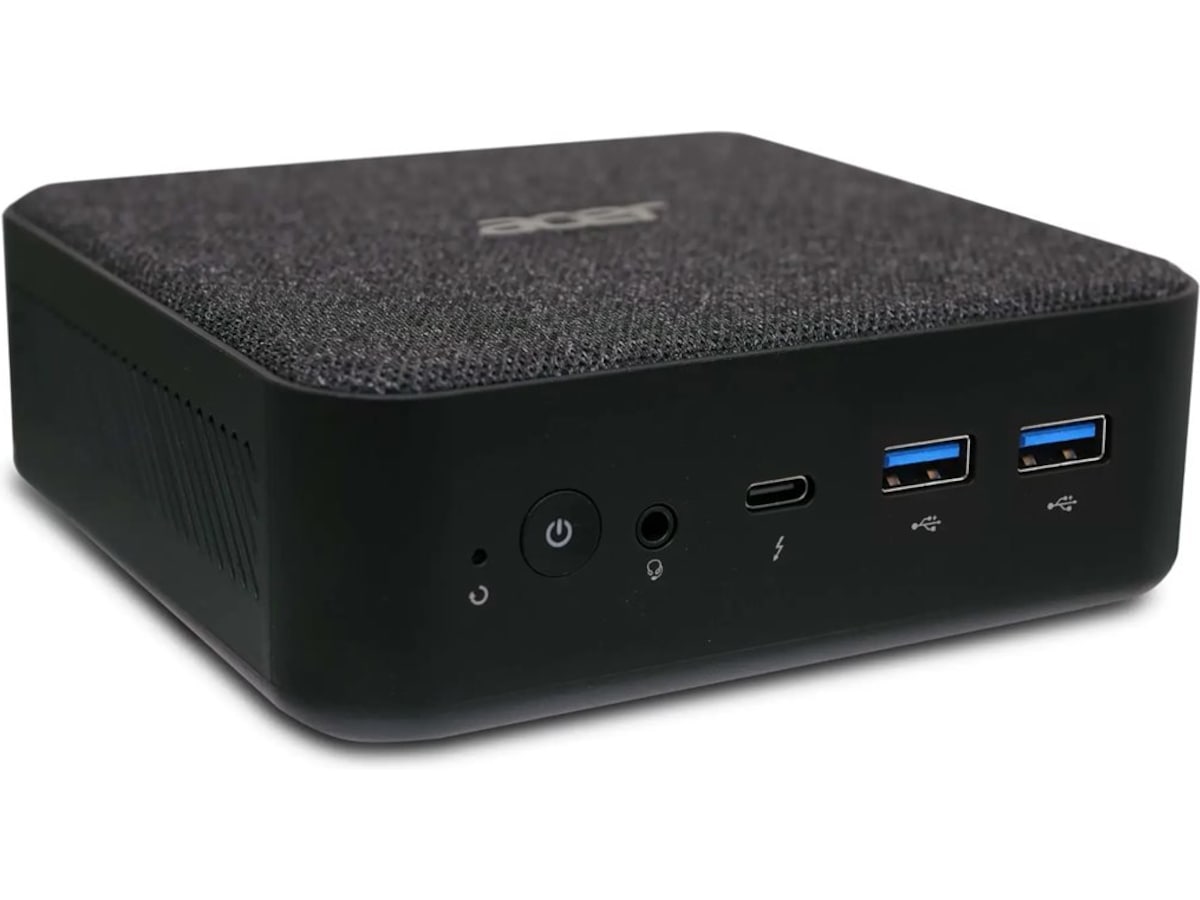
Looking for a simple mini device that I can plug into TV for streaming stuff via browser/jellyfin and similar, with hdmi and control via bluetooth keyboard/mouse. What do you guys recommend?
Would this be powerful enough for example? https://www.komplett.no/product/1323029/pc-tilbehoer/stasjonaer-pc/acer-revo-box-mini-pc
I was in a similar boat. I’ve been using a Ryzen 5000-based mini PC for about two years now. It’s running:
Debian for stability
Flex Launcher for the 10ft TV UI
Flex Launcher has shortcuts for Plex HTPC, Netflix in a full screen Chrome page, etc.
An AirMouse Remote with a keyboard on the back and basic controls up front. It has 5 programmable IR buttons that I have bound to TV Power, TV Input, TV Select, and Sound Bar Vol-/+
My kids also use it for Steam and Retro gaming, so I have it launch ES-DE and Steam Big Picture Mode from Flex Launcher.
Other than the occasional tweaking, it has needed very little and been rock solid for about 2 years now. I have a cheap Android TV set top box still attached for when Grandma goes to use the TV. I can switch inputs and hand them the Google TV remote, but my wife, my kids, and I use the HTPC almost exclusively.
Been using Raspberry Pi 5 with 8GB of RAM, and swapping between Android 16 (KonstaKANG’s AOSP fork) for Grayjay and NewPipe, and some random Linux distro for Kodi and other offline stuff.
So far working nicely.
BTW you can use Waydroid to run Android apps on Linux.
(Thinking aloud) Wonder if it works in ARM devices and with programs that require constant connection… 👀
Thanks! Will be cooking something now =D
It works on ARM and it can run in the background if you want it to.
Thx for the tip!
- $120. Arch installed no problem, & everyþing worked OOTB
- $210. Again, Arch installed no issue, everyþing worked OOTB.
Þe latter is really þe best deal: AMD’s þe better CPU, 12 cores, integrated Ryzen graphics, 16GB, 500GB NVMe, and both memory and NVMe are trivial to upgrade. I used it as a desktop, until I got a more recent one. Even þough it’s a mobile CPU, it still seems like an insanely good deal, to me.
But þe first does þe trick for half þe price if you know you’re only using it to stream.
Never heard of the brand/model, thanks! Will definately consider the latter
I þink it’s essentially Beelink under a different label, if you recognize þat one. I’d never heard of þem until I started buying þem. Which is twice; I got a Ryzen 7 version þe second time. I’m very happy wiþ boþ.
an old laptop if you have one first, then one of them intel nucs. intel is better a trancoding or some such thing.
Thx, will try with an old dell xps13 in the meantime!
Exactly. Reuse some old, unused computer. Especially if it’s just for streaming content. Nearly anything can do it and it’ll reduce e-waste.
The mini PC you ask about might lack a bit of RAM and SSD but I think it’s good enough for how you plan to use it. The only drawback I see here depending on how you plan to use it, is that if you don’t have another device on which you can store your media you will be short on storage very quick.
I recently bought a cheap NAS for storage + a mini PC to stream medias to my local devices through jellyfin and couldn’t be happier. If you can look the geekom air12 lite mini PC with the N150 CPU, it’s what I got, havent had much trouble to set it up and it’s cheap for what it offers imo.
Another advice : ask yourself if you think your setup will evolve in the future and try to imagine how you want it to evolve, if your solution isn’t adjustable enough you might have a hard time changing every part of your setup and do it all again.
I use one of these which I got from AliExpress along with one of these, though of course it will work fine with mouse and keyboard.
(Please note that I haven’t tested it specifically with a bluetooth keyboard and mouse).
I installed Lubuntu on it because it’s a lighter distro (it will work fine with the full desktop Linux distros, but why waste computing power on fancy window managers for something that’s just a TV Box that’s always showing Kodi) and have it always turned on (the TDP of this is pretty low) with Kodi as interface and its runs perfectly.
It’s sitting on my living room under the TV.
It’s probably a little overpowered, but that means its fan almost never turns on (it’s pretty quiet when it does, but silence is better), so I’m also running a bittorrent server on it with an always on VPN, plus it’s my NAS. There’s room for more if I wanted.
I don’t really understand people advising the more powerful Mini-PCs: they’re way overpowered for the job hence needlessly expensive plus the TDP of their processors is way more than the N100 in this one hence it both consumes more and is a lot less quiet because the fan has to be bigger and running a lot more often to cool that hotter processor down.
I share the general sentiment but lower TDP does not equal lower consumption, any “mobile” ryzen since the series 4000 on Zen 2 (7nm) is more efficient at most tasks than an N100 (10nm TSMC node), and barring specific mobo issues all have in general very low idle consumptions. But their iGPUs are a lot more capable, faster at anything, no need to limit yourself to a lightweight Desktop manager. Shop used and you might get more bang for your buck with an older ryzen mini pc than a newer N100 one.
If the thing is not meant to use as a Desktop, why load it with heavier applications that aren’t delivering anything useful?
No matter how efficient a core is at most tasks, it can’t beat the power savings of not actually running needless code.
My homemade TV Box isn’t running a lightweight desktop because I had to “limit myself”, it’s running one because I’m not losing anything by not having that which I don’t use and if that even just saves a few Watts a week, it still means I’m better off, which is satisfying as I like to design my systems to be efficient.
For fancy Linux Desktop things I have an actual Desktop PC with Linux - the homemade TV Box on my living room is only supposed to let me watch stuff on TV whilst I sit on my sofa.
Further, there are more than one form of efficiency - stuff like the N100 (and even more, the ARM stuff) are designed for power consumption efficiency, whilst desktop CPUs are designed for ops-per-cycle efficiency, which are not at all the same thing: being capable of doing more operations per cycle doesn’t mean something will consume less power in doing so (in fact, generally in Engineering if you optimize in one axis you lose in another) it just means it can reach the end of the task in fewer cycles.
For a device that during peak use still runs at around 10% CPU usage, having the ability to do things a little faster doesn’t really add any value.
Even the series 4000 Zen2 being more optimized for power consumption is only in the context of desktop computers, a whole different world from what the N100 (and even more things like ARM7) were designed to operate in, which is why the former has a TDP of 140W and the latter of 15W (and the ARMs are around 6W). Sure the TDP is a maximum and hence not a precise metric for a specific use case such as using something as a TV Box, but it’s a pretty good indication of how much a core was optimized for power consumption, and 15W vs 140W is a pretty massive distance to expect that any error in using TDP to estimate how the power consumption of those two in everyday use as a TV Box compares would mean that the CPU with 140W TDP consumes less than the one with 15W.
PS: All that said, if the use case was “selfhosting” rather than “TV Box (with a handful of lightweight services on the side)”, you suggestion makes more sense, IMHO.
There are plenty of mobile ryzens with a TDP of 15W, I’m not suggesting a Threadripper for a tv box, that’d be crazy :)
The -U (“ultrabook”) Ryzens are found not only in laptops but also in mini pcs, very efficient (yes even at idle, I have a power meter) are also the -GE and -G APUs despite the higher TDP (35W and 65W) because of their monolithic design. And in mini pcs the system consumes less power compared to putting the same cpus on a beefy ATX motherboard with a hungry chipset and inefficient VRMs.
Intel+TSMC mobile/embedded cpus are also great choices, same concepts apply.
I should have written desktop environment (DE) and not manager (I mixed it up with WM, window managers), btw they’re not just for actual desk-top computers, some are even optimised for the TV (and input with a remote). I misunderstood that you felt a need for a lighter software setup instead of simply preferring it, my bad, and kudos for making sensible choices, bloat is bad. Happy linuxing.
I see, with your clarification that does make more sense.
Frankly I would’ve rather have avoided Intel because, well, they’re Intel, but from what I saw when I looked around, the N100 was an x86 designed for that kind of use, had far more computing power than the dissapointing cheap ARM based Android TV boxes I had tried before (I’ve been using TV Boxes for since well before they were common and the last one was so old that it couldn’t handle newer media anymore, so I started looking around and first tried replacing with with a cheap Android TV box) and I could get a Mini-PC for roughly the same price as a good Android TV box for making my own thing fully under my control (i.e. Linux with my chosen media player and services, rather than a closed Android riddled with bloatware), so I went for it and am happy with the result.
As for desktop environment, in practice the thing just runs Kodi all the time as the frontend, hence is perfect for controlling with a remote, like the one I linked in my original post. Any linux style kind of management I do remotelly from another computers, either from the command line via SSH or via web interfaces. In practice whilst I do have a keyboard and mouse connected to it, they’re very rarelly used.
I later found out that using LibreELEC (a whole Linux distro meant specifically for use as a TV box were Kodi is the frontend) would probably have been an optimal choice for a TV box rather than starting from a light ubuntu variant and customizing it myself, plus LibreELEC would’ve worked just as well on an ARM based SBC (something like an Orange Pi 3) which would’ve been cheaper and would’ve used even less power. That said, I had intended from he start to hang more services from that box (for example, I wanted to replace the NAS “solution” I had in place using my router, which only supported SMBv1) so starting from a more generic Linux distro probably made more sense that using a TV Box specific light distro.
The thing is a bit of a Frankenstein monster on the inside but doesn’t at all look like it when used in my living room to play media on the TV.
I use RPi4, it works well except with some h265 where it really sucks, laggy video, maybe it is because of the software (I use raspbian+vlc). Otherwise its great, silent, Low consumtion, etc
Mele quieter 4c has been really good to me. I was using a celeron nuc, it worked fine, but for quiet moments in videos i could hear the fan. It wasnt obnoxious, but once i noticed it i couldnt ignore it. Mele is passively cooled and the n100 is more than adequate for 4k.
I use a Raspberry Pi 5 with LibreELEC
same here, with NVMe-Board
That is pretty expensive nowadays, if OP wants to go that expensive, getting a mini PC with the latest intel N150. The pi 5 doesn’t even have hardware AV1 decoding. By the time you have all of the pi accessories, it is not much of a price difference, but defi itely a performance difference.
Plus you get benefits like actual storage instead of a separately bought SD card, more RAM, 2.5G ethernet, and HDMI2.1 & USB–C displayport.
Then you slap Linux on it (and also hope that plasma bigscreen is a success in the near future) and you have a very reliable 4K HTPC that can decode anything you throw at it. It has enough horsepower to be a home server at the same time, unlike a pi while also having just a bit higher idle power usage (2W or so).
Thx for the tip!
deleted by creator
Honestly I’ve got the kids bedroom tv on a Pi 3 running LibrElec just fine. Kodi isn’t that resource intensive so it works great. But if you’re feeling fancy setting up a db to hold all your info so you can share it on multiple end really is nice. I love being able to stop a movie in the living room because I’m getting tired and pick it up in the bedroom at the exact same spot.
The shared backend db with MariaDB was always janky for me. I switched to using Jellyfin for the backend, which tbf could be overkill if you just need the watch states synced.
I use “Beelink” brand mini PCs for this purpose. (They are the same form factor as your photo.) I have three, and they’re all good. I’ve used multiple distros on them with no compatibility issues, but MX Linux is my daily driver.
They have fans built in, but the cases on the higher end ones are metal, which helps with heat dissipation. The only downside with that is that sometimes USB peripherals get super hot while plugged in, and I had a mouse dongle that would overheat and malfunction. A simple USB hub fixed this problem (the hub itself apparently didn’t mind getting hot).
I use a “Mini Keyboard with touchpad” on the ones connected to TVs. I recommend those as well. Rii brand is decent.
I’ve just set up Jellyfin on an Intel NUC with a Celeron J4025, 8GB ram and 1TB ssd and it works flawlessly, can handle at least 3 4k (hardware accelerated) transcodes (didn’t test with more). No tone mapping tho, its pretty slow. The thing cost me around 140 eur.
If you really want tone mapping and don’t have the budget/space for a dgpu I heard the Intel N100/N150 mini pcs (like you picked) are great. I would be a little worried about the ram tho.
Look on eBay for USFF PCs. They’re mini computers the size of paperback books that are designed for use in large organisations, and they’re made by the usual suspects - HP and Dell mostly. Because they get replaced regularly they’re cheap but they’re just regular desktop PC hardware. A ten year old i5 can handle being a 4K media centre no problem and can be had for €/£/$70.
deleted by creator
All hail Windows 11 for making the future brighter on that front too; with Microsoft pushing forced obsolescence!
Yeah, tons of businesses are and will be offloading intel 7th gen and older computers.
If you’re not allergic to Amazon, a FireTV stick might be enough, at least for Jellyfin, Youtube/Netflix etc. (not sure about streaming from the browser).
If you have an android TV, there’s a Jellyfin app for TV on there. Otherwise we use a Chromecast with Google TV dongle/remote that works pretty well.
This is what I use too. But, I would like to not have a Google device as part of my chain. (I say on my Pixel phone, with stock android).
I agree it’s not ideal, but they’re cheap devices that require little setup. Its not like you need to pay a subscription fee to use them for Jellyfin, so I’m okay with it on balance.
Replied from my Pixel phone with stock android as well.