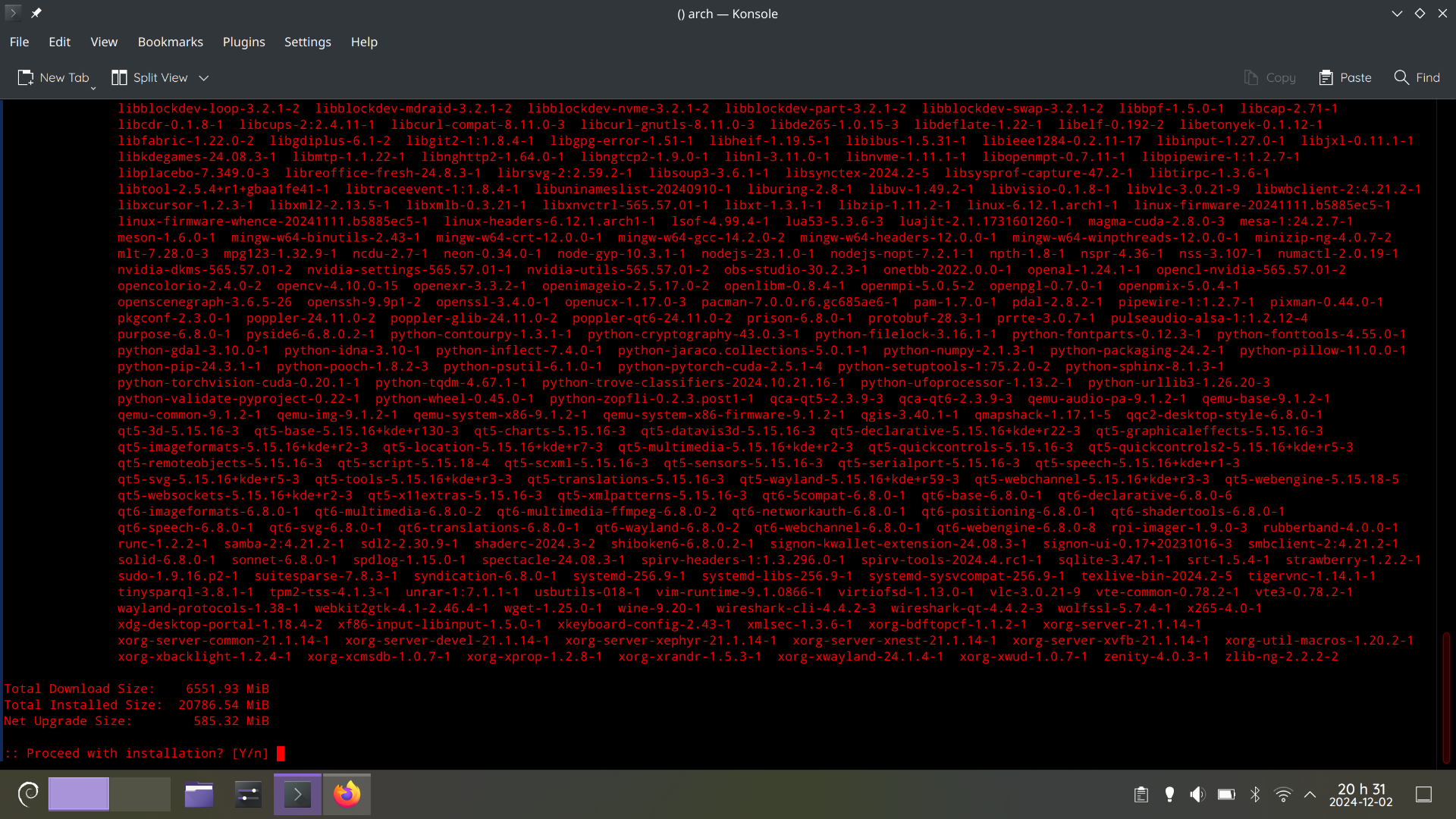
LOL, That’s just a normal Monday
Haskell packages every other day…
@potentiallynotfelix my eyes burn 🔥
Is it Debian Sid?
arch linux, i’m sshed from my debian machine.
Nah, just update it.
You see, this is why atomic desktops aren’t a bad idea.
This has nothing to do with immutable desktops.
Well in an immutable distro, there is little to no chance for the system to end up in an unusable state (I guess it is the same for distros which apply the updates atomically). Traditional distros are far more likely to bork when so much shit is updated at once
It’s arch. There’ll be no issue here.
As an anecdote (and not statistics) I have distro upgraded OpenSUSE with 5000 packages to install (thanks TeXlive LaTeX). It was fine.
I don’t think this is true. The package manager is there for a reason to prevent that. If you have more updates to install at a time, then the chances are the same as if you would have installed the problematic update one at a time. Just read the manual intervention information from Arch and see if there is something to do, then it won’t bork. If people don’t know what they are doing and do not read the additional information (that is required to do so on Arch), well yes, then you could end up borking your machine. But not because so many updates are installed at a time. The package manager and operating system and their maintainer designed it in a way that you can install ton of updates at a time without borking. This is fine.
Between this comment about arch and the other comment about opensuse, it must only be apt which has issues with large updates with complicated dependency chains. I remember 5-6 years ago Ubuntu borking itself when I tried to update after a decent gap and had 100+ packages to update. There is also the fact that people used to advice me to make a clean install in lieu of updating whenever a new version of Ubuntu dropped.
Before my switch, i used Ubuntu exclusively for 13 years in row. I always heard of problems (and not at least because of the PPA repositories) when upgrading from one major version to the next, be it a LTS or not. I never did that and always installed fresh because of these stories. Mostly 4 years in between, or sometimes 2.
Its entirely possible that most problems happened because of packages from PPA that the user did not change for the new upgrade. Because PPA repositories were often designed for a specific version of Ubuntu. So its not entirely the fault of the
aptpackage manager in that case.No, it’s just that Ubuntu never correctly upgrades between releases.
I’ve tried so many times, and it basically always failed.
You wouldn’t believe the shit I’ve seen on internet connected production servers…
Those are rookie numbers.
Sheiiiiit, i had same thing, broke completely after update
😂 they always sneak a rotten little package into these big lists man
And they’re red, that means the offer is about to expire. Better act quick!
Better apt quick!
Remembers Tumbleweed fondly
Would you recomend it for daily usage?
I used Tumbleweed for eight years with no problems. I only moved to EndeavourOS because Suse bared their corporate teeth and I got fed up being a couple of generations behind on the Nvidia drivers. EndeavourOS is also good.
My problem with EndeavourOS is that it is terminal centered. I prefer GUI. Don’t think it has a package manager gui.
You can install Octopi or Pamac which both handle the standard repositories and the aur. I don’t know if they handle flatpak or snap though.
I believe I tried Pamac in a VM and it didn’t work properly. Or it didn’t exist in the repôs. I might check it out again if I have time.
Isn’t it running plain KDE? If so, Discover is included.
Discover is not working properly on Arch based distros because there’s no packagekit backend for them.
That’s disappointing, Discover is pretty neat.
Used tumbleweed for ages. No issues. Switched to slowroll again with no issues. Now trying fedora. All with Kde plasma.
Read the Arch news before clicking “yes”.
I have Informant installed for this. Saved my hide a few times.
deleted by creator
I used to be an adventurer like you, but then I took an error to
gpg.
To be fair, arch could look like that after a few days.
NixOS is like that every day for no reason
Oh, you updated one byte in your config? Better download the entire ducking Internet and rebuild everything!
staging rebuild cycles only happen every two weeks or so.
The reason is always that something changed and causes all dependent packages to change, requiring a rebuild of those too.
It is arch
It looks like it’s Debian’s logo in the bottom left and that that’s
aptoutput.EDIT Nope, that’s
pacmanoutput, seems like they ssh’d into another arch-machine.
Got busy and didn’t update my template for awhile. Machines would be instantiated a few minors back. 9.2 vs 9.4, for instance, but this was back in 7-land.
Updates would be about 600 packages, or most of the install.
Took 5 min, completely safe. Patch, bounce because we looked funny at dbus so it can’t cope, and then good to go.
I used to tease my windows peer: he’d be still on “do not turn off your computer”.
Sometimes I wish someone would make a an Arch box and come back to it years later to see the updates it has missed.
But that’s assuming an Arch box would be reliable enough to stay alive that long lol.
Always heard of 20+ year old bsd and debian machines chugging along with no issue.
Pretty sure you can’t leave Arch lying around for even two months.
I have updated arch systems that had not been powered on for years before. It was fine. No issues what so ever. Arch is not some flaky distro that breaks if you look away for a minute. My main system has had had the same install for over 5 years now and I regularly forget to update it for months at a time. Again, no issues.
Yeah really the biggest issue I could see is pacman’s keyring being so out of date that it has to be manually refreshed with a new one
It won’t rise much beyond that, since you only get one update per package. Whether it’s upgrading Firefox from version 120 to 121 or to version 130, it doesn’t change much in terms of download size, nor the number of updates.
At least, I assume, Arch doesn’t do differential updates. On some of the slower-moving distributions, they only make you download the actual changes to the files within the packages. In that case, jumping to 121 vs. 130 would make more of a difference.
If you do want lots of package updates, you need lots of packages. The
texlive-fullpackage is always a fun one in that regard…