I think everybody on here is constantly keeping an eye out for what to host next. Sometimes you spinup something which chugs along nicely but sometimes you find out you’ve been missing out.
For me it’s not very refreshing or new: Paperless-ngx. Never thought I would add all my administration to it. But it’s great. I probably can’t find the thing I need, but I should have a record of every mail or letter I’ve gotten. Close second is Wanderer. But I would like to have a little bit more features like adding recorded routes to view speed and compare with previous walks. But that’s not what it is intended for.
What is that service for you?
Recipe manager and meal planner which can pull recipes from the web. I started using it after a few recipes on sites disappeared. My families most used app (besides plex).
been loving mealie too! tied in with home assistant for shopping list and the meal planning calendar has helped us cook more together and stop spending so much on takeout!
FreshRSS, i had it installed and setup with a fee feeds for over a year and only like this month has it become my daily read, i can get almost everything in there to just read through while I drink my coffee, sites I bookmarked but never go to can now come to me.
Also with ‘five filters full text rss’ to get all the images in the feed
What’s the extension for? FreshRSS can fetch contents natively.
The extension is to get the rss link to paste into five filters
Five filters takes the link and gets all the images and all that then makes a new rss link that you give to fresh rss.
When I tried just fresh rss a lot of the sites I tried wouldn’t get me images or it would be just the headline and I would have to click the link and go to the actual site to read the article
I’m still not sure that filter thing is necessary. FreshRSS can fetch content and images using the CSS selector of the website. You may want to check out the Advanced section in their documentation: https://freshrss.github.io/FreshRSS/en/users/04_Subscriptions.html#retrieve-a-truncated-feed-from-within-freshrss
Anyway, whatever works for you :)
Love FreshRSS. It really is something that I didn’t know I needed. I often switch RSS apps, and it allows for seemless transitions.
Would you mind elaborating a bit? I’ve been looking into good rss solutions lately and blogs without a feed were where I got stuck. How do you use five filters? How do the two components work together?
Edit: Also, some sites WITH a feed like Pitchfork are next to useless when all you get is the headline.
Here’s a short blog post that summarizes how to use Full-Text RSS with FreshRSS. It’s a bit of a pain to add new feeds but it makes for a smooth experience afterwards.
Otherwise, you could always just use RSS clients that have the ability to fetch full articles, Read You on Android and Fluent Reader on desktop both can do this.
That plus a browser extension that finds the right rss feed for you like get rss feed url on firefox.
I copy the rss with the extension
Then I paste that into five filters
Use that to give it to fresh rss which will get me a nice looking post with images and text
PaperlessNGX Syncthing
Paperless is rEally awesome… Scan to folder, it will automatically be sorted and categorized, full text search and one neat thing: It just stores the pdf in subfolders which makes backup also usefull without paperless
If you don’t mind me asking, how/on which criteria does auto-sort and -categorization work? Scanning file name and contents? But then you’d have to pre-define some sort of keywords, no?
It’s actually quite simple - not sure how it does work under the hood, but take a look at your documents. Every insurance, employer or company has its own letterhead with logo, contact information and legalese. You just tell paperless on one document “hey, that is my insurance, please tag everything like this as insurance” and it will do that.
That’s easily Home Assistant. It got me into the whole home automation stuff and I have gradually included more and more parts into it - including some health related stuff. It really makes my family’s life easier and helps us organizing it.
Are you able to provide a few quick examples? I have it installed but don’t know what to do with it really.
The easiest thing: We use a motion sensor to automatically turn on the light for the stairs. You wouldn’t need Home Assistant for that, but with a little more configuration you can adjust the light levels and colour temperature based on the time of day (not as disturbing at night). We have two rooms which have problems with humidity in one a fan is automatically turned on (basic) in the other a dehumidifier is triggered based on the outside and inside temperature because there are large windows which are producing a lot of condensation otherwise. Now the really specific stuff: My daughter has Diabetes and we need to manage her blood glucose levels. There are alarms but ideally you would act before they are triggered. So we hooked her blood glucose levels to a light in our bedroom which turns on if her levels are getting out of bounds at night. That way she isn’t woken by the alarm, but by one of us and can go back to sleep much quicker.
Paperless - Pay slips, Bank statements, MOT records, Insurance policies, User manuals, restaurant menus. All filed and searchable. Letters I get are photographed, uploaded and immediately disposed of, zero stress.
Is the document exporter the only backup system? I’d want to connect it to a cloud backup somehow if I’m going to trust it with all my important stuff.
Couldn’t tell you, sorry. I have Paperless in it’s own LXC (helper-script) which I 3-2-1 as a machine. Many duplicates, but they’re only PDFs.
I can tell you I spent a small amount of time trying (and failing) to get paperless to save the files onto my NAS. I can also tell you, if I stretched up really tall I can just about scrape rock bottom when it comes to skills in this stuff.
Could you elaborate a little on the LXC, please?
I was thinking about looking into Paperless after seeing it gleefully mentioned so much in this post, but lack of easy/accessible backups seems strange for something you wanna use to eventually destroy your only other copy of it (the physical letter).
Sure,
I used TTecks helper script to install paperless as an LXC. I then use proxmox’s inbuilt back up schedule to grab snapshots of that LXC, and others, I usually keep 1 "nightly"and 1 “monthly” right now.
Syncthing, another LXC thank you tteck, has access to the back up folder. It is synced with a RPi 4 pulling double duty as my redundant DNS all installed using Docker. The pi 4 install is synced with my proxmox host and an off-site box, through tailscale at my parent’s house.
There are better systems, like Borg and what not, but this one is mine.
I have an “important” share on a my NAS that is also synced 3-2-1. It would be better if Paperless saved to my NAS directly, then I’d only have 3 copies. Right now I have 6: 1 nightly and 1 monthly spread across 3 machines, not counting RAID because the “b” in “RAID” stands for back up.
My oh shit plan: grab a back up file. Rebuild the lxc from that snapshot. Access my pdfs.
I keep once in a lifetime stuff: birth certificate, paper counter part to my driver’s license, etc. They’re still backed up. But, for day-day communications that I’m supposed to keep: 5 years financials, tennant agreements etc. My old filing system was “throw them in a box, if I remembered and find them never. Or, try not delete the email they’re attached to”. Now I have a glimmer of a hope
Something a lot of people miss with paperless is its automatic import options.
There is a folder called ‘consume’ that you can place files in and paperless will import them just like you’d uploaded them manually. Combined with tools like FolderSync or SyncThing you can have files on all sorts of devices automatically upload to paperless.
Sitting down to use the flatbed scanner is a hassle, so I use GoogleLens to take multiple photos of a document, save them as a single pdf, then FolderSync moves that to my server automatically where paperless imports it.
Along side this; Paperless has an smtp mail importer. You can add your email accounts and paperless will automatically import new emails based on whatever criteria you specify. Imported mail will then be flagged, moved, or outright deleted from the mail server.
You’re right, I don’t take advantage of any of these features. I should.
Partly because of lack of know how on my part. So I don’t trust myself to successfully have it log into my email, get what it needs and leave everything else untouched. My main uploads, payslips and bank statements, are behind their own apps too.
Partly because paperless is isolated in it’s own little container (in my setup at least) so access to the consume folder is behind another step, I could syncthing it… I just haven’t.
And partly because I use the android app as my main interaction with Paperless. The app uses my phone as a good-enough scanner.
Partly because paperless is isolated in it’s own little container (in my setup at least) so access to the consume folder is behind another step, I could syncthing it… I just haven’t.
For this, Bind-mounts are your friend:
Volumes:
- /srv/paperless-ngx/consume:/usr/src/paperless/consume
Files get dropped in /srv/paperless-ngx/consume on the host and import to the container.
As far as setting up mail goes: it’s pretty straightforward. Add an account, then create a rule for each type of mail you want it to manage. Specify filters like who it’s from, what’s in the subject/body, how old is it, etc.
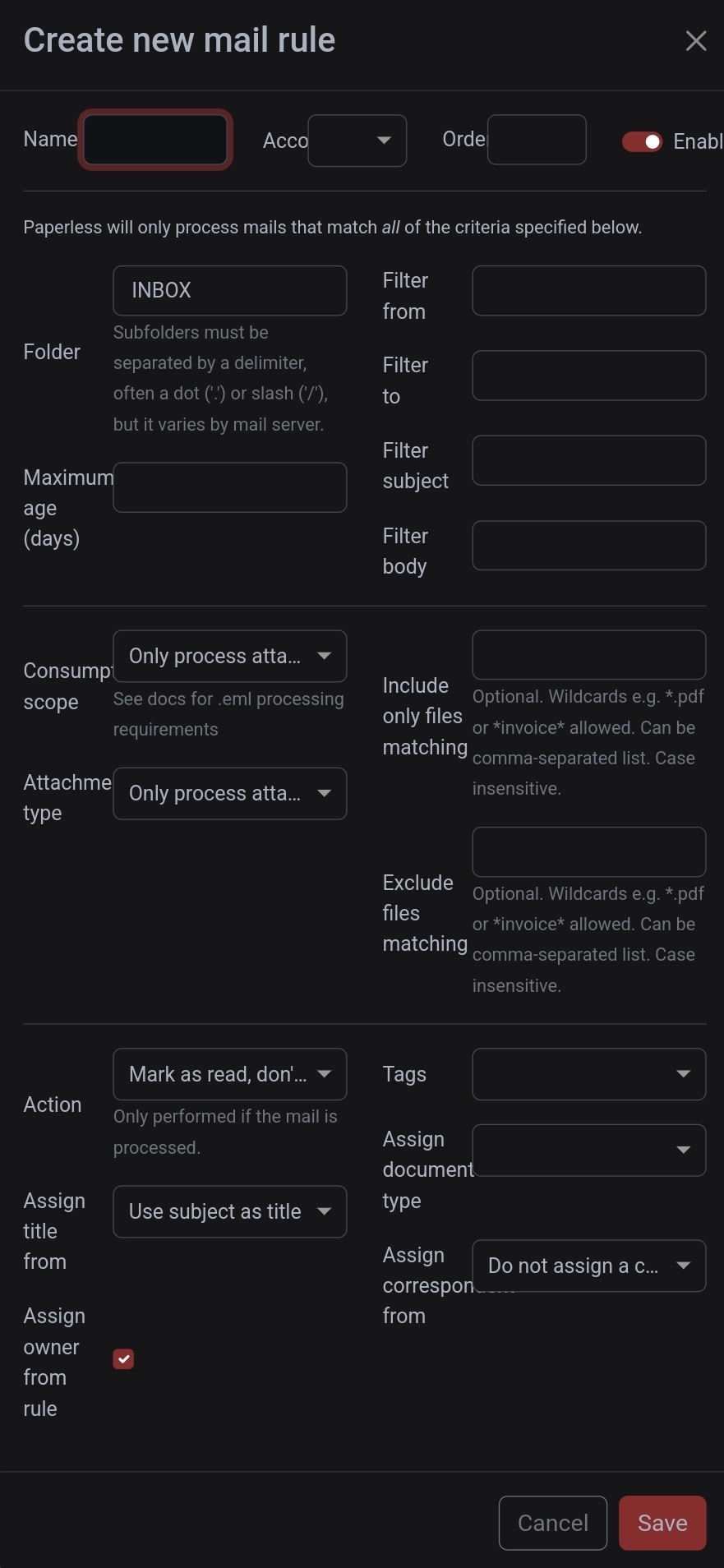
And until you are comfortable, just leave the action set to mark as read. Worst case, if you didn’t set your filters right; it’ll unnecessarily mark mail as read. No big deal.
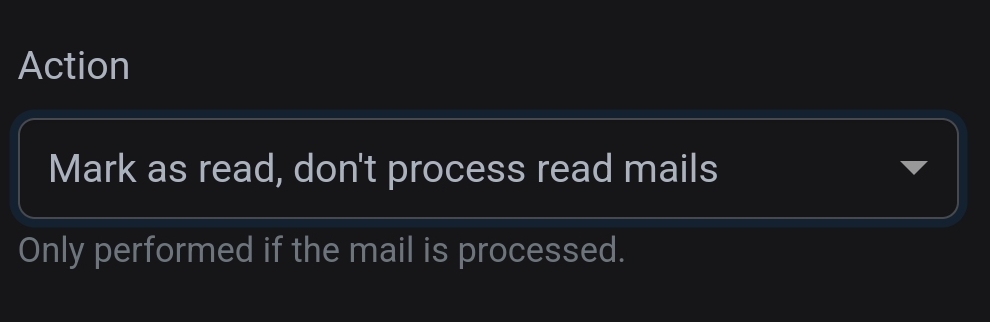
I just have mine move processed mail to a folder on the mail server called ‘Paperless-Imported’, which I manually clean out now and again.
Thank you. Setting it up seems less daunting now. I’m going to try for setting up emails.
The android app is fairly functionally complete, and I only interact with my phone or tablet. In fact, for desktop tasks I have a Linux Mint VM I just console into from my tablet, a sort of sudo laptop.
In anycase, for manual uploading files my phone is probably easier. But, your advice is good for everybody that’s not me, sensible people.
Your comment about bindmounts might have solved my biggest problem with Paperless, in that it doesn’t write to my 3-2-1 back up folder directly so I end up 3-2-1ing the whole machine. Which is fine, but I keep multiple snap shots of my LXCs so it’s multiples of multiples.
/zpool/important/paperless:/use/src/paperless/originalSpecific file paths aside, would [path to zpool]:[path to originals] have paperless saving the originals to my zpool so I would only have 3 copies instead of 3*#of snapshots?
Indeed it would. That’s exactly how I have mine setup; with borg backing up the originals folder from the host.
If you are making this change to an existing installation; remember to copy the contents of the current originals folder out of the container and into the host folder you intended to bind mount, before you change the mount.
So, copy the contents of container:‘/use/src/paperless/original’ place them in host:‘/use/src/paperless/original’, THEN add your bind mount to the container config.
Otherwise you may lose the contents of the folder within the container and have to retrieve it from a backup.
Easily set up, and easily attached to other things. Simple notifications about whatever is needed, like service health or updates, new posts on public platforms, etc. A simple
curlis plenty to send and receive notifications, and it works on Android without requiring FCM (Google infrastructure).Tangent to this, “Apprise lets you send notifications to a large number of support notification services.”
Alternative: Gotify
Sadly it doesn’t work with CrowdSec which is the biggest thing I would want notifications on (bans and such) and Gotify isn’t the pub/sub MQTT-style that I like about ntfy…
Ntfy can act as an email server if you configure it. So if an application is not supporting ntfy directly but email, you can go that route. Ntfy will then simply forward the email as push notification. Its also pretty simple to set up, used this as a workaround because authelia doesn’t support it directly. Here is the link to the specific ntfy documentation: https://docs.ntfy.sh/config/#e-mail-publishing
I used the local variant (https://docs.ntfy.sh/config/#local-only-email) which does not require any DNS entries, as I only use it for sending notifications between my self hosted containers (all on the same host).
A clone of 12ft.io but the old version before they got into beef with the New York Times and kneecapped it. It doesn’t work on every single article with a paywall but it works on the overwhelming majority (including New York Times articles)
And it doesn’t really count because I knew I’d use it but komga+komf+fmd2. I list it though because I didn’t realize I’d use this stack so much. I can now read with my phone, my laptop, my ereader, etc. tachiyomi/mihon works, reading progress is synced, and I never have to visit one of those garbage manga aggregation sites ever again
Jellyseer
Even though I don’t have it hooked into an arr stack it is still useful for what is upcoming.
why use jellyseer? what are the advantages of it compared to just using jellyfin.
You can’t request media?
Can still request it without an arr stack - it just won’t download it :) Can then buy the Blu Rays and rip. Also jellyseer has a watchlist you can add stuff to to keep track
They do different things.
Jellyfin plays the media, jellyseer lets me see what films and tv shows are upcoming and select it to be downloaded when I get some time.
Syncthing. Decentralized data backup that works with minimal setup. Now I can add cloud sync to most any app.
I setup my own with a bash script for backup years ago that uses rsync, feel too invested in that now to change
Watch out to enable “keep on delete” features. I didn’t do that and didn’t see that gigabytes of personal photos got deleted which I had to recover from an old backup. Still don’t know how it happened as I only found out a few weeks after the fact.
Sync is not backup! If there’s a software bug or a wrong setting sync can delete your files. Syncthing is pretty mature so I doubt this was a Syncthing bug, however you shouldn’t only trust Syncthing. I’m doing btrfs snapshots weekly and delete them after three years for important folders nowadays.
Never knew I needed? Another vote for Paperless-ngx. I still feel like I’m living in the future using it. The trick I’ve found was initially setting up a good document naming & management convention & following it religiously for every document. The search function is fantastic at narrowing down results. Used in conjunction with specific coloured tags I can immediately see what I need from search results.
Fired up Immich recently. Amazing. Will be donating as I like their stance.
I also enjoy Linkwarden. Switched from the also excellent Hoarder as I prefer the UI.
Most used? Nextcloud with Joplin.
@saltarello@lemmy.world funnily enough, I switched from Linkwarden to Hoarder. I like the smart lists. Just bookmark everything, check it later.
The one that was way more useful then expected is immich. I have over 100,000 photos I took during my life and it usually takes me DAYS to find a specific picture I need.
I installed immich and let it AI scan everything for a week or something. Now I can search for something specific like “it’s a black square in the middle of the photo and has a little knob on it” and it finds me the photo I need.
It’s also cool to see photos of people, organized by the individual by searching their name or clicking on their face.
Is this local only? No clouds reported data?
Of course it is.
You can download different models as well. For me, without a GPU, searching for example ‘cat’ takes a few seconds, and it is not the most accurate, but still works OK.
This is exactly why I’d want a GPU in a home server.
That and transcoding. Wonder what the best option would be without breaking the bank/wasting too much idle power. All the GPU talk online seems to be for gaming.
https://github.com/Stirling-Tools/Stirling-PDF
Happens to be more useful than I originally thought.
I’ve installed it as well but the blackout/redact feature didn’t work as expected…So not sure if it will be that useful for me. But since I ditched Adobe, I now at least have a PDF editor.
I was disappointed with the automatic redact feature too, but saw that they just updated and added a graphical one also.
Thanks, that’s good to know. Going to update it right away, hopefully this will solve my problem.
Would recommend putting a memory limit on the container.
I had it crash my server by eating it all up.What limits do you set on yours?
Quickly send files, paste images/text snippets between devices.
I’m using the older Snapdrop (which PD was forked from) with some patches I made to:
- Work behind Authelia for SSO + 2FA
- Use the display name provided by Authelia instead of the random usernames it gives out by default
- Send transfers over the internet without dealing with the temporary “rooms” that Pairdrop uses (it’s behind Authelia, so only authorized users can get to it).
It has 100% replaced emailing things to myself or shuffling files to/from Nextcloud. I probably use it to send text (URLs, clipboard contents, etc) to/from my phone as much as I use it for sending files back and forth.
I’m hodsting my own Matrix server with WhatsApp, Telegram, Discord (you don’t need a bot for that, you can just share your login with the bridge) and Messenger bridge. I have all my IMs in one app, don’t have to install spyware on my phone, and I can make bots that troll annoying people that message me on any platform.
Hosting it was super simple, thanks to the Ansible project that’s extremely robust and well done, I literally just got a hosting, domain amd changed like 5 config values to enable the bridges I wanted, gave it an IP and ssh key, and ran it. And if I need to update, I literally “just update” (it’s all wrapped up into “just” tool), and it eve handles cases where I didn’t update for a while, failing graciously and telling me what I need to do maually, usually just rename some config values.
I wholly recommend it. You probably wont convince your friends to switch from <insert app here>, and this is the best compromise.
I’m using a small instance on Hetzner, for 6$ a month. You could in theory get a free oracle cloud instance for it, but I didn’t manage to get one.
And you can easily share it with anyone interrested, make them an account, so they can also consolidate their DMs. I’m sharing it with a few friends and colleagues.
When I was looking into matrix bridges I heard a bunch of stories about people getting their accounts blocked after using them through the bridges. Is this still an issue?
Once in a while discord signs me out and I have to do a bunch of extra sign-in steps on the official client. But otherwise I have discord, WhatsApp, Google voice, Google chat, Google messages (sms), Facebook, telegram, signal.
All the mautrix bridges are will made and robust
Good to know, thank you. How did you set up the whatsapp bridge?
I’ve been using it for almost a year by now, and so far I didn’t have any problems. I’ve not considered that problem though, so it might be happening and I was just lucky.
Thanks for the report. Do you use the whatsapp bridge? If so, how did you set it up? Emulator?
I use Pixel with GrapheneOS as my phone, and I just have a separate profile that only has WhatsApp installed and nothing else. Since the profiles are completely separated, it doesn’t have access to anything else I do on the phone and it’s not running in the background (the profiles are basically sandboxed fresh slates, and switching it can be set-up to behave in a same way as basically turning off the phone as far as the profile is concerned).
When the bridge asks me to log in again or refresh a session, I simply switch to the second profile for a minute and re-log in. I’ve heard iIt might be possible to set up an emulator and leave it running on the server, but that felt like too much effort.
Would you recommend the Discord bridge? I’ve always wanted to install that as well. Is there anything I want to know before putting in the effort to install and configure it?
- A puppeting (personal account) Discord bridge basically requires your own homeserver. You are trusting the homeserver owner / bridge host fully with your Discord account.
- It is technically against Discord ToS. While I don’t think anyone’s been banned yet, several people have started receiving warnings that they “spammed”, most of them after sending an attachment. These warnings are on your account for 2 years, and could contribute to an account ban.
- Voice chat is not, and probably will not be supported.
- Do NOT bridge a “large” server. You are essentially re-hosting the chats, which can be extremely taxing for large and active Discord servers.
I use mine for a single channel in a “medium-size” server (~2k people), a friend group server, DMs, and a few channels that follow a bunch of announcement channels on other servers.
Those are certainly valid points. But do I want to care about that? Honest question… Discord also doesn’t care about my privacy. Or making the internet a better place. So I think -in turn- I feel quite alright to ignore whatever client they like me to use. And their exact ToS.
What’s with the “taxing for large and active Discord servers”? Does it lead to issues if I’m not using their Electron app or website? I can’t imagine where this additional strain on their servers would come from?! I run my own homeserver, by the way. So I shouldn’t weigh down on anyone else’s server…
When you use the official discord client, it only sends to your device whatever chat channel you have open at the time, and when you click on a different channel, it just downloads the last 20 messages, and downloads more when you scroll etc. If you bridge a discord server to a matrix server, it sends all of the contents of all of the channels in real time across. If the server had 50 channels, bridging it to matrix would be the equivalent of you having 50 official clients open, one to each channel. Hence the additional load on discord’s side to send you a lot more data than they usually would.
(Disclaimer: this is all conjecture based on a general understanding of how the systems work, I could be getting some details wrong)
Would you mind sharing the link t the ansible project?
https://github.com/spantaleev/matrix-docker-ansible-deploy
Its pretty well documented and easy to follow, it took me only like an hour to setup.
I’m not OP, but maybe this one?
Thank you!
How do you get around the requirement to run the official app somewhere?
I run a WhatsApp and signal bridge, but not recommend running the official app on a phone
Yeah, that part about WhatsApp is annoying. I just have a spearate profile on Graphene that has only WhatsApp installed, and whenever it wants me to refresh a session I just switch to the profile and log in.
I’d say the ARR suite but I knew beforehand that would need it. I just love that I can access overseerr, search up and coming and already out content, click “request”, and then magically it just shows up on my plex after a couple minutes.
A service that I host that I never knew I needed is Nextcloud. Works exactly the way OneDrive worked for me. I record footage on my phone, upload it to Nextcloud, and log onto any computer of mine in the house and can edit the footage. Sometimes I edit footage in VR while I play XPlane, then I’ll save it, turn everything off, and continue right where I left off on my laptop.
Probably super basic but locally syncing things is a godsend to the way I used to do things (KDE connect transfers footage from my phone to a single computer).