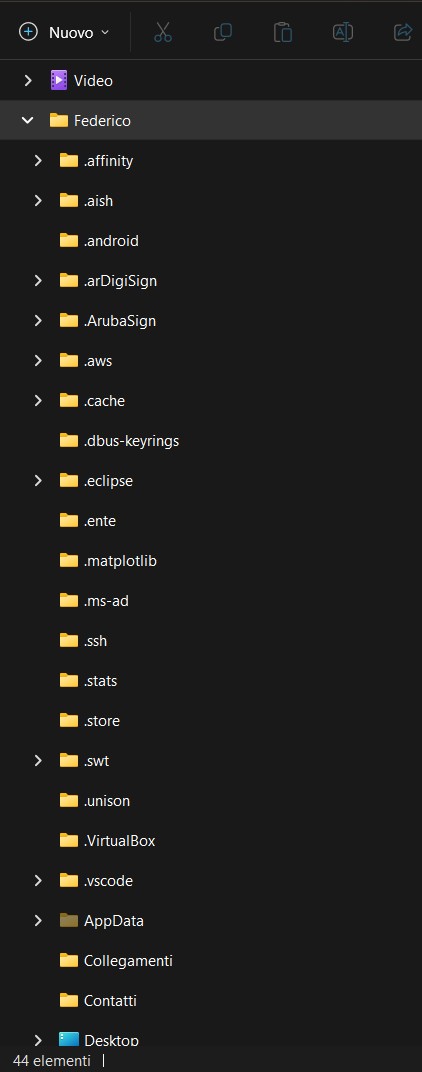
AppData folder: am I a joke to you?
Nobody wants to develop a tag-based filesystem?
It’s basically in use today. Apparently younger generations are more used to searching for files rather than structuring them. https://www.theverge.com/22684730/students-file-folder-directory-structure-education-gen-z
Developing it would be way above my skills but I’ve been fantasising about it for a long time. https://lemmy.world/comment/14344097
If you’re on a Windows box, the apps you’re calling out are assuming some level of FHS or XDG compatibility, neither of which are Windows things.
If you’re on a mac, macOS uses its own thing but can play well with dotdirs. However, you’ll find a mix of assuming XDG and weird macOS storage locations depending on how the tool determines storage location priority.
If you’re on Linux, there are too many standards.
AFAIK appdata are stored in ~/.local/share, but you don’t even have that folder!?!?!
It’s not the Linux convention that’s fucked up in this regard, but your system.
If you want it stored in ~/AppData, you need to make a link to it from ~/.local/share.I’m no expert, so there may be other ways to do it. but apparently your system doesn’t follow conventions.
He’s using Windows
WHAT? So he chose an OS that doesn’t follow Linux standard on PURPOSE?!?! That doesn’t make much sense. 😋
I even have a couple of things that found ~/.local but missed /share
He’s using windows.
But while we’re on the subject, ~/.local/share is cancer and shouldn’t exist.
The appropriate path is /usr/share.
EDIT: Okay to be clear I mean that anything that could be global should go into /usr/share and massively save on space and effort if another user needs the same stuff.
Anything that doesn’t need to be global doesn’t need to go into /use/share but somewhere else in ~/.
The way it is now my ~/.local is a massive dumping ground of crap from configs to static app resources that should go into /usr/share to entire applications with snap or flatpak (why I don’t use them) to random config files.
It’s just a nasty mess on my home partition when it in most cases really doesn’t need to be.
Users below rightfully pointed out many exceptions like venvs and while I still believe there should be a more correct place for them to go e.g. (~/.venv, ~/.flatpak), but obviously they shouldn’t go into /usr/share willy-nilly.
I have removed the sass below because I should’ve been more comprehensive in my criticism before ad-hominem.
I’m a little confused by that statement. Where should locally installed (non-sudo) applications, such as virtual python envs who are accessed by multiple other not-necessarily-python apps or perhaps baloo, flatpak, etc, store their shared data? I’m rather convinced that giving all users write access to /usr/share is a terrible idea.
I have a SystemD service
The irony is how lennart and his cancer approached standards, top to bottom.
Now I want McRibs.
The appropriate path is /usr/share.
That’s a global folder, and not proper for storing “per user” data.
/usr/share? How is a random app getting write permissions to that?
Everyone here is talking about conventions used on Linux, but this looks like Windows Explorer to me…?
Why are there so many directory names in there following Linux “hidden file” conventions, if that’s the case?This is not a Linux or Windows thing. It’s a lazy developer thing. It’s also another one of the ways that some devs will coddle the end-user because “learning a file directory system is hard.”
I’m pretty sure the .file notation is a bug-turned-feature of a GNU coreutils program, Windows has no such thing and marks files as hidden using filesystem attributes.
I couldn’t say whether I prefer it one way or the other, but the dot prefix does stick out like a sore thumb on systems that don’t hide them by default… though I think AnyOldName3’s explaination makes sense.
for someone regularly using both: it is a convenience feature.
that way i just know config files are under
~/.myApp. if windows devs would beore consistent, i would be ok withAPPDATA%\myApp. however, too often it is underAPPDATA%\..\Roaming\myApp- which is just a pain. so i prefere linux style on windows.edit: copy paste error
I see your point, but as someone who prefers my home folder be my home folder, I prefer they put it under
~/.configregardless of what operating system is being used.Roaming and local are there for reasons.
Mostly enterprisey ones, but roaming “roams” with your user profile.
If you have ever used a system where you could sign onto any computer and your stuff would be there, it’s mostly due to roaming folder.
Local is local to the pc and does not roam to others
I think you meant %LOCALAPPDATA%
%APPDATA% points to roaming
If you write cross-platform software, the easiest solution is usually to pretend everything’s Unix. You’ll hit some problems (e.g. assuming all filesystem APIs always use UTF-8 will bite you on Windows, which switched to UCS2 before UTF-8 or UTF-16 were invented, so now uses UTF-16 for Unicode-aware functions as that’s the one that’s ABI compatible with UCS2, and passing UTF-8 to the eight-bit-char functions requires you to opt into that mode explicitly), but mostly everything will just work. There’s no
XDG_CONFIGtelling you to put these files anywhere in particular, as Windows is Windows, so most things use~as a fallback, which Windows knows to treat asUSERPROFILE%.Lots of frameworks for applications and games have automatic translation of file paths to sensible directories, but when you’re writing software you’re probably doing shit fast and dirty until it’s ready for release, by that time you now have a bunch of people relying on your software so changing the file structure will cause loads of issues.
The guidelines for Windows developers kinda suck tbh. Maybe it’s better these days, but plenty of weird legacy software behaviour can be blamed on MSDN.
They are using windows wrong, put everything on the desktop and don’t worry about all those scary files everywhere else.
/S
.androidis either from the Android SDK, or possibly Android Studio so blame either Google or IntelliJ..vscodeis Visual Studio Code which is made by Microsoft so your guess is as good as mine on that one..eclipseis Eclipse and is a Java IDE approximately the age of dirt and might actually pre-date the AppData folder existing..sshis OpenSSH and has been around long enough on the *nix side of things that it might pre-date both AppData and the XDG folder conventions. Not sure about most of the rest.
I realize that the OP is a Windows case, but I’d be rich if I had a penny for every time a savegame or config file is stored somewhere totally whack.
I’m completely self-taught when it comes to Linux, so I have some obvious gaps in my knowledge. I’ve looked for good write-ups on how Linux folders are intended for use and been unable to find a good resource. Thank you for sharing the official standard name. Reading up on it now.
That’s respectable! But yeah, the FHS is something that’s surprisingly hard to find in-depth information about if you don’t already know about it.
I think this page from systemd (or this page from the arch wiki, if you prefer formatting) has a decent description of not only the FHS, but also the more standard user/home structures.
I continue to be impressed with the Arch community and their dedication to collecting information about Linux into one place. Props to everyone that has contributed! You really are helping users solve problems everyday!
People pretend Arch is a DIY OS but really it’s a lego kit with homemade instructions and sometimes a little capuchin comes up to help you put some of the pieces together.
I’d be rich if I had a penny for every time a savegame or config file is stored somewhere totally whack.
Fun thing of you enable protected folders on windows: No app can get write access your Documents folder (or Images or Videos or…) unless you put them explicitly on the whitelist. That means you get to experience all the programs that are crashing or hanging or… just because they’re simply assuming that that’s the best place to dump data and because these folders always exist, you don’t need proper error handling in case you cannot access them…
Once Microaoft/Windows blocked access to the Root path of one of my drives.
That was surprising.IIRC the default for the root of the drives in Windows is an analog to Linux / which should be root:root 755.
The difference: When Windows displays the UAC dialog and asks you to elevate, it will (mostly?) just add your user to the ACL list instead of elevating your file browser while you access the drive. If ACLs are inherited from other folders below, that can have serious side effects…
No by root I meant D:\
Some random peogram tried to access the root of one of the (non-C:\) drives and got blocked.
I on the other hand wondered why the program didnt work until I got the obligatory notification that something was blocked.
I gave up using the default documents folder because a lot of game developers think that is a good place to store the saves
Man: project zomboid just creates a “Zomboid” folder in home, not even with a leading dot.
Yeah I noticed this too. Brutal.
Amazed that no one can figure out a .config/ or .local/ already
Sure, AppData exists, but do you expect them to… read?


is it just me or these look a bit arbitrary
and id love to understand the logic behind whats inside /home cause it seems way too chaotic to me
The FHS is a real thing, the second picture is some indian techblog nonsense. ”Unix System Resources” lmao.
Why does Redhat auto mount my extra hard drives at
/run/mediabut Debian & Co put it in/media/?hmmmm? Exactly. 9/11 was an inside job.
Don’t forget about good ol
.minecraftAt least it’s in
appdata%, and not inuserprofile%.
Are dotfiles a thing on Windows? It’s been a while since I used it.
They are in subfolders of C:\Users\Username\AppData\Roaming or \Local or \LocalLow.
Or in the program’s installation path in C:\Program Files or \Program Files(x86).
Or in a separate directory directly under C:\
Or the settings are handled via Registry keys.
Or whatever the fuck Microsoft Store apps do.
Or any combination of the above.I remember that much lol. I should have clarified, I was trying to ask why are there dotfiles in the screenshot
No. Hiding files is still just an attribute.
Actually, technically, it’s two. Files marked as system files are treated as hidden as well…
With the downside that files marked as hidden on windows generally can’t be read by tools and scripts in the way you expect it.
This is why i never use the default folders, I will always make my own elsewhere.
It’s frustrating when apps apply Linux-specific behavior to other platforms. No windows apps should be just throwing hidden folders into the user directory!
I began using SMPlayer, which uses MPV, and yeah, it was confusing having to mess around in %localappdata%. But unironically, having to do so kinda prepared me for the switch to linux, what with getting used to using the filesystem.