
Having grown up with a Mac before OS X came out, I liked that I could make XFCE look a bit more like OS 9, but I haven’t been able to find a suitable equivalent for kde yet.
I might give a Windows 7 theme a try. As much as I hate Microsoft, I’ve been feeling unusually nostalgic for 7. That one was kind of peak for gaming.
I like kde a lot, but their theming is kinda shit. The win7 themes dont really achieve aero effects that well.
Where do I get my certificate?
What’s wrong with wanting a UI you’re used to?
Everyone wants other people to switch to Linux until they do literally anything a purist wouldn’t do with their own personal setup 😅
My grandmother never realized she was using Linux because it just looked like all the other computers. (Linux was not the cause of her death)
great comment!
(Linux was not the cause of explodicle’s grandmother’s death)
You’re using a UI?!?? 😡
This is one of the reasons i hate kde and love gnome
I can’t do GNOME. I’ve tried multiple times over the last25 years. I am well past the point where I do heavy wild customizations to KDE etc. Some colored window decorations to make it easier to find the buttons. Change icons and pointers. Monolith MHL in the background. And a little jiggle physics. Some of that GNOME can do, but it will often fight you over it. For myself plasma just has less friction, literally and figuratively. Though to be honest I’m not familiar with the friction coefficient of a gnome.
I’ve heard some say the restrictiveness of GNOME makes them more productive. Poor bastards.
I do bind Ctrl-E for a new file browser and Ctrl-D to show desktop which I picked up from Windows.
I tweaked to look like windows xp, loved the retro feeling
Well, first I tweak my windows to mimic the appearance of the windows that I liked, windows 7. Then I tweak my Linux to mimic that.
Just because hurr durr windows bad, doesn’t mean their huge team of UI and UX designers didn’t ever come up with a good design. And like most things Microsoft, I take pleasure in pirating it when I can.
IMO, Windows’s UI/UX might seem good only if you haven’t tried anything actually different. Tiling/scrolling WMs is the way.
I don’t really like the feel of a full tiling windows manager, I’ve tried it and I just can’t vibe with it. I use fancyzones on windows and fancytiles on mint, because I like to be able to define my zones of arbitrary size and position, like 3/8ths of a vertical screen, and snap a window to it, but then also sometimes adjust the window border a bit with the mouse. Or just stack window on top of each other. I use mouse a lot on both my work windows PC and my home Linux PC, so I customise both of them to be very similar and have the exact workflow I want, which is hyper specific. I even have the same 3-monitor layout, and keyboard and mouse on both my work PC and home pc so my muscle memory between work and home doesn’t suffer 😅
I’m pretty much always picking XFCE or KDE over just a WM. In the case of KDE, I use it like Windows. I make XFCE as Unity-like as possible, which I believe is the best interface for limited screen real estate.
I’m using the term “WM” loosely, as a more of a general term here.
And no, i can’t call a DE that adds a title bar to every window, has a huge-ass taskbar, and a limited amount of free space per workspace “best for limited screen real estate”. Something like Niri, MangoWC or Hyprland (with scrolling layout enabled) works much better and cleaner precisely in that regard, since they offer
a) a hotkey-first UX, meaning that everything usually represented by a UI button is moved to the keyboard and no longer needs to clutter the screen
b) literally infinite horizontal space.
I literally can’t go back ever since i gave tiling a try, any floating de/wm now feels clunky and awkward to me.
I use KDE on my desktop because I don’t care about maximizing screen real estate in that context. I have a large monitor, so I can afford to lose some pixels to my taskbar or window borders. That being said, if I did care, I can make the taskbar autohide and pick a slim/minimal theme for the window borders. With regard to XFCE, I said I make it Unity-like. As such, there is no taskbar. I have a slim panel at the top that shows stuff I want to be able to see easily (i.e., pinned background applications, battery life, date, time, etc.) My dock-like panel autohides, so it takes up no real estate. Maximized windows merge into the top panel like in Unity, so the window borders take up no extra room.
Any DE can become “hotkey-first.” For example, I launch terminal with CTRL+ALT+T. My application launcher is CTRL+SPACE, and it is text-based. Most DEs have default hotkeys for a lot of functions, and they are customizable.
Of course, all of this comes down to how one’s workflow is. I don’t ever see myself wanting to scroll my desktop or deal with windows auto-tiling. Multiple desktops is another example. It’s something just about every DE offers, but I’ve never had a use for it. Different strokes for different folks.
Goddamn it I still miss 7
only for gaming compatibility
Linux Mint was designed to deliver a smooth landing from Windows, and if you’re the type of guy to have a problem with it, then the entire FOSS communtiy is gonna have a problem with you, because you’re making it harder for people to escape from corporate solutions.
Windows 8… or Windows 11 😬
There is a scale of psychopathy…
Windows Me!
XP, though? Hell yeah. I still miss that theme.
The Media Center theme was a nice twist on the default XP theme I’ll admit.
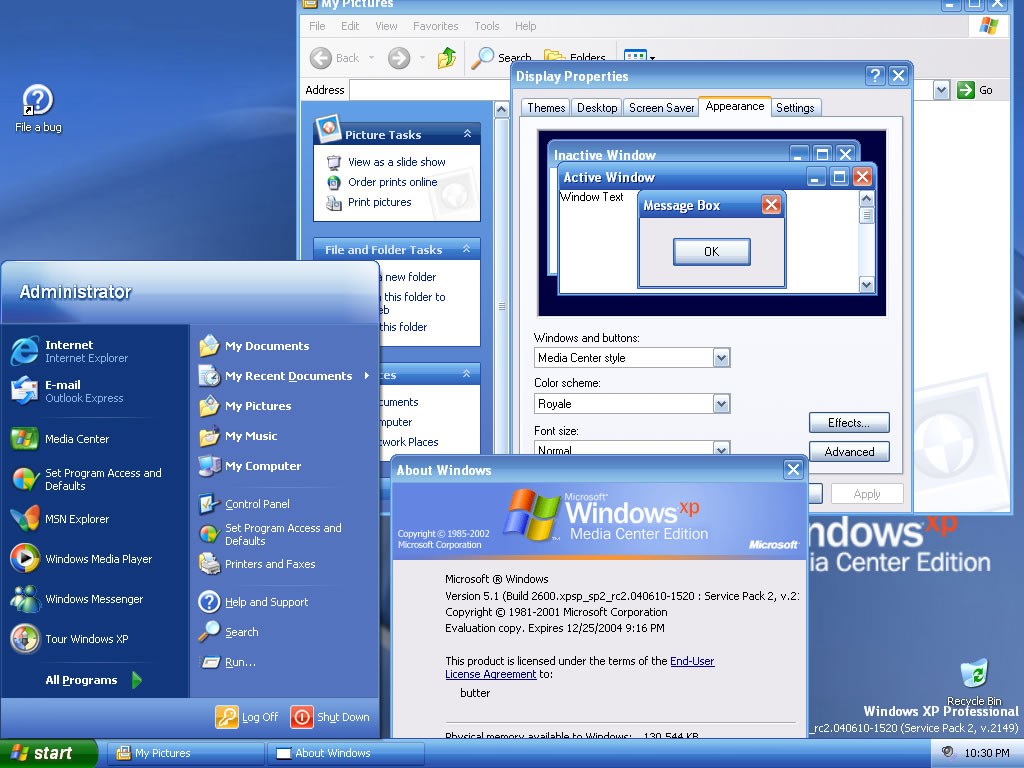
I used Royale Blue for ages, it was super easy to find the installer for and was signed by M$ so needed no UXTheme patch.
There was also Royale Noir and Royale Zune. Noir is a dark theme (Not to be confused with dark mode) and Zune, which was a different shade of black and sported an orange start button. Lastly there was also Royale Embedded which was a darker shade of blue, and had a blue Start button.
XP or NT, I’d go back
Windows 95 blew my mind.
Then windows 98 preview also was amazeballs
Lol, I grew up with the 98se theme and xp theme, and at this point i just think they’re both incredibly ugly. Peak windows desktop prettiness and usability was windows 7 for me.
Put this thing in a VM and then let a scammer remote into it, see what he does.
I disabled the UI stuff where it would look like Windows 2000 from XP until it stopped letting me. Different strokes, I guess.
98 SE.
Vista
vista and 7 both look really good, so thats fair
WindowsME
Psychopath
The Mountain Dew Baja blast of windows releases
Inexplicably beloved by furries?
… no hang on, that actually tracks.
Honestly, 8 and 8.1 weren’t bad visually (technically a whole different matter). I wouldn’t mind making my WM resemble good old Windows 8, but actually has a sane technical base of Linux underneath it.
It was the one with the weird start menu wasn’t it? Also wasn’t it the one that they started adding the second duplicate ui in a half assed way?
Like where they ended up with 2 control panels
Yeah, Microsoft removed the Start Menu and added full screen tiles, that were widgets that updated with stuff (like news). I don’t remember when the two 2 control panels things happened, Windows had always been a mess to me up to that point. It could’ve been sooner or later, because Windows was built with legacy support in mind.
XP
DOS
Powershell
That’s one of the bad ones
random comment to see if i can comment… (im not a bot)
I mean… I used to have a macbook with Linux inside customized to look like Windows 🥸😈
I tweak my linux so it becomes a prison for anyone that boots that isn’t me, we are not the same.
If someone that isn’t me can competently use my computer I consider it a personal failing. Always open to tips
“what in the fuck is a luks?”
That’s why I log in through tty. What comes next is anyone’s guess. Nerd wizardry.
Reminds me of this youtuber that fell for a scammer’s bait intentionally except he was in a VM of hannah montana linux. The scammer was so fucking confused haha
Got a link?
I don’t have a link either, but i’d check Kitboga’s channel, he is usually screwing around with scammers in insane ways
I just want an icon only taskbar at the bottom and a Windows 7-like application launcher. Besides that it doesn’t have to look like Windows at all.
Thats fine its your linux.