Hello everyone! I know that Linux GUI advanced in last few years but we still lack some good system configuration tools for advanced users or sysadmins. What utilities you miss on Linux? And is there any normal third party alternatives?
You must log in or register to comment.
A native Apple Music client
I would like something to change my monitor output at a system level, for example I could emulate a CRT screen or decide my aspect ratio. Something like RetroArch shaders but in a more high priority level.
I really miss Microsoft AD configuration GUI.
Wait, no, that sort of group you have to make through Entra, formerly Azure admin center, wait no they actually wanted a SharePoint site for the group, wait no you can’t do that through entra even though you can see the groups, you have to do that through O365 admin center, wait no you can only make a SharePoint aaand teams group there, you have to click more -> SharePoint admin center and then create a new group there, but not the default, you have to click “show more group types”, but where can you modify the members of this group? Oh you can just go back to O365 admin center to do that. Now you want to make some small access changes to the force-created email for the group? Oh well you have to go to Exchange admin center for that. Wait, not Outlook admin center? No they are named different things just to make it easy.
Now someone who made an event involving the group is on holiday so I have to remove it, I can do that from exchange admin center right? Well actually the easiest way to do that is to log into Exchange from a power shell terminal through the GUI pop-up and terminal commands. But wait, the search for the event actually doesn’t work there ever, even with the exact name? I guess I will give myself rights to the calendar, reboot Outlook, go to the calendar, remove the event, go back to the terminal, remove my rights to the calendar, restart outlook.
Actually, I don’t miss Microsoft sysadmin tools.
I personally would like a systemd gui. There have been several attempts in the past, but none is maintained.
On openSUSE, I’ve apparently got at least this thing for looking at SystemD services:
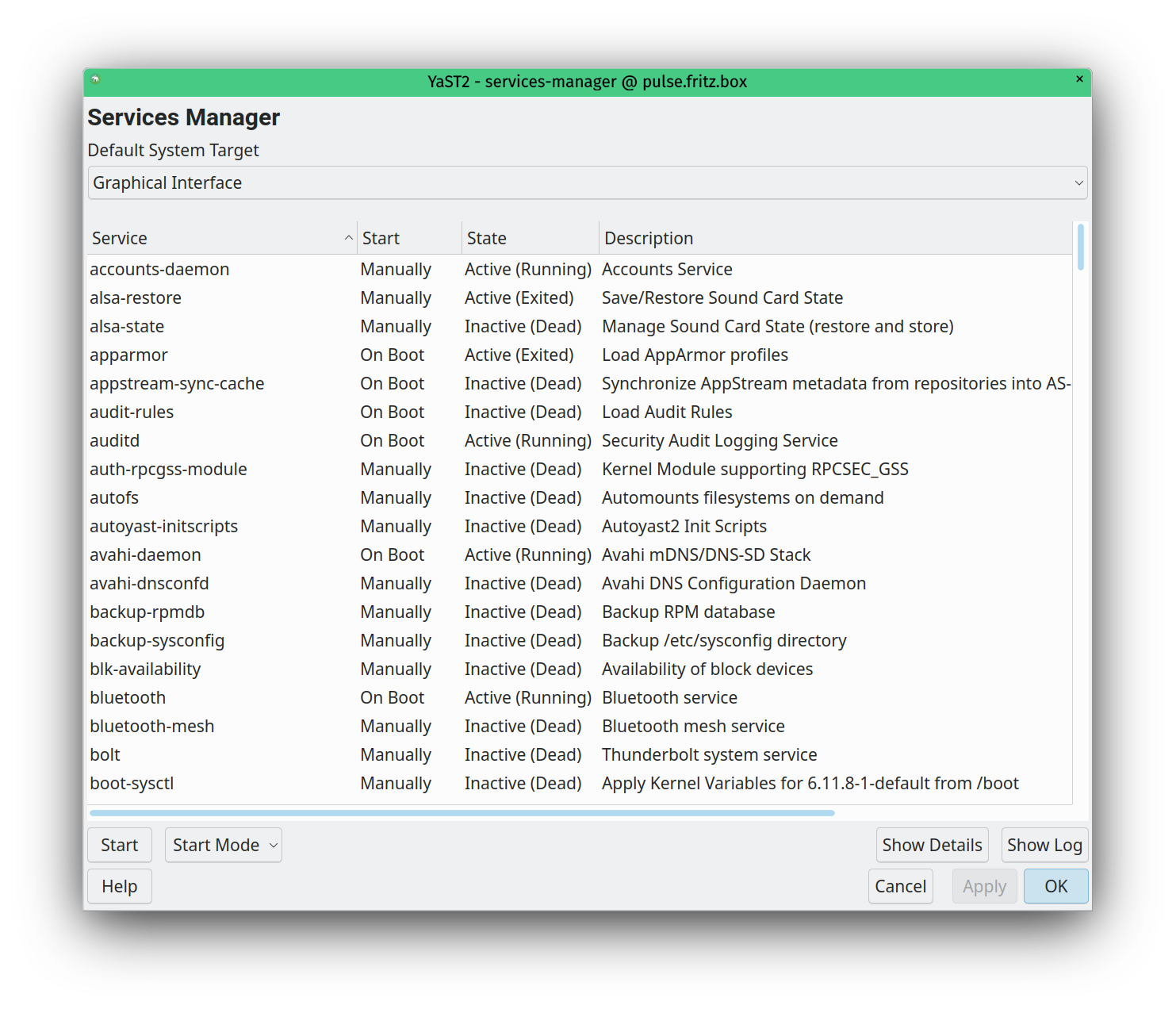
Allows viewing the services for the different boot targets, as well as the service files. You can also start/stop services or change their start mode (on boot vs manual).Well, and there’s a JournalD viewer with filtering:
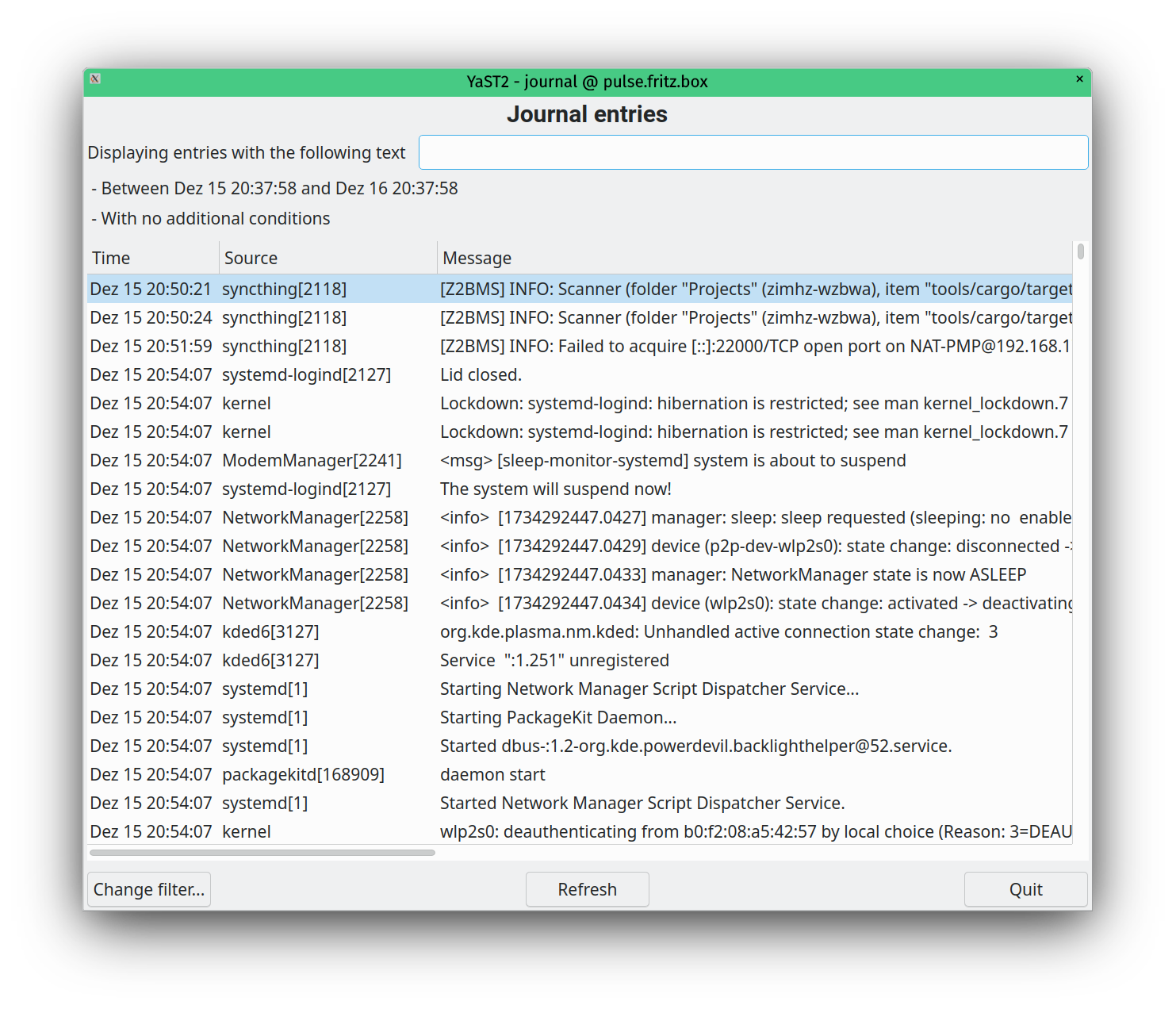
Not the most developed GUIs, but…

SystemD is far too much of a poorly thought through mess to have anything like a sane GUI configuration, it doesn’t even have a sane textfile based configuration. We’re going to have to wait fir SystemD to crumble under it’s own weight and be replaced with multiple, simple, cleanly designed components before we have any hope of a sane config again. Sort of like we used to have before a certain someone/some company (depending on how conspiratorial you’re feeling) decided to come along and muck it all up.
/rant
Thank you for coming to my Ted
TalkRant. You may gather I dislike SystemD quite a lot.For anyone else reading along: This person is talking out of their ass.
I also find that calling systemd “SystemD” is a tell that someone is unfamiliar with or has a conspiratorial relationship to it. It’s named “systemd”, all lowercase (but I’m likely to capitalize it on sentence starts like a normal word). Using an ungrammatical uppercase D at the end of the word, that isn’t even something the creators claim is correct, is … a choice.
(And it’s a choice that reminds me of e.g. how rabid anti-cyclists in Norwegian can’t even spell “cyclist” correctly, but instead consistently use “bicycleist”.)
Ok, fair point on the capital D, I must have read it like that years ago and it stuck. I shall have to make an effort to unlearn it.
As to the rest, systemd has been a constant thorn in my side ever since L. Pottering published “Rethinking PID 1” back in 2010 or so. I found, and still find, that most of the assertions and actions in that document either don’t really hold, or just aren’t really relevant. Basically it’s trying to solve a problem that really wasn’t an issue in the real world, and does so in such a massively overbearing way that everything actually becomes more laborious than it otherwise would be. From my perspective it’s an unnecessarily complex and poorly architected attempt to answer a need that was better served in different ways. That it’s become a near mono-culture is deeply concerning.
I’ve also run into all sorts of awkward edge cases and misfeatures over the years, from the automounter that occasionally didn’t to race conditions that only manifest at the worst moments, none of which would have occured had the basic tenet of “do one thing and do it well” been followed. The extreme verbosity of the configuration, and unnecessarily large number of places it can be spread just serve to make it even more unpleasant to deal with compared to the simplicity of init scripts, crontabs and the like.
The sad thing is, there’s undoubtedly some good ideas buried in it, but they could all have been implemented much more lightly and in a way that worked with the rest of the ecosystem rather than fighting it. Things like starting daemons in what is essentially a repeatable sandbox, or being able to isolate logging per service. They could, and had both been implemented already, but systemd has a real “not invented here” problem, so everything was built again, with all the attendant bugs, and design issues that inevitably brings.
Ultimately clients pay good money for me to look after their systems, systemd or not, so I probably shouldn’t grumble, but I miss the days when Linux was a clean and elegant system, without this multi-tentacled thing sitting on top of it.
Ultimately clients pay good money for me to look after their systems, systemd or not, so I probably shouldn’t grumble, but I miss the days when Linux was a clean and elegant system, without this multi-tentacled thing sitting on top of it.
I also have a sysadmin/devops/sre type career, and my impression is rather the opposite: With systemd Linux became a lot cleaner and predictable, compared to the mess of shell scripts we had before. There’s never been anything clean or well-architected about shell scripts, they’ve always been a messy collection of not-quite-the-same languages that have all safeguards turned off by default, and it’s up to the programmer to turn them on and hope they actually work. Good for one-shots and exploration in the terminal, though.
I also don’t miss logrotate or finding out that some app places its logs somewhere mystical. Being able to read app logs just by knowing the service name is wonderful, as are the timestamp and boot arguments.
systemd didn’t appear as just one guy’s brain child, nor could it rise to the dominance it has if the way it works was as controversial or bad as it is in your opinion.
I haven’t been on-call for the past few years, but my impression is that there have been fewer and fewer on-call events over my career. That’s also largely on app developers and a shift to Kubernetes, but it’s a generally pleasant change. There’s nothing I hate more than being woken up.
Its far too convoluted. A systemd gui for… DNS? Boot services? User Services? tmp file management? Everything?
All of those are entirely separate components; I have no idea what you’re attempting to imply here.
Those are all things systemd manages… as well as logs, udev, etc etc.
What kind of gui too could you even imagine would sanely present all of that?
As mentioned, those are entirely separate and even independent components.
Systemd (as in: pid1) only “manages” them insofar as that it controls their running processes just like any other service on your system.
systemd-boot doesn’t interact with systemd at all; it’s not even a Linux program.
The reason these components have “systemd” in their name is that these components are maintained by the same people as part of the greater systemd project. They have no further relation to systemd pid1 (the service manager).
Whoever told you otherwise milead you and likely had an agenda or was transitively mislead by someone who does. Please don’t spread disinformation further.
Without going into the weeds and all, given they all are in the same project, regardless…
You said “a gui for managing systemd”, so which part? Boot, udev, and journal? All three are required and not optional for systemd the OS infrastructure layer suite (or whatever it’s called these days), so minimally, assume that?
If so, what kind of sane gui could manage those three very disparate things?
If you talk about “a GUI for systemd”, you obviously mean its most central and defining component which is the service manager. I’m going to assume you’re arguing in bad faith from here on out because I consider that to be glaringly obvious.
systemd-boot still has no connection to systemd the service manager. It doesn’t even run at the same time. Anything concerning it is part of the static system configuration, not runtime state.
udevd doesn’t interact with it in any significant user-relevant way either and it too is mostly static system configuration state.journald would be an obvious thing that you would want integrated into a systemd GUI but even that could theoretically be optional. Though it’d still be useful without, it would diminish the usefulness of the systemd GUI significantly IMHO.
It’s also not disparate at all as it provides information on the same set of services that systemd manages and i.e. systemctl has journald integration too. You use the exact same identifiers.
Everything! And a virt-manager like tool for nspawn! And for the faux-cron jobs! Make it as byzantine as systemd itself
That’s the point. That systemd is convoluted, so a gui could help. And yes, for everything. :)
My point is there is no way to sanely create a GUI for something has it’s tendrils in… Everything. In fact, there’s no sane way to do any sort of UI for such a beast.
Maybe the system should be made less convoluted.
I mean, do we really need a half dozen network management services, all broken in their own way and none that do everything you need?
Pretty sure any one using YAST is confused right now
A GUi for SystemD
With the ever increasing complexity of systemd, the GUI will quickly get in par with Firefox in lines of code 😂
Just yesterday I saw one on Lemmy but I don’t know if I will be able to find it again.
Found it! https://lemmy.ml/post/23671806
The only thing I miss from Windows is Voicemeeter. God, I loved that thing. I miss it so much.
Handling the audio and adding what were once simple things like noise supression has been a really really shit experience.
IrfanView. Nothing comes even close. I would probably move to Linux if not for that.
Irfanview!
It’s FAST, it’s SMALL, it’s PURE POWERRR
I never understood why there isn’t anything even remotely close to it in Linux. Kde has Gwenview which is awful slow, bloated yet barely has any features at all.
There is a way to run it through wine but that is awful. Cane e start a GoFundMe for the dev to make a Linux KDE release with Deb and rpm files? I’ll happily contribute.
For real! Every time I spend real periods of time with Linux (and a random year with a MacBook Pro a friend wanted to get rid of). It always hits a point where I need to view images and can’t find anything that matches IrfanView. I have tried XnView and it is way too much with regards to the UI and features I don’t need. The most frustrating thing (and this applies to most others I tried) is handling going through a folder of images that are different resolutions. IrfanView has the option to both scale the program’s window based around the image size, and also be set to scale images if the are larger than my display resolution.
It is a very weird combination of those two things that drives me nuts. There are settings in XnView that kind of work but break. Like it might adjust the image that is large, but then the program’s UI will not shrink to fit a small image (the window will just stay large and have large black borders). Or it will shrink the window to the width of a large image, but not scale and the height will still require scrolling up and down to see all of it. The funny part is that I don’t even look at my saved images all the time. But shit is like a hard slam on the breaks at high speed.
I did end up just dealing with the kind of weird clunkyness of running it via WINE while on the Mac as it was my only PC at the time. Which was still better than not having it for my use-case. Just weird how it has been the only image viewer (with mid-level editing options) that has “felt” correct ever since I first tried it out over like 17 years ago.
Given that windows administration is powershell these days they kind of are similar.
Windows is missing so much in their guis abilities (like copy text) that I wonder what there is you are missing.
HWMonitor / cpuID / cpuz. One of the frustrating things is not having good driver level support for certain mbs with system monitoring utilities, so you can’t see fans and some cpu stats (like per ccd temps etc on Ryzen processors). Specifically things like it87 boards
HardInfo2 may be interesting to you
I’ll check this out, thanks! I really just need to figure out how to build in the driver level stuff for my chipset. Even this I think just pulls from lm-sensors which needs the low level drivers to populate the appropriate files to read from.
Maybe simple and easy to use GUI Firewall.
You should try gufw. Great for simple setups! For more complicated ones you could use opensnitch.
Portmaster?
I use csf which isn’t GUI, text only, but the configuration is so straightforward and simple that it’s been my default for years now on server and desktop
Thanks. I will try all the suggested options and see which one is more convenient. :)
Good luck!
My Linux experience has been command line training. Now I avoid GUI stuff like the plague if I can help it.
It seems impossible to set display scaling from the command line. Anything that fixes that would be nice.
One of my favorite things about Gnome is that almost anything can be customized via CLI with dconf or gsettings. Which is great until you encounter one of the few things you can’t customize, like displays.
What is your DE? On KDE Plasma Wayland you can just use
kscreen-doctor output.HDMI-A-1.scale.2to set it to 200%And it seem like CLI not GUI issue :)
Debian + GNOME. I’m extremely new to Linux so excuse my ignorance. I searched around the topic a while finding some commands that didn’t work and others having the same issue. If you know different that would be much appreciated!
If you are talking about fractional scaling it is not available (probably only available as an experimental setting on debian??). Otherwise, does this work https://wiki.archlinux.org/title/HiDPI#GNOME ?
It didn’t unfortunately :/
I’m willing to entertain the possibility that the linux world may be lacking in some things, but I’m pretty sure “configuration tools for sysadmins” is not one of them.
Sound volume mixer
Pavucontrol exists.
If you need something advanced install EasyEffects