

0·
16 days agoQualcomm tends to have pretty good proper Linux support compared to many other SoCs, wonder if this thing could run non-Android Linux and Steam with FEX.
Software Engineer, Linux Enthusiast, OpenRGB Developer, and Gamer
Moved to lemmy.today from CalcProgrammer1@lemmy.ml
Qualcomm tends to have pretty good proper Linux support compared to many other SoCs, wonder if this thing could run non-Android Linux and Steam with FEX.

If it’s used for something that benefits society sure, but AI slop farms don’t do that. Also, if it’s reasonable sized and not determined to buy up way more resources than needed to destroy the consumer electronics economy.
Sodium batteries have considerably less energy density than lithium, at least at the moment. They’re best for stationary use such as solar and grid backup, not for portable devices. Not really even a good fit for EVs yet.
The myriad of reasonably priced unofficial batteries on eBay and AliExpress.
Yeah, this feels like extreme price gouging. I generally like what iFixit does, their toolkits are great and I’ve bought Steam Deck parts in the past (a replacement fan when mine got noisy). However, if they’re going to participate in price gouging I’m done with them. There’s no reason a Steam Deck sized battery should ever be even close to $180, and given how numerous third party options are, there’s zero reason to pay that price for an “official” one. It’s a battery, it’s as generic of a component as it gets. Sure, it has a charge controller, but so do the third party ones. It’s a custom shape, but that’s probably just two standard sized cells taped together. If the shape were a real problem the third party ones wouldn’t be any cheaper.
You can run postmarketOS on Fairphone 5 and 6 AFAIK.

Keychron would be my choice because they have open source QMK/ZMK firmware, a decent web-based configuration tool (Keychron Launcher) that is built around an open protocol (VIA) with their own open extensions. The build quality is good and they are customizable (hot swappable switches, standard layout so keycaps are available). They have a bunch of models so you can find some cheaper options and some more expensive premium options. I am quite fond of the Q series which have a solid aluminum body but these are the expensive ones, the K series tend to still be great keyboards but with a more affordable plastic or plastic/aluminum hybrid design.
As the OpenRGB creator, if you care about RGB, especially if you want to sync with other devices, stay away from the no-name boards with closed source firmware. Might have good build quality, but their firmware situation is awful and you likely won’t be able to control it from anything other than the official app, RGB sync is out the door on many of them as they don’t have an RGB streaming mode.

I thought the X was in reference to the roman numeral for 10. Mac OS X == Mac OS 10. They sat on version 10 for a long time and then moved on so it’s no longer X.

Crucial 16GB 1x16GB DDR5 5600 CL46 SODIMM Laptop Memory PC5-44800
SanDisk Optimus 5100 2TB M.2 2280 NVMe PCIe 4.0 x4
The DRAM that came in it was SK Hynix 5600, but having mixed sticks has not been a problem for me. I’ve used it quite a bit on all 3 operating systems with no memory concerns.
The SSD was just whatever was available on eBay for a decent price, any NVMe will work. If you get a normal size 2280 drive you need to relocate the standoff because the included drive is a small 2230 drive (same size as the Steam Deck uses). Moving the standoff is pretty easy so you can accommodate either size NVMe SSD.

There is winget, which is built into newer Windows. You can install a decent amount of stuff using it. I have a setup script for setting up my OpenRGB development environment that uses winget to pull down MSVC build tools and libraries, 7-zip, and more.
I use git all the time at work from CLI. Windows Terminal is something I would highly recommend if you’re going to heavily use CLI on Windows. Set up profiles for CMD, PowerShell, and if you have it, git bash. I don’t use WSL (don’t use Linux at work and use actual Linux at home) but git bash provides Windows equivalents of commonly used Linux/Unix commands.
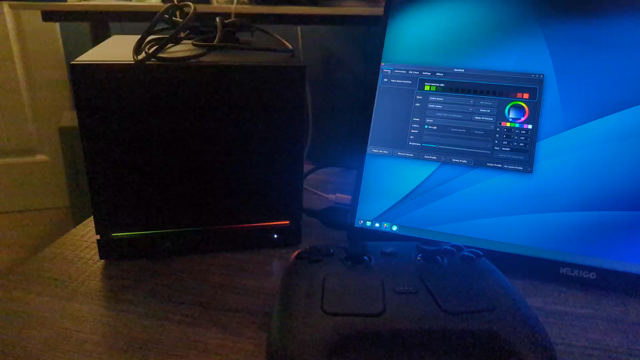
Steam Machine is awesome, got my 512GB + Controller last week. Upgraded SSD to 2TB and added an extra 16GB stick of RAM. Triple booted SteamOS/Arch/Windows. Great little gaming box that also doubles as a travel PC.
Keychron support made it into OpenRGB 1.0rc3, so just grab the 1.0rc3 version from https://openrgb.org/. To patch your firmware to fix the color issue, see this PR: https://github.com/Keychron/qmk_firmware/pull/492.
Keychron is my current preference. Open source firmware (QMK/ZMK), excellent build quality, highly customizable, and their stock QMK/ZMK firmware works with their web-based Keychron Launcher in any Chromium-based browser or you can use any other app that supports the VIA protocol. Keychron also has their own per-key RGB extension to the VIA protocol and I’ve recently added support for it in OpenRGB, so my Keychron keyboards sync with all my other lights. The only problem is their firmware has a limitation on the lighting configuration where each key has to be the same brightness in per-key RGB mode. I’ve opened a PR on their GitHub to fix it and flashed custom builds to my Keychron Q2 (QMK) and Keychron Q6 Ultra 8K (ZMK).

Mission Center is my favorite task manager app on Linux. It does copy the Windows design somewhat, but Windows’ task manager is one of the better designed things in Windows.
At least using AI but proofreading and fixing AI’s mistakes uses your human brain to some degree. If they must use AI I’d rather they be smart enough to comprehend what it puts out and do at least some critical thinking of their own.
Only as useless as you want it to be, you could, for instance, use it with the hardware sync plugin to display CPU or GPU usage. I should mark it as manually configurable for segments so you can divide it up and use it for both CPU and GPU actually.
While I’m generally pretty anti-AI especially in OpenRGB itself, I did try slop coding a Decky plugin with free AIs for selecting OpenRGB profiles and colors just as an experiment. It didn’t go well though and I’m not familiar enough wih Decky or the languages it uses to really do it justice. I’d love to see such a thing from someone who knows what they’re doing.
The OpenRGB Effects Plugin has some audio visualizer effects including a port of my old Keyboard Visualizer. You can also use the Python SDK to integrate OpenRGB lighting into third party software.

I have the regular RG35XX Plus, I should get it out and try a newer OS on it at some point.