Just a lil nitpick: article is by iFixit who is a Lenovo business partner. So perhaps less objective than one might hope.
It’s unlikely that fact will change the repairability of the devices. They risk too much by posting biased and false information on that end.
I use iFixit’s guides all the time, so I would hope that their score isn’t affected by it. I’ve seen them as being fairly good at their role.
It seems to me that Lenovo’s repairably is more affected by that iFixit partnership than the opposite. I don’t see anything factually wrong or suspicious in the article.
Nevertheless, a conflict of interests is possible.
I agree, but like others have said, it bodes well that they’re open about this in the article
As someone who has changed a laptop keyboard before.
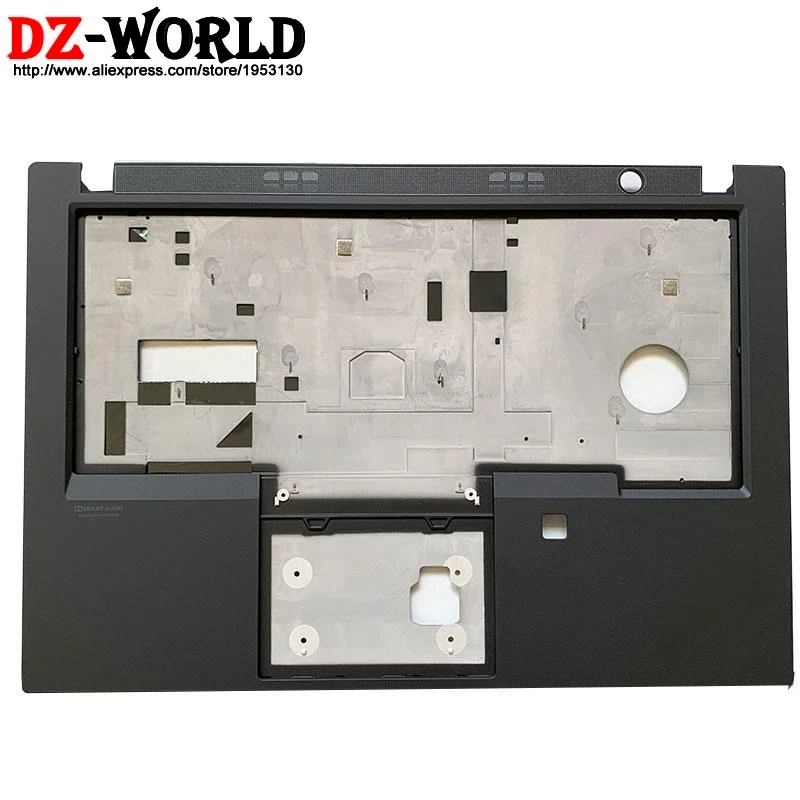
That picture says it all.
Picture’s worth a thousand expletives.
This is true, but they’re also not wrong that fully-modular USB-C ports is an absolutely huge win. It’s one of the biggest things when it comes to laptops these days.
That was where I went “holy hell”. Wearing out ports is something I am constantly quite scared of when plugging things in. Especially things like cables when they want to twist vertically, but the port is horizontal, and, well, it’s a thick cable, so…
They even state it them selves in the article, so it is not like they are trying to hide this. Also they say that this is not the end all be all of reparability, which IMO should merit not then getting a 10/10 but idk what their metrics are.
But I won’t buy anything lenovo, should I finally let that go?
I have an X1 Carbon Gen 9 (so a few years old now). I wanted to replace my HDD and they (Lenovo) had videons on how to do it.
I’d say yes. But stick to ThinkPad series. I have an IdeaPad for work and I really which I told my boss to buy a ThinkPad instead. Keyboard has broken twice in 2 years.
I used to work at a company that bought bulk electronics and refurbished them. Phones, laptops, whatever. Flooded crates of laptops weren’t an issue, nor was human feces.
Anyway, since we weren’t really an official partner of any of the manufacturers, we didn’t have whatever in-house repair guides their own technicians would have. But what we did have was Google. And I’ll tell you what, just google “Lenovo (model name) HMM” (Hardware Maintenance Manual) and you get an excellent official guide, freely available to everyone. For Thinkpads anyway, not sure about Ideapads. Example: Here’s the current gen Snapdragon version of the T14s, on Lenovo’s own website. They seem to keep older ones available too.
But to be fair, HP and Dell also do this for their professional gear.
Yeah, its less the durability, and more the long standing security issues:
- Firmware flaws they didn’t always patch
- many vulnerabilities that were known
- bundled apps that included known vulnerabilities
- Installing software on first boot from hardware (discontinued)
- Superfish injected ad traffic which allowed mitm attacks
- hardware level backdoors
So most of these things get alleviated since I always wipe new computers and put Linux on them anyways. But the repeated poor decision, security, and anti consumer practices concerns me.
Ok but how long is it going to be supported? If they abandon the idea its just a particularly expensive regular laptop, even if they keep supporting it you’re locked into ThinkPads ecosystem. It’s not truly repairable until its a standard that doesn’t rely on the benevolence of a single company.
What ecosystem? pretty sure the “ecosystem” is standardized computer parts for thinkpads.
So to go down the bullet point list:
- Swappable battery: I’m going to assume its a generic battery and therefore the best possible option here since I know some (a lot of) laptops have weird proprietary batteries. Point for Thinkpad.
- Industry standard m.2: Even notebooks can do this.
- Easy keyboard replacement: This looks like a lock in? Of the laptops I’ve seen where you can swap the keyboard, which is actually quite a few but in a really dodgy looking way, the keyboards look very different from this. Point for looking WAY easier but might take it away again if this keyboard really is proprietary.
- Swappable memory: I’ll give you that many notebooks solder this in but its easy to find a regular laptop with swappable memory.
- Streamlined display repairs: Much like the keyboard this looks awesome and WAY less jank than normal way you have to do it but it also looks like a proprietary part.
- Modular cooling system: I don’t really know enough to say on this one, most laptops have a cooling system you can take out with similar form factors but I doubt they’d work well with random parts from other machines, then again I doubt this laptop would work well with random parts from other laptops either so your still probably locked into buying the correct one from ThinkPad.
- Modular ports: This is actually pretty awesome, though again where else am I even going to get these modular ports.
Ultimately its still good, the stuff that’s already common has been made way easier and some new options have opened up for repair and replacement, I can’t really blame thinkpad for being the only ones providing this hardware when they’re the only ones making a laptop that would use it in the first place, its still an ecosystem lock in to a degree though even if its not an intentional one. It would be nice to see some competition in the space.
Yeah, it is still a laptop in the end. More repairable than most but still a laptop. I just had a problem with the “ecosystem” wording as this is best used to describe unrepairable pieces of crap that refuses third party parts (looking at you, Apple).
Perhaps do some homework. ThinkPad have dominated in business for decades for good reason
Think-pad? Pshh, a momentary gimmick.
(My very first laptop was a ThinkPad with 256mb of RAM, 100 years ago. My current laptop is a ThinkPad with 32gb of ram)
Thinkpads had 3rd party replacement parts for the last 20 years.
Ooh yes baby! As an early Framework adopter who’s repaired it already a few times, including a solder job on the board, I am happy to see it. I am getting increasingly angsty about where Framework would go in the future as its VCs crank up the profit knob. Having the biggest real manufacturer in the world introduce an alternative is fantastic. With that said, it also depends on Lenovo actually making parts direct-for-purchase available at decent prices. Without that, repairability serves just as marketing wank.
E: Is that a magnesium body plate?
An advantage that Framework still has is their upgradeability.
Fact.
But to be honest, the strength of the body of the Framework is pretty weak. Drops and more pressure result in permanent bending. I’ve already replaced one bottom. So if one wants a physically durable machine that can be thrown around, upgradeability might be okay to give up.
Is that a magnesium body plate?
As is tradition for thinkpads.
I thought they went away from it for their latest gens.
Oh my. It seems you’re right.
Its nice to see the return of the classics!
No, they’ve always had some sort of magnesium reinforcement. Full blown roll cage? Yeah that went away around the T440 series. E or L series? They’ve always been cheaper. But there’s always been some magnesium reinforcement on the T series.
T460 https://i.ebayimg.com/images/g/jrMAAOSwOwdkVWl8/s-l1200.jpg
T480 https://m.media-amazon.com/images/I/31Oj9fSCo-L._AC_UF894,1000_QL80_.jpg
T14 Gen 1 https://ae01.alicdn.com/kf/S59cb725ffd0043ccacb3e731f8409715c.jpg
Gen 3 https://www.ifixit.com/Guide/Lenovo+ThinkPad+T14+Gen+3+Keyboard+Replacement/157530#s329289
Gen 5 https://i.ebayimg.com/images/g/dn8AAOSwqT9mg1T-/s-l400.jpg
Now if I can buy it cheaper empty without microslop spyware installed on it, that would be great
Well i didn’t have “Year of the Linux Laptop” on my 2026 bingo card! That’s awesome!!
Nice. Well actually I know that they offer linux preinstall when I occasionally look at their sales on their regional site time to time. It’s good to see affirmation that they will continue to offer no winslop option.
I’ve only bought a laptop from lenovo directly once, and it was horribly overpriced. Don’t know it it changed in the last 15 years since I bought it though.
Edit: for clarification, I’m not still using that one, it died many years ago.
Yes, but if you are running Windows on them, do they still inject Chinese state-sponsored malware into Windows on every boot from UEFI/BIOS storage?
They were caught doing this on several occasions, to the point where Lenovo products are forbidden across significant swaths of the U.S. government and military.
Err… were they? I remember vulnerabilities and a ban from SOME of the US gov agencies, but not clear if it was because of spying concerns or because they wanted a US supplier.
Source?
One example of many.
You must be new to tech to not remember this. Wasn’t all that long ago.
Not even remotely the same thing OP is claiming. It’s their own windows flavor version with auto start script. It’s bad but not that bad.
Trust me bro *tm
How this hasn’t killed all serious interest is beyond me.
Very few people, relatively speaking, have heard anything about this whatsoever. That’s how.
There’s this thing called uninstalling the factory OS and reinstalling with a clean image. If you go a step further you can even get rid of Windows altogether and install Linux.
How can you trust that there’s no rootkits being injected into your linux install?
How can you trust other laptop manufacturers aren’t doing the same if we’re going with unfounded assumptions?
Most Linux images offer checksums to verify integrity.
Goldfish memories by most muggles and normies.
Plus the latest shiny and feature FOMO.
And then you have procurement who are told to get the most at the least cost, allowing state-owned companies to undercut most competition. Without clearly-specified guidelines that exclude dangerous tech, most rank-and-file salarymen will be told by Dilbert bosses to order the hardware or look for a different job.
How would you recommend someone shop for a laptop? Any good guides?
Don’t listen to what the other guy is saying, it’s all bullshit. His vocabulary betrays this wonabe haxxor with bad ideas about everything and weird choices, and his suggestions are the same.
So, some of rakabis’ advice is pretty good. I’ll just say that if you’re wanting to get away from being locked into a computational ecosystem with an even worse support lifetime than windows devices, avoid buying a Mac. A 2018 MacBook stopped receiving 90% of updates in 2024.
Caveat that by saying that older MacBooks, i.e. pre Mac made chips, are usually pretty reasonably priced on the used market. If you’re willing to switch to Linux then there’s even really good support for the hardware, with basically every distro working on MacBooks with Intel chips out of the box. The only part of deploying Linux on my wife’s 2017 MB Air that was REALLY a headache was the webcam. There’s info on every step to get the drivers installed and everything working, it’s just not all in one place, and a little outdated.If you have the money and want simplicity, reliability, and interoperability, go for a Mac. Just clench your sphincter and maximize the RAM; min. 32Gb ought to be minimally appropriate for a 7-8yr lifespan of basic duties. And FFS, go for what your current data uses up ×2.5 or 1Tb, whichever is larger (vital performance reasons in that). Don’t get the smallest storage unless third-party upgrade options exist like for the Mac Mini M4. And remember: all RAM and a lot of storage is integrated these days, which is why you should always max it out; there is no upgrade path except wholesale replacement of the machine. CPU is largely immaterial unless you are doing truly heavy lifting like video editing or AI, so that can often be the lowest choice.
If you want freedom and truly unconstrained system, some form of Linux/BSD on a Framework system is the way to go. Or if a desktop, hand-assemble it yourself.
If you are going to stick with Windows, go for a business-class Dell. Trust me, it’ll be almost as $$$$ painful as a Mac, but these little f**kers are built to last. At least you can upgrade the RAM and on-board storage, although I honestly recommend not going under 32Gb for anything other than basic tasks. It’ll be a lot more zippy with 32Gb even if you spend the first week tearing all the AI and built-in spyware out of Windows.
Running a business class Dell on Debian. Fantastic machine.
My memory was fuzzy, but I think it wasn’t UEFI but apps/drivers, but j could be wrong
You are correct, however they were malicious in nature and loaded on every boot from the UEFI/BIOS. They required Windows and auto-terminated the install if they already existed.
They can’t be a 10, only framework gets a 10. Nothing compares.
Lenovo also owns the Motorola phone brand, and they’re going to adopt/allow GrapheneOS. I think they know how to grab customers right now, and I honestly like it.
They were also the first OEM to support steam deck on their handheld (beside Valve).
Isnt lenovo the company that used to make the rugged military laptops that actually had Chinese or foreign backdoors installed?
That’s fucking depressing and SO ironic…
So in order to get more spying machines onto US IT networks, their honey pot is “build a product that is pro consumer”, and it will sell like hotcakes in the IT community.
What a fucking timeline
The shitty aspect is their actually not bad hardware. They last forever and seem to be held in high regards in the tech community but it’s as if people forgot a decade later than their still owned by Chinese. Still banned for security reasons for military use even currently after 20 years. Now the military still supplies them just not for mission critical purposes but for personal devices not govt use.
Wild. Every tech person at some point shills for Lenovo and they do have great things. Just screams Trojan horse to me still. IMO
It’s Lenovo reading the room (well, which is unusual), rather than worrying about the consumer.
It’s still a big corpo and line must go up.
Nice to see this is turning out to be a net positive though.They’re usually also well supported on Linux, and even sell them with Ubuntu pre-installed. Generally not a terrible brand.
Didn’t they have some huge controversy for having spyware pre-installed or something like that a few years ago? Doesn’t take away from the direction they’re moving in now, though! Hopefully they continue to move in this more pro-consumer direction.
Yeah the Superfish incident. AFAIK they haven’t done anything sketchy since then and if you’re the type to just wipe everything and install your own distro anyway it shouldn’t really affect anything but still not a great look.
Ubuntu? Yeah. It’s pretty much the only distro I will recommend against using (the Ubuntu spins are usually fine though). They offer Fedora as well though.
I presume you are referring to the SuperFish scandal in 2015.
Is that a good idea for a non tech person* with no Linux experience who absolutely needs to send documents successfully to others the first time without delay or should I just wait until my degree is finished and I am less dependent on document interoperability and have fewer absolute deadlines?
- My level of technical knowledge is here: if a program or usb device isn’t functioning, I know to check the driver, but I always have to look up what the device manager is called. On the other hand, I am capable of looking things up and following simple instructions, which has to count for something.
Not gonna lie, Linux is a pretty big learning curve, but it’s worth it to get away from Apple and (especially) Microslop Winblows. It’s the only OS that respects the user.
Lol what I was using Linux when I was a kid. Other than learning how to use terminal commands and a package manager occasionally it’s hardly any different from other OSs
IMO switching to Linux as a new user is no harder than switching from Windows to Mac, which I think is something more people can identify with and aren’t afraid of, for the most part.
Couldn’t disagree more. Having to learn how to use a Mac is a huge learning curve.
Couldn’t disagree more. Having to learn how to use the command line to complete basic tasks is a huge learning curve.
i think it heavily depends on the person’s use case. if someone is doing web browsing and maybe making a couple word documents, the learning curve is negligible. also, you dont need to use BASH to do most things, it’s 2026. most anything you can think of, you can do via GUI.
It doesn’t matter what the usecase is if the Wifi or speakers or camera don’t work. Or if all the icons and text are so small as to be nearly impossible to read.
what basic task have you run into that requires the command line? have you tried Mint? my 83 year old dad has been on mint for over a year with no complaints, and I don’t think he even knows how to open the terminal . . .
I’m just not interested in rehashing this conversation. Anyone who has used Linux already knows, even if they won’t admit it. Being dishonest about it isn’t helping anyone. I used Windows for 30 years and never touched any kind of CLI in that time. I did use it on MacOS but only for Homebrew because there’s no other GUI alternative.
I think you’ll be OK but there will be a slightly learning curve since it is a different OS. As for documents make sure they work well with either LibreOffice or OnlyOffice, which should be available on other OSes. There are also always online office suites if needed.
If you have a spare flash drive, you can also test out Linux distros (flavors) before installing them in a live mode, like a demo.
Best of luck.
who absolutely needs to send documents successfully to others
While the problem is Micro$lop intentionally not following their own document standard, i’d say wait until you finish your degree.
Generally speaking though, unless you ave very specific needs, you’ll most likely do fine with linux. You can try a liveUSB version: boot it of off a USB drive, test it, without installing (it’ll be slower though).You can try out most Linux software immediately on Windows, so you know what you’re in for. LibreOffice and GIMP work in Windows, but that isn’t really true the other way around with Office and Photoshop. Your mileage may vary when it comes to tolerating these alternatives.
You should be fine if it’s just messing with the usual document types but my understanding is universities use a lot of proprietary bullshit for homework and stuff these days that probably doesn’t play well with Linux. I would try setting up a virtual machine or a old PC if you have one first to dip your toes in the water
your level of technical knowledge is so far beyond the average person’s that it’s insane. the idea of ‘my computer has a problem, i’m going to google what the popup says’ simply does not occur to so, so many people.
also- you can definitely make and send documents with linux, no problem. more popular distros (ubuntu, mint, fedora (which i recommend, but im biased)) are as intuitive and point-and-click for surface level use as Windows is, and most come pre-installed with an office suite.
Installing something like Linux Mint or Ubuntu is fairly easy. The hardest part is probably creating the install media and that’s not particularly hard ei her.
If you don’t rely on specific software (like Adobe), using Linux is a good idea. I’d still advice not to mess with a computer you rely on and wait until you have sufficient time to troubleshoot something. Even if nothing goes wrong a new OS can still take a little getting used to.
Try with a VM first, or install on an external drive and boot from USB.
I got a Mac at work and I struggled for a long time to do many basic things. Any change can be a challenge and there’s a learning curve. Same moving to Linux
Your technical knowledge as described is unironically far beyond the average user so I’d say you’re probably good. Depends on what you want to do though. You can occasionally have problems if you need to do something specific or are married to software that doesn’t exist on Linux. Word processing is down pat. You won’t have the app version of Microsoft Office, but there are open source alternatives like LibreOffice that are compatible with Office file types. For formatting, you may have to download some Microsoft owned fonts since they’re technically proprietary and not bundled with Linux/your office suite. In browser, Microsoft 365 and Google Docs works no differently than normal.
As someone else mentioned, you can test almost any distro on a live USB. There is also this site where you can remote in and test the general look and feel for free. You won’t have an internet connection though:
It depends. If you get a Laptop that is specifically compatible with Linux (like a Lenovo) and use a “noobie Distro” (like I do (Linux Mint or Fedora, whichever looks nicer to you)) then you’re fine
If you use a Laptop which is not compatible, you’re going to have a very bad time
You’re exactly at the perfect level to start getting your feet wet without losing productive time (as long as you don’t go on a distro-hop frenzy 🤣).
Weirdly enough, you’re way ahead of 99% of the tech-using population worldwide.
If your computer has 4+ cores/threads and 8GB or more of ram, I’d set up a virtual machine to test it out.
Linux itself works just fine for anything, but it’s different. There’s a learning curve and you might find that the thing you need to do immediately has a different process than what you’re used to, or needs some setting up first. There’s also always formatting differences between word and libreoffice writer (same can be said for different versions of word), and some higher level excel things that aren’t easy or not possible in calc.
You’re as prepared as anyone ever is. Getting good with a search engine is the best preparation.
Also, if that fails? Most distros have a forum where you can ask for help and actually get it.
Document interoperability? LibreOffice works well, and you can save in all the same formats as MS Office and more.
The learning curve is mostly what the new tools and programs are called. But so much stuff actually works better over there in Linux land - VLC, Krita, Blender, Audacity, much more.
Try things in a Virtual Machine! If you really can’t give up some of your windows tools, you can try dual-booting, but Windows Update doesn’t always play nice with another OS on the machine.
Also, don’t forget creating a bootable USB stick with the distros you think you’d like. Rufus or balena etcher should get you there, just figure out what distros you think you’d like to try out, as sometimes it can be easier to set those up than create a vm, plus you might be able to notice any obvious issues running natively.
I’m my family’s “computer guy” despite not being overly tech savvy, and I always tell them it’s just cause I can use google. Being good at something is literally just a matter of how quickly can you pick up on how something is done, and how well can you retain that for the future through whatever means work for you.
Depends. If you use Google docs or the browser version of Office 365 (or whatever it’s called now) you’ll be fine. If you want to use an offline document editor, you’ll need to be technical enough to understand the difference between file formats like doc, odf and pdf.
If you receive a doc file, edit it in LibreOffice and send it back, the recipient might complain that the layout has shifted slightly.
If you need to be absolutely sure the recipient gets the document layed out exactly as you created it and they don’t need to edit it, exporting to pdf is a good option.
If you need to send or receive Excel/spreadsheet files you might have a bad time, I think. Though interoperability there may have improved since the last time I tried that sort of thing.
Before switching to Linux, download the Windows/Mac version of LibreOffice or OnlyOffice and see if it suits your needs. If not, it should be possible to run Office 365 on Linux using Wine or Winboat. However, Wine might not work or require too much tinkering for the average noob. Winboat should be more foolproof, but will increase the startup time of the application because you’re running it inside a Windows VM.
Motorola has been kinda crap for years now, not supporting their android phones with updates, etc.
Hopefully this is a new leaf for them.
Isn’t Lenovo that dodgy company that did the China stuff though? Hopefully they’ve been bought by someone else since then.
Ripper job on Lenovo’s part; I’d give them flack for using LPCAMM2 instead of DDR but honestly, it is ultimately the better choice for laptops and it’s totally cool to see it instead of soldered RAM.
Ideally they’d bring back the old keyboard layout based on the T25, but that’s more or less nitpicking at this point.
My personal problem are the speakers; although ever since getting my hands on an M1 Pro MacBook I’m kinda spoiled in that regard.
It looks like the AMD model still comes with SO-DIMM. Was hoping for AMD + LPCAMM2 + repairability, but I guess you can’t have everything yet.
I’d give them flack for using LPCAMM2
Why would you do that?
Because it’s a new-ish standard that few manufacturers use (I’m only aware of Dell and Lenovo using it) and thus, it could be harder and more expensive to replace them than normal DDR5 sticks (although those are expensive right now as well so eh).
But ultimately, they offer more benefits than drawbacks.
Yeah, but at the same time, it has WAY better performance than traditional SODIMMs. The primary technical reason laptops had RAM soldered for so long was because the transfer speed became problematic with that physical format under DDR5. LPDDR removes that bandwidth constraint, and maintains user serviceability.
The primary technical reason laptops had RAM soldered for so long was because
Profits.
technical reason
Technical != financial
I was wondering what they meant when talking about the WiFi chip. Is it replaceable but just annoying to get to or is it soldered to the board? I thought typically WiFi chips tended to be one of the few replaceable parts.
It is soldered to the board
In the early 2000s, my longest lasting laptop was an IBM T14. I replaced the battery twice and increased the memory. I retired it right before the pandemic. It lasted over 15 years.
I replaced it with another Lenovo T14. Great keyboards and comes with Fedora workstation or Ubuntu out of the box.
Return of socketed mobile CPUs when?
Won’t laptop manufacturers need to get CPU manufacturers to produce socketed mobile CPUs again?
I don’t think that would be very profitable. Spending lots of money negotiating with the CPU company just for a very small fraction of customers.
Should most electronics come with no servicability at all, because most customers are not gorillas breaking products for no good reason?
The road to enshittification is paved with people telling you to just use the popular thing everyone else, calling removable media “e-waste”, or even suggesting you to just buy a pair of Raycons if you don’t want to pay for electrostatic headphones and an audiophile external DAC.
Yes please.
Noice. Would also be wonderful if they stopped pouring a shit ton of that nasty black underfill under the bga chips and used some regular red/clear compound around the corners instead like literally everyone else.
There’s a difference between ‘repairable’ and ‘upgradable.’ Most of the comments seem to conflate the two. Lenovo isn’t doing a Framework.
It’s a smart move. Differentiates them from other laptop-makers for corporate IT, who can do the parts swaps themselves. Also smart is associating the brand with iFixit and working to get a 10/10. That’ll be what sets them apart from all the others, at least for the next year or two.
A think pad t series is not really much harder to take apart than a framework. Just more screws and fewer magnets. The screen is probably an exception however.
That’s his point. It’s similar to framework, but not the same.
Easy repairability is great, truly.
But framework offers more than that, easy repairability AND upgradability, because they offer new upgraded parts with the same compatibility as the old ones, so you can just drop them in.
Lenovo is not yet doing that. Which is fine. Just a noteworthy difference.
I would be curious to see how often people actually upgrade their frameworks.
I agree with their repair stance. It just feels like one of those things people will tell you they want and then never do.
Still maybe the explosion in memory prices will change the incentives and people will start holding things longer. It will be interesting to see.
It is a bigger deal in business settings, where one laptop can see multiple hands and you’ve got a team dedicated to repair.
Not typically an issue for the individual user, but increasingly an issue for a team of users as the size of the team grows
I got my framework about a year ago, before the tariffs got crazy, and well before ram got crazy (I put 96 gigs in it to play with AI workloads, and for the lulz).
My plan is to ride this thing until it starts showing its age. Which I imagine will be another 3 or 4 years? Only then can I comment on my actual desire and commitment to upgrading it.
Until then, I’m just banking on the fact that the company will a) live. And b) still have parts for my machine.
I do appreciate what they’re doing, and I like my machine now.
There are definitely people out there who upgrade super frequently, who knows, maybe I’ll be one of them in 1 or 2 years instead of 3 or 4. Hard to say what life will look like then, the way things go these days.
I would be curious to see how often people actually upgrade their frameworks.
For me, I’ve upgraded my mainboard to a newer CPU generation for better integrated graphics (old one is in a case as a home server) and I upgraded to their matte screen when they released those.
While easy to repair, how does durability compare so you don’t need to repair it in the first place?
While not bad like an HP consumer grade laptop, I have not heard good things about the rigidity of the frameworks. All the modularity takes away space for reinforcement and leaves more points for things to break.
The modularity might be considered almost a gimmick of recessed USB-C accessories, so I would personally be happy with a device that leaves that outside the core chassis, so long as the chassis ports are at least as modular as this ThinkPad concept. No idea if those big empty areas are a serious liability structurally or not…
Even among shitty laptops, it’s always been keyboard, screen, or charging port as the things that break, not sure structural support matters too much on those fronts. I have had boards fail, but not due to physical events.
keyboard, screen, or charging port as the things that break
That’s exactly where structural reinforcement makes a difference. Keyboard less so since usually it’s the switches that break. But ThinkPads have reinforcement not just on the chassis, but the ports too. There’s a plate about 1 inch wide on all the ports of my machine. The less all components flex the less likely things break. From simple insertion cycles to actual physical damage, it all adds up over time.
Ok, my ports break out of use, have had pretty bad luck with USB-C charging ports on the thinkpads… Never been dropped but they just stop working… Then if out of warranty I start using another USB-c port… then that breaks…
Seeing a modular USB-c port is just absolutely fantastic…
There’s a difference between ‘repairable’ and ‘upgradable.’
Absolutely! I’ve got a Lenovo IdeaPad Flex 5 (laptop/tablet thingy).
I’ve upgraded/replaced the ssd - no problem.
Unfortunately, this laptop has an issue with the keyboard: the left section/panel intermittently stops sending inputs. Meaning, keys like escape, a, w, shift, l-control - just stop (even in the bios). I’d read that they keyboard “collects” static which causes problems with certain sections of the keyboard.
I thought I’d see how difficult it would be to replace the keyboard. I watched a teardown video, and of course you need to remove everything… but I lost it when, the person in the video used a heat gun to melt “plastic rivits” that connected the keyboard to the motherboard case. Then with the replacement keyboard needed to remelt the plastic rivits.
This laptop is not repairable. In fact, I swore I’d never buy another Lenovo again as a result. … but if their focus is on making them repairable (and their recent partnership with GrapheneOS) - I might be eating crow tonight.
Note that ThinkPad and IdeaPad are practically different companies with how Lenovo acts.
Fully expect IdeaPads to continue to be shit. ThinkPad can do the most wondrous good stuff in the world and IdeaPad will stay garbage.
And yes, I went through the same exact maddeningly shitty keyboard replacement procedure. Never again IdeaPad, though ThinkPad has been fine.
Bonus points, ThinkPad brand never shipped Superfish, and most of the firmware security flaws have been IdeaPad side. It’s amazing how half-assed they are with that brand yet pretty competent with ThinkPad.
oops, that’s Motorola
https://www.lenovo.com/us/en/d/motorola-smartphones/ Same company, actually, so you were basically right the first time!
The “upgradability” part in a small laptop is questionable to me, anyway.
The GPU is really compromised in that chassis, as having it in a slot compromises cooling big time, and limits how much power it can use. And while I love upgradable RAM for the CPU… it’d be better if they used faster CAMM modules. Many other brands have upgradable SSDs/WiFi.
Swappable ports are awesome, no question.
…But honestly, I’d rather have a smaller chassis, bigger GPU and better cooling right off the bat, like a Zephyrus chassis. And have it reparable, and make the whole motherboard standardized/swappable, but not compromise the chassis so severely by making it modular.
What’s the price of this compared to a comparable (feature-wise) laptop? Just curious what the repairability premium is.
First, you have to define “comparable”. These are Enterprise-grade laptops. Their class includes the Dell Latitude and HP Elitebook. It doesn’t include anything you will ever find at Best Buy. It might be tempting to do so, since your visible specs like CPU and RAM are the same. But they really aren’t the same.
Within their class, Lenovo has (for over a decade) been noticeably more expensive than their counterparts. Roughly $100-150 more per unit for the T4x0/T14 vs a Latitude 74x0 (now Dell Pro) or an Elitebook 840.
Current prices are: HP Elitebook 8 G1i 14 - Core Ultra 5 236v, 16GB/512GB, $1249
Dell Pro 14 - Core Ultra 5 236v, 16GB/512GB, $1659
Lenovo Thinkpad T14 Gen 6 - Core Ultra 235u, 16GB/512GB, $1809.
All have integrated graphics.
I don’t think the detailed specs/pricing for Gen7 (what the article is about) has been announced yet. I would expect it to be in line with previous generations, since their 9/10 repairability score was.
I’ve been a ThinkPad user for about 4 years now, got a second-hand T470s running Fedora. It’s been an amazing experience! I’m not one for brand loyalty, but (so long as Lenovo doesn’t fuck them up) ThinkPads will always be my first choice for a laptop.
Yeah I like Lenovo in general too! I have an Ideapad rather than a Thinkpad, but this is my second Lenovo and they’ve both lasted for ages, never had any weird problems, played nice with Linux etc.
I’ve been wandering the laptop desert for a few years now. Lenovo, Dell, System76, Framework, StarLabs.
I’m currently on a Dell Pro 13, but the keyboard really sucks and the hardware isn’t fully Linux compatible.
StarLabs had keyboard issues and terrible battery life.
Framework seems like Linux was an after thought. Their HiDPI display isn’t fully Linux compatible.
I recently got my parents an X13 and everything just works. Camera, Bluetooth, graphics, display. All good.
I prefer 13in screens, but I’ll take the repairability of the T14 gen 7!
I didn’t know that about Framework HiDPI displays
Happy for them, I’m sure the 100 people that still can afford computers will appreciate it.
Thinkpads are usually acquired as enterprise retire their stock, 2 or 3 year old devices for a fraction of the new price.
Hey… people win the lotto all the time! So for brief moments throughout the day there’s probably 101-107 people in the world who can still afford one!
Thinkpads are generally invredibly cheap due to scale. You can also refurbished last years model for under 400 usd.