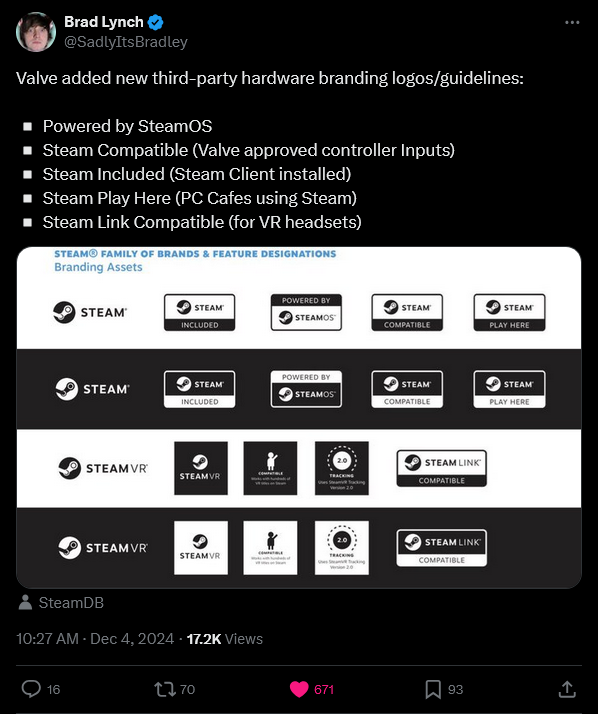



Edit: All fine now. It was only a temporary thing.
I get a bad Gateway error. Does this link work for anyone? Or did Valve take the document down / private?
Works for me.
OH right, now it works for me too. Must be a temporary thing. Thanks for the reply, everything fine now.
shits about to get real


(I’m a real sicko)
For those of you who is hyped, what is that so good with SteamOS, please? Honest question.
Own a Steam Deck myself. I ran SteamOS for about two months, I think, then I finally had enough of it because I really want to install some software of my choice on it, and having some control over the machine in general. But SteamOS is putting an immutable layer on top of it somehow and reset the changes I made every time I updated it. Forgive me for I don’t remember much detail.
Now I run Gentoo on it. I can still install Steam and all the games if I want, and I have full control of it.
You seem to be comparing it to other Linux distros. The success is that it’s not Windows, can still run pretty much all the games, and lowers the hardware requirement.
What makes it appealing imo is the immutable aspect. It makes it much harder to break which is what the average user needs. And Distrobox is now included by default which makes it possible to install whatever packages you need inside a container.
SteamOS itself isn’t what’s great, what’s great is the game mode that came with SteamOS. It’s also available in a couple other distros, like Bazzite for example. If you aren’t taking advantage of the game mode, and the Steam Input that came with it, then you’re missing out on one of the best features of the Deck.
Possibly related, but I was able to download a distrobox image of SteamOS through BoxBuddy. Dunno if it’s legit or what, but I was able to play games through it (though made no sense to). This was a week or two ago that I saw it on the dropdown when installing a new box.
Edit: I see other people in this thread mentioning some old steamos so maybe it’s that I dunno, maybe I will check later.
If it’s based off of Debian 12 then it’s the old version of SteamOS.
Steam Machines: “First time?”
If this takes off the Xbox handheld will be DOA and Microsoft once again looses a very lucrative market due to pure incompetence.
KDE is now working on releasing an atomic Arch-based distro themselves, which sounds a lot like SteamOS. I wonder how they will compare.
The image with a bit more pixels (hopefully)
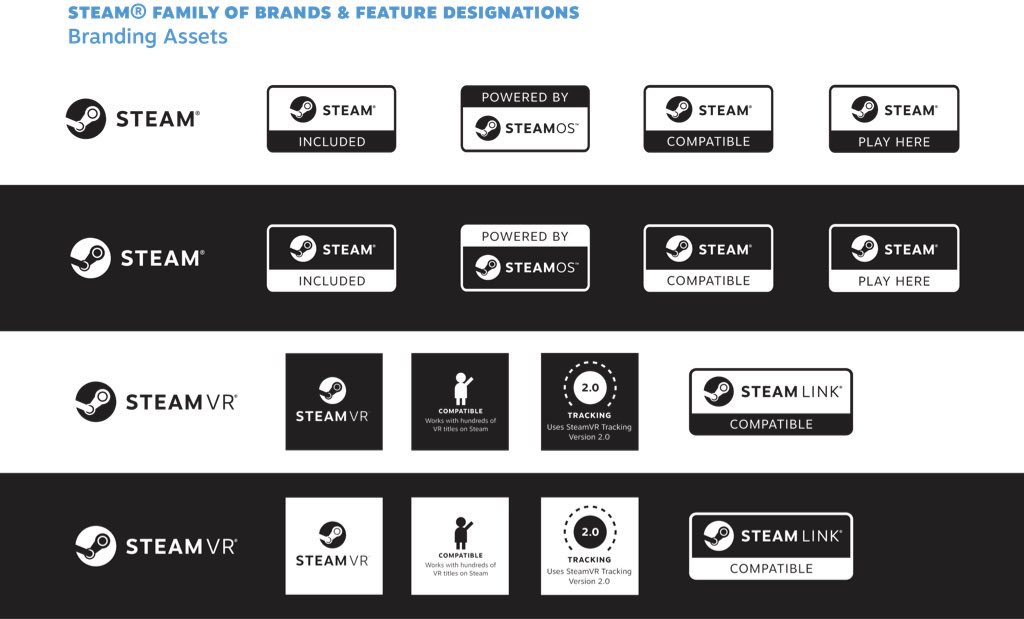
Significantly better thank you!
what’s a steamo and how is it used to power things?
Not sure if that’s a joke about a since-corrected typo or if you’re serious.
Just in case serious, it’s the Linux-based operating system that runs on the Steam Deck, and soon to be related devices. So, Linux modified to work better for gaming, especially with Steam.
I legitimately didn’t know what the steam OS was, so thanks. I was very curious about something that has very little to do with my interests, but I like playing games have always been curious about the steamdeck
i wasn’t trying to poke fun at any typo, i was just trying to make light of the logo looking like it says “STEAMOS”. but i appreciate you taking the time to give an earnest response :)
Oh as if “steamos” is the plural of “steamo”? I think the plural of “steamo” would be “steamoes.”
Looking forward to swapping bazzite with steamos on my ally x
I have a computer with Windows 11 and I play two games: civilization V (thorugh Steam) and Guild Wars 2 (own installer).
Is there a tutorial for noobs to install a Linux distro along those 2 games for newbies? I would like it to coexist with my current Windows 11 just in case.Linux mint is a stable distro that I would recommend to beginners. Or maybe Nobara or Bazzite would be a good choice too. Use whatever distro you like most.
All you really would have to do after installing your distro is to install Steam and enable “Steam Play” in settings. It allows Windows games to run on Linux. Then you install Civilization V through Steam as normal and when installing Guild Wars 2 you can use Steam as well. Run the installer as a non-steam app and install it. Then run the game exe through Steam once it’s installed.
There should be good guides online (YouTube or Google) for installing Linux Mint alongside Windows.
Once you have your system installed feel free to let me know if you need help with Steam and getting the games running
Hi, I installed PopOs and it’s not very beginner friendly, or at least not to the extent that I’m used. I have already spent around 12 hours configuring settings, learning to make enough partitions, etc. Most hours ha e been trying to know why Guild wars2 was laggy as hell, and I finally discovered I had to configure the UEFI (Bios?) in an obscure parameter so my graphic card (nvidia) was detected.
Now it’s in a loop of ‘building vulkan shaders’ or something like that, it takes hours.
Honestly, I thought this process was going yo be easier, I have used so many terminal commands that I feel I’m in the old days of MsDos.@LemmyRefugee @DaTingGoBrrr Using Linux for gaming is harder then using it for coding or web-browsing 🌐.
Especially if you run closed source games like Guildwars 🎮. In my experience open source games like minetest or supertux run better.
Building vulkan shaders seems familiar: Do you use steam?
You can use WSL (Windows Subsystem Linux) to run a Linux VM on your windows machine alongside any other applications. I would recommend that.
To be able to select the OS on startup is called dual boot. This is more complicated though so you might not want to start there if you don’t know PCs and don’t want to put effort into learning.
A Linux version that finds widespread use is called Ubuntu. You likely want the latest stable version.
I don’t have a tutorial, but once you do have a Linux install, for standalone games I can recommend checking out Lutris. It has many user-provided install scripts that can set up games automatically, seems to include Guild Wars 2: https://lutris.net/games/guild-wars-2/
Interestingly, Guild Wars 2 is apparently also on steam - for steam games I recommend looking them up on protondb, in many cases windows-only games work out of the box, but if you’re not afraid to do a bit of tweaking, you can often find fixes there: https://www.protondb.com/app/1284210
However the details of this pan out, the timing of this news is beautiful. It’s right there alongside the headline in my feed about the Windows 11 market share going down.
And it’s not about being anti-Microsoft, it’s just that the market conditions are great for cementing Linux as an expected place to release your games. And I personally love seeing VR as part of it.
Steam Machines?
Deckard will probably be a split unit: a lightweight headset with a small stationary unit for wireless streaming. That stationary unit will also work as a normal steam machine connected to a TV and will be on sale seperatly. (This is all speculation)
This sounds great, if the streaming to the headset is lossless. And the streaming isn’t a huge drain on the battery. (High bandwidth super low latency streaming is usually a strain on batteries).
All of the high quality wireless adapters for things like the Vive and Index have gotten hot, too.
If it’s just h.265 streaming… fuck that. Dark scenes always look like shit.
So far every streaming option for Oculus Quests have the option to choose h264 or h265, and now AV1, and I assume eventually h266. Lossless if using USB-C.
In close collaboration with Valve
Sounds to me like they will open it to other manufacturers, but this could mean that they are releasing it publicly also. I’m excited!