I’m just glad modern cables aren’t modeled after grappling hooks
Wait, are you saying that you DON’T enjoy having to crawl under your desk to fetch one side of a cable that you dropped and now catches every single other cable when you try and bring it back up?
We used to have time to eat serial, but now everything has to catch the bus.
still better than fake “i have prepared every port that anyone has ever seen for breakfast this morning, but the kids are only grabbing one measly USB C toast as they head out with friends”
All devices now have chips that do a handshake with the charger, exchanging information about supported standards and charging using the best common option. So I charge my prohe with a 90W laptop charger, even when it is unable to use the whole wattage
On the other hand, I have a USB-C charged laptop, but it only accepts one specific spec of 45w, and one specific spec for 60w. This means that 90% of usb-c chargers don’t work for it, including chargers that support 45w or 60w charging. This means that even if you buy a charger with the right wattage, its effectively random whether it will work or not.
You just note down the company who delivered the idiotic product: next time your options for purchase are narrower, but it narrow the chance to buy products badly designed.
Just because some companies sells USB butplugs it doesn’t mean USB standard is necessarily a pain in the ass overall.
Just because some companies sells USB butplugs it doesn’t mean USB standard is necessarily a pain in the ass overall.
No, but it does mean that the USB standard allows for being a pain in the ass, compatibility-wise, which kind-of defeats the point.
I have a fucking thinkpad that does not follow the USB PD spec!
The thing has only type-c ports, the thing is relatively recent (2023), the thing accepts 140W via type-c, I never bothered to check the actual specs and assumed PD 3.1
Turned out that no, this is not PD, this works only via proprietary power brick that outputs 20v@6.75A, that I didn’t get as I already have a bajilion of PD 3.0/3.1 power supplies at home.
back of the device

I have different work Thinkpads from 2019, so probably the first one was 2018 or 2017 generation. And they accepted whatever laptop usb charger (ok, most of them were also Lenovos, but some generic stuff our IT was ordering from Amazon as well)
My current T14 works with my AliExpress 120w powerbank.
Probably good to rely on brands who don’t mess with standards
The point is that it is unclear which USB C can do what.
And why exactly would that matter? Your devices automatically negotiate to the most effective alternative. If you want to streamline it, you read the manual? FWIW I’ve never had a device with completely unlabeled ports…
Cable only charging, only this, only that speed.
Device A only this, only that.
Device B see A.
No 5 kOhm resistors on the CC pins? Not even 5V charging works for C->C. I love USB C, absolutely do not get me wrong, but holy fuck this willy nilly bullshit destroys it. Just make USB3, then 4 years later etc. with very specific things it must be able to do and mark all devices and be done with it.
deleted by creator
Wattage is not the issue.
Half the cables I have will charge a phone, but will not pass data. There’s no visual clue, so when I want to use a usb mic for example, I have to try cables until I find one that works.
All mine are either labelled such that they are differentiated clearly from other on-device ports, identical to all others, or they are the only port on the device. While i could complain about the specific symbols and lack of standardization there, I have one singular device i care about fast charging with. So it’s rather moot once i identify the high power port.
More USBC plz. Looking forward to the 230V standard.
What’s the solution here though? I am 100% unwilling to go back to non-compatible and separate chargers for electronics where not completely necessary. It’s awesome taking only my laptop charger with me and being able to charge all devices optimally with it.
It’s the USB Implementers Forum’s job to standardize these things, and they’ve just been doing a bad job. The naming scheme is a mess and the requirements are so loose, manufacturers just kinda hit whatever specs they want.
They need to set specific comprehensive list of technical requirements for each class of USB-C cable and port, reduce the number of classes (no more than 3-5), and make the naming scheme and logo design of those classes very clear and obvious to the less informed.
I think the complaint is more about the ports on computers, and the answer is for manufacturers to label the ports and for users to read them.
That last part is admittedly hard for a lot of people (myself includes at times).
The issue is, that’s not even enough! For example, the Dell 120 W laptop charger only supports 5V/1A or 20V/6A output, so phones will mostly charge at 5W because they dont support 20V input. Then there’s all the different charging protocols… Oh boy.
I’m not sure how your example is “not even enough”? If the charger is labeled as only having a 5v/1A and a 20V/6A profile, then where is the problem?
The problem is that the average consumer will have no idea what those numbers mean. If it was as simple as “this charger can output up to X watt”, labeling would probably be fine, but as soon as it gets more complicated than that, you’re beyond what most of the population is able and/or willing to deal with
Well, I’m all for universally easy things and a consumer not being stressed, but if we really got to the “I don’t get basic numbers” territory, then go learn some school physics, and maybe that Volts is the pressure in the pipe, Amps is how fast the water flows through it, and Watts is just pressure times flow rate - it’s that simple. Go and fucking learn what is what, there’s enough information in my comment alone.
Yep! In this case, you may go “Oh, 120W is more than my phone’s 20W charging speed, so it’ll be fine,” only to find out that because it’s only available at a voltage higher than the phone supports it’ll be a very slow charger. I don’t think most consumers want or care to look at what charging profiles their phones and chargers support.
At least thunderbolt you usually get an icon plus number. Though most devices don’t label the ports.
All the other USB standards are confusing as shit.
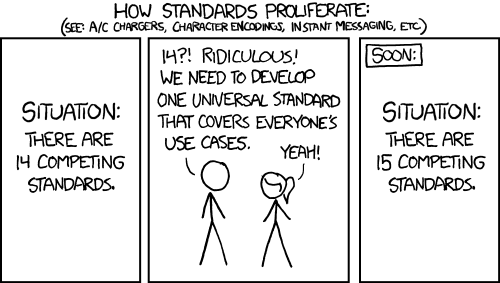
there are too many standards.
for most part, rather than all that mess, maybe just stamp the cable/port with max wattage and max speed. So rather than worry about what standard am I using, I just know what I have and what goes where.
Sure but to be fair the vast majority of devices charges fine with the baseline 5V/1A, even if a bit slower.
Exception is larger devices like laptops but I can’t say it’s a huge problem as their larger chargers are distinct enough
I’m having some cheap devices with USB C plugs to charge, that stubbornly refuse to get charged with “better” cables. Only the real cheap ones work.
Probably because some pins must not be used or something, but it really sucks needing a separate cable around just for those devicesI get, that not every cable or device can support fast charging, but the other way round should at least work
Except that C to C only works when the receiving device has at least the required 5 kOhm resistors on the CC pins. Otherwise nada. But guess what? Lots of shit does not, so only charges from USB A.
deleted by creator
“a bit slower” can mean multiple hours even for a regular smartphone, or a full day for something like a powerbank. That can easily catch you out if you expect the device to fast-charge as usual. It works, but it’s far from ideal
While that is mostly true, I do have several USBC devices that refuse to charge with a name brand 65 watt charger I have, but they just love the cheap dollar store 5 watt versions.
I have a few devices that have usb-c but only charge off an A-to-C cable. Presumably no charging circuit to negotiate with usb-C chargers.
All it would have taken are 2 resistors…
USB, the jack of all connectors, master of none.
Well, the U does stand for universal.
Blame the standards group. There are so many things USB is excellent at but they have been horrifically butchering the implementation.
They need to mandate compliance. Each accessory should support a basic level of features. Packaging and listings should include a facts table which shows the support for the various features. You shouldn’t have to guess.
But let’s talk about the features. Oh. My. God. Let’s talk about it.
USB-PD is great. But they don’t have to support it. Or they can have their own implementation which is also compliant. Or their own implementation which isn’t.
Oh, but you can connect your headphones into the USB port and play music! Well, only if the device, cable, and headphones support analog audio. Or if the device, cable, and headphones support digital audio. But if it supports digital audio, both devices must support synchronous audio. Or asynchronous. Or adaptive. And none of these are cross-compatible.
Well, that’s annoying. At least video isn’t bad. You can use it to connect directly to your monitor! Just make sure it’s DP. Or HDMI. Or VGA. Or MHL. Or VirtualLink. Only DP and HDMI are cross-compatible.
They also can support Ethernet. Or they might not. They could support ThunderBolt. Or they won’t.
They have to be at least USB 3.0. Sorry, 3.1 Gen 1. Wait, 3.2 Gen 1x1. Oh, I mean SuperSpeed USB 5Gbps. Ah, fuck, never mind they changed the standard again - USB1/2 are fine.
But at least manufacturers are happy to put the specs on their packaging and listings, right? I’m sure there isn’t any natural incentive to hide this information so they can sell inferior products.
Woah, worse than i thought.
That’s just the port side. The cables are just as fun, you have multiple levels of power delivery support, that generally don’t include data. There are data cables, that may or may not support video. Thunderbolt cables support most everything. The highest charging speeds generally require dedicated cables. Assuming everything is standards compliant it shouldn’t break anything to plug in the wrong cable to the wrong port.
Every interaction I’ve ever had with display port has resulted in me rage quitting. Did it ever do anything?
What? I have been using it as my preferred video port for over a decade. How could it possibly make you rage quit?
Eh? DisplayPort is great, non-proprietary HDMI that we should all be using instead. I use 4x DisplayPort connections at work daily.
Are you referring to DP interfacing through UBS-C?
Display port? What’s wrong with it? Only thing I can think of is it is sometimes hard to get out if you can’t squeeze the cable to unsecure it.
Today’s kids can’t afford a PC so it doesn’t matter either way.
But things were simpler then, you may think it was bad having so many different ports but you’d be surprised.
My experience is the opposite, no one ±5 years of me (born '90) ever had their own computer until they were in their late teens, and only a few had that then, most only got their own when they started working. Now my younger half-brother (born '12) and most of his friends have their own computer and consoles. And we’re very much not higher-middle class, many (including my family) are working class and barely scrape by. It’s just a more important thing for kids now so they save money for years and ask for all their presents to be money for it.
That’s why i said today, if you got your PC or console a few years ago you were fine.
Today a stick of RAM costs almost as much as a basic PC just 2-3 years ago.
I still use toslink. How else am I supposed to get audio to my DAC?
Realistically, I prefer USB 9B) over toslink for my DAC, but I am more confused how HDMI and DP are being shown as outdated.
My newest monitor supports USB-C but I’ve never used it. DisplayPort for the win.
usbc 😅
It has USB-B, toslink, and coax. Coax and toslink can’t be used simultaneously. I use USB to connect to my PC and I have an HDMI audio extractor pass through thingey that has toslink so I can use my PS5 with my DAC.
Use toslink for all. Does the USB connection to your PC and/or HDMI extractor work with digital signals like Dolby whatever?
I just came a little.
Remember having to park your hard drive before turning off the computer?
Wow, It’s almost like we had a reason for different kinds of wires…
Honestly, I’d much rather have just 1 cable for everything
Remembering which port can output/recieve what speed/wattage isn’t that big of a deal compared to digging through a bunch of cables every time you need to charge something.
I hated it back when every device needed their own specific charger.
The problem is the wires can have the same head and not support everything the port can so not all wires work so you still end up digging through wires only now you also have to test each one, you theoretically could get only Super wires that support 40Gbps, Dp, 250W etc but those are expensive so you won’t and even if you do no body else will do you’ll always end up with a bunch of charge only (throw those away immediately) or low power or need the one that carries video but also need one that does 250w or whatever, the whole standard is a mess and it’s all because they tried to o shove everything into one cable, something we always knew was s bad idea because video and sound and data and networking all take different signals and different voltages.
I just bought a couple of cables that support basically everything, and that’s it.
They connect to everything, they charge everything, they are interchangeable, and they don’t bottleneck.
Granted, I do not care about video and sound. To me, those are only needed for plug-once-and-forget devices, so DP/XLR/etc make sense. Data and charging, however? Yeah, USB-C is so much better than what he had to deal with, despite the standard being kind of a mess.
When USB-C was still new, there was the possibility of an out of spec cable to kill your device. That’s, I think, slightly more inconvenient than said device not charging fast enough or not offloading cat pictures at the bitrate you expect.
That’s right, it goes in the USB-C hole!
Slow charge speed detected.
I heard the voice
I just plug in my USB devices and they work. What am I doing wrong?
This was for PS/2 which wasn’t hot-swappable and there was a small chance you could fry your motherboard if unplugged or plugged in incorrectly as it went straight to your motherboard microcontroller.
The upside was it initialized at POST so passed straight to BIOS
Result is the same. Doesn’t so what its supposed to so without proper planning.
USB A 3.0

Aux plug still exists on PC’s, same as display port, USB A and HDMI.