

- cross-posted to:
- technology@beehaw.org
- cross-posted to:
- technology@beehaw.org
A new study published in Nature by University of Cambridge researchers just dropped a pixelated bomb on the entire Ultra-HD market, but as anyone with myopia can tell you, if you take your glasses off, even SD still looks pretty good :)
You must log in or register to comment.
After years of saying I think a good 1080p TV, playing a good quality media file, looks just as good on any 4k TV I have seen, I now feel justified…and ancient.
Same.
Also, for the zoomers who might not get your reference to the mighty KLF:
Shhh – the ISPs need a reason to sell bigger data plans. Please think of the ISPs…
Except everyone uses crap bit rates and compression on their streaming content and it really doesn’t look that much better than 1080p. UHD Blu Rays tho are a totally different story, absolutely outclassing lower res content.
Honestly after using the steam deck (800p) I’m starting to wonder if res matters that much. Like I can definitely see the difference, but it’s not that big a deal? All I feel like I got out of my 4k monitor is lower frame rates.
Pixel density is what makes content appear sharp rather than raw resolution. 800p on a 7" screen is plenty, if you think about it a 50" 1080p TV is almost 10x the size with a 25% increase in resolution
if you think about it
I tried that, and I’m not totally sure about the correctness of my numbers, but your numbers intuitively seem off to me:
a 50" 1080p TV is almost 10x the size [of a 7" screen]
How did you arrive at this? I’d argue a 50" screen is much more than 10 times the size of a 7" screen.
The inches are measured diagonally, and I see how 50" is somewhat “almost 10x” of 7", as 49" would be 7 times longer diagonally than a 7", and 7.something is " almost" 10.
But if we assume both screens have a 16:9 ratio, the 50" screen has a width of ≈110.69 cm and height of ≈62.26 cm, while the 7" is only ≈15.50 by ≈8.72 cm.
The area of the 7" is 135.08 cm² while for the 50" it’s ≈6891.92 cm². The ratio between these two numbers is ≈51.02, which I believe means the 50" screen is more than 51x the physical size.
At least, that number seems more realistic to me. I’m looking at my 6.7" phone screen right now and comparing it to my 55" TV screen, and it seems very possible that the phone screen could fit more than 50 times inside the TV screen, not just “almost 10x”.
If I totally misunderstood you, please explain what you mean.
My numbers for width and height were calculated using this display calculator site that someone else mentioned somewhere under this post, and I rounded the decimals after doing the calculations with all decimals included.
Haha no, you have not misunderstood at all! I was just driving a point and I did no calculations whatsoever, by that «50" is almost 10x 7"» I did mean that 50 is “almost” 70 and nothing else x) As your calculations show, it’s actually a much bigger difference in area, but that stat seemed enough to make my point and easier to understand :)
Thank you for actually thinking about it and taking the time to do the math ^^
Oh, I see. But yeah, it’s a pretty big difference.
You’re welcome. I like to think that I like thinking about things and stuff.
They did get around to saying it’s pixel density at the end…
But still, it’s human variation. Everybody is gonna be different. I’m not a resolution snob, but anything under 100fps pulls me out of the experience. So usually I just run at 1440, when I have fps to spare I’ll put all the settings up rather than go to 4k.
Other people would rather 30fps at 4 or even 8k
Kind of a tangent, but properly encoded 1080p video with a decent bitrate actually looks pretty damn good.
A big problem is that we’ve gotten so used to streaming services delivering visual slop, like YouTube’s 1080p option which is basically just upscaled 720p and can even look as bad as 480p.
Yeah I’d way rather have higher bitrate 1080 than 4k. Seeing striping in big dark or light spots on the screen is infuriating
I was wondering when we’d get to the snake oil portion of the video hobby that audiophiles have been suffering. 8k vs. 4k is the new lossy vs. lossless argument.
Just recently, on this site, someone tried to tell me that there was no audible difference between 128kbps and 360kbps mp3. Insane.
i’d rather have proper 4k.
Stremio
For most streaming? Yeah.
Give me a good 4k Blu-ray though. High bitrate 4k
I mean yeah I’ll take higher quality. I’d just rather have less lossy compression than higher resolution
I’ve been investing in my bluray collection again and I can’t believe how good 1080p blurays look compared to “UHD streaming” .
I can still find 480p videos from when YouTube first started that rival the quality of the compressed crap “1080p” we get from YouTube today. It’s outrageous.
Sadly most of those older YouTube videos have been run through multiple re-comoressions and look so much worse than they did at upload. It’s a major bummer.
A big problem is that we’ve gotten so used to streaming services delivering visual slop, like YouTube’s 1080p option which is basically just upscaled 720p and can even look as bad as 480p.
YouTube is locking the good bitrates behind the premium paywall and even as a premium users you don’t get to select a high bitrate when the source video was low res.
That’s why videos should be upscaled before upload to force YouTube into offering high bitrate options at all. A good upscaler produces better results than simply stretching low-res videos.
This. The visual difference of good vs bad 1080p is bigger than between good 1080p and good 4k. I will die on this hill. And Youtube’s 1080p is garbage on purpose so they get you to buy premium to unlock good 1080p. Assholes
The 1080p for premium users is garbage too. Youtube’s video quality in general is shockingly poor. If there is even a slight amount of noisy movement on screen (foliage, confetti, rain, snow, etc) the the video can literally become unwatchable.
HEVC is damn efficient. I don’t even bother with HD because a 4K HDR encode around 5-10GB looks really good and streams well for my remote users.
I stream YouTube at 360p. Really don’t need much for that kind of video.
360p is awful, 720p is the sweet spot IMO.
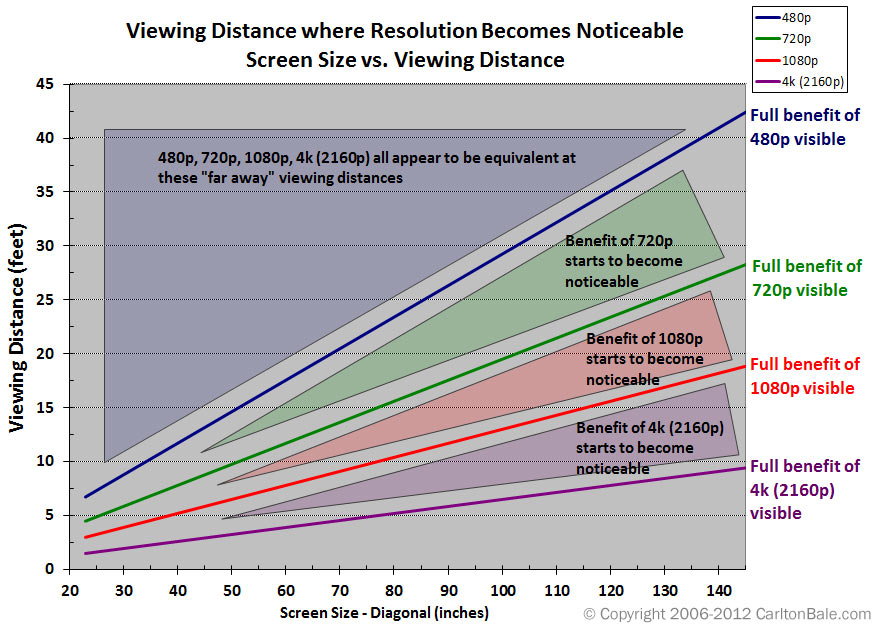
I can pretty confidently say that 4k is noticeable if you’re sitting close to a big tv. I don’t know that 8k would ever really be noticeable, unless the screen is strapped to your face, a la VR. For most cases, 1080p is fine, and there are other factors that start to matter way more than resolution after HD. Bit-rate, compression type, dynamic range, etc.
Seriously, articles like this are just clickbait.
They also ignore all sorts of usecases.
Like for a desktop monitor, 4k is extremely noticeable vs even 1440P or 2k/1080P
Unless you’re sitting very far away, the sharpness of text and therefore amount of readable information you can fit on the screen changes dramatically.
Complete bullshit articles. The same thing happened when 720p became 1080p. So many echos of “oh you won’t see the difference unless the screen is huge”… like no, you can see the difference on a tiny screen.
We’ll have these same bullshit arguments when 8k becomes the standard, and for every large upgrade from there.
I agree to a certain extent but there are diminishing returns, same with refreshrates. The leap from 1080 to 4k is big. I don’t know how noticeable upgrading from 4k to 8k would be for the average TV setup.
For vr it would be awesome though
The article was about TVs, not computer monitors. Most people don’t sit nearly as close to a TV as they do a monitor.
Oh absolutely, but even TVs are used in different contexts.
Like the thing about text applies to console games, applies to menus, applies to certain types of high detail media etc.
Good to know that pretty much anything looks fine on my TV, at typical viewing distances.
There’s a giant TV at my gym that is mounted right in front of some of the equipment, so my face is inches away. It must have some insane resolution because everything is still as sharp as a standard LCD panel.
So, a 55-inch TV, which is pretty much the smallest 4k TV you could get when they were new, has benefits over 1080p at a distance of 7.5 feet… how far away do people watch their TVs from? Am I weird?
And at the size of computer monitors, for the distance they are from your face, they would always have full benefit on this chart. And even working into 8k a decent amount.
And that’s only for people with typical vision, for people with above-average acuity, the benefits would start further away.
But yeah, for VR for sure, since having an 8k screen there would directly determine how far away a 4k flat screen can be properly re-created. If your headset is only 4k, a 4k flat screen in VR is only worth it when it takes up most of your field of view. That’s how I have mine set up, but I would imagine most people would prefer it to be half the size or twice the distance away, or a combination.
So 8k screens in VR will be very relevant for augmented reality, since performance costs there are pretty low anyway. And still convey benefits if you are running actual VR games at half the physical panel resolution due to performance demand being too high otherwise. You get some relatively free upscaling then. Won’t look as good as native 8k, but benefits a bit anyway.
There is also fixed and dynamic foveated rendering to think about, with an 8k screen, even running only 10% of it at that resolution and 20% at 4k, 30% at 1080p, and the remaining 40% at 540p, even with the overhead of so many foveation steps, you’ll get a notable reduction in performance cost. Fixed foveated would likely need to lean higher towards bigger percentages of higher res, but has the performance advantage of not having to move around at all from frame to frame. Can benefit from more pre-planning and optimization.
I’ve got a LCD 55" TV and a 14" laptop. Ok the couch, the TV screen looks to me about as big as the laptop screen on my belly/lap, and I’ve got perfect vision; on the laptop I can clearly see the difference between 4k and FULL HD, on the TV, not so much.
I think TV screens aren’t as good as PC ones, but also the TVs’ image processors turn the 1080p files into better images than what computers do.
Hmm, I suppose quality of TV might matter. Not to mention actually going through the settings and making sure it isn’t doing anything to process the signal. And also not streaming compressed crap to it. I do visit other peoples houses sometimes and definitely wouldn’t know they were using a 4k screen to watch what they are watching.
But I am assuming actually displaying 4k content to be part of the testing parameters.
Yeah well my comparisons are all with local files, no streaming compression
Also, usually when people use the term “perfect” vision, they mean 20/20, is that the case for you too. Another term for that is average vision, with people that have better vision than that having “better than average” vision.
Idk what 20/20 is, I guess you guys use a different scale, last mandatory vision test at work was 12/10 with 6/7 on I don’t remember which color recognition range, but I’m not sure about the latter 'cause it was ok last year and 6/7 the year before also. IIRC the best score for visual acuity is 18/10, but I don’t think they test that far during work visits, I’d have to go to the ophthalmologist to know.
I would imagine it’s the same scale, just a base 10 feet instead of 20 feet. So in yours you would see at 24 feet what the average person would see at 20 feet. Assuming there is a linear relation, and no circumstantial drop off.
A lot of us mount a TV on the wall and watch from a couch across the room.
And you get a TV small enough that it doesn’t suit that purpose? Looks like 75 inch to 85 inch is what would suit that use case. Big, but still common enough.
People are legit sitting 15+ feet away and thinking a 55 inch TV is good enough… Optimal viewing angles for most reasonably sized rooms require a 100+ inch TV and 4k or better.
The counterpoint is that if you’re sitting that close to a big TV, it’s going to fill your field of view to an uncomfortable degree.
4k and higher is for small screens close up (desktop monitor), or very large screens in dedicated home theater spaces. The kind that would only fit in a McMansion, anyway.
8K would probably be really good for large computer monitors, due to viewing distances. It would be really taxing on the hardware if you were using it for gaming, but reasonable for tasks that aren’t graphically intense.
Computer monitors (for productivity tasks) are a little different though in that you are looking at section of the screen rather than the screen as a whole as one might with video. So having extra screen real estate can be rather valuable.
I think age makes a big difference, too. I’m over 50 and I’ve never been able to really tell between 720p and 1080i and 1080p, much less higher resolutions. And I’m nearsighted.
Do you wear glasses?
Yep, nearly all my life, or contacts.
with all the menus now days I mainly want sharp text
I can barely tell the difference between 720p and 1080p. I will probably never buy another TV.
Maybe I need glasses?
Maybe I need glasses?
Mosdef
I do wear glasses and I came here to post exactly your first sentence. There probably is a difference, sure, but I personally can’t see it unless I put both files next to each other and really try to see it.
I’ve been digitising our movie collection so I played around with resolutions to minimise the storage space needed - I did settle on doing everything in 1080p but mostly because it feels weird to use a resolution the internet tells me is bad and I’m vulnerable to peer pressure (voice in the back of my head “oooh but what if anyone ever looks at those files?? What’ll they think???” type nonsense).
I also had a few files that came in much higher resolution that I re-encoded to fractions of their file sizes and honestly same effect.
I’m pretty much in the same boat, 720p looks fine to me in the vast majority of cases, and while I’m not great at going to my eye doctor regularly, the last time I had my vision checked it was fine, and it was right around the time I was shopping for a new TV and upgraded from 1080 to 4k, and still had a 720p in my bedroom.
If I looked really hard at them, I could tell the difference from the 720 to the 4k, but truth be told, I’m just not scrutinizing the picture quality of my TV that much.
I was like that too before I got glasses (I knew I had vision issues, but not how severe it was). I can’t stand 720p anymore.
Yeah, I can definitely tell the difference between 720p and 1080p, but the difference isn’t so large as to make me use it everywhere, so I default to 720p unless I need a bit more definition (usually for text).
My TV is 4k but I can’t remember the last time I actually displayed 4k content, almost everything we have is old DVDs (so 480p?) and 1080p Blurays. I don’t see the point in paying extra for Ultra HD when the picture isn’t that much better at our viewing distance.
If you haven’t been tested, or are a couple years overdue, yeah probably. If you put a new 4k TV (with an actual 4k video, not Netflix) side by side with you current one, you’d notice. Especially if it’s OLED, because they can turn off the emitters to make blacks actually black.
Hard disagree. 4K is stunning, especially Samsung’s Neo-QLED. I cannot yet tell a difference between 4K and 8K, though.
You would need a 150+ inch screen for 8K to make any difference. 8K is pretty much dead in the water considering DVDs outsell 4K Blu-Rays and 8K media is pretty much unavailable and 8K gaming being basically impossible. Even the TV manufacturers are phasing out their 8K devices since no one is buying them.
simply incorrect. in some circumstances sure 1080p is sufficient, but if the tv is big, close, or both. then 4k is a definite and noticeable improvement.
4k looks sharper as long as the actual content is real 4k, even from afar.
So completely correct as the point you are trying to make is the point the study focuses on (definition per viewed angle)
well yes a microscopic 4k display is no different than a 1080p one to our eyes.
but theyre claiming it doesnt matter on TVs in the usual setting which is just untrue.
Yeah tell that to my sister, who wants 4k for her laptop simply because she’s heard 4k is better 4 times 1080p, she’s buying a 13 inch.
Small numbers are just not sufficient for some people. I know if I send this article to her, I’ll be questioned “why do you not want me to see happy?”. So instead I just watch my nephews collage fund contribution shrink.
Sorry it became a rant of family tech guy.
Eh, let her for a few weeks, but show her how to switch resolution.
Ok, but then 2k would usually do.
I didn’t get why HD tv was relevant at all. I really did not understand that for a couple years.
Then I got glasses.
I suspect 4k matters for screens of a certain size or if you sit really close, but most of us don’t so it doesn’t matter.
I don’t like large 4k displays because the resolution is so good it breaks the immersion when you watch a movie. You can see that they are on a set sometimes, or details of clothing in medieval movies that give away they were created with modern sewing equipment.
It’s a bit of a stupid reason I guess, but that’s why I don’t want to go above 1080p for tv’s.
HDR 1080p is what most people can live with.
The study used a 44 inch TV at 2.5m. The most commonly used calculator for minimum TV to distance says that at 2.5m the TV should be a least 60 inches.
My own informal tests at home with a 65 inch TV looking at 1080 versus 4K Remux of the same movie seems to go along with the distance calculator. At the appropriate distance or nearer I can see a difference if I am viewing critically (as opposed to casually). Beyond a certain distance the difference is not apparent.
Exactly. This title is just clickbait.
The actual study’s title is “Resolution limit of the eye — how many pixels can we see?”.
Exactly why big box stores force you to look at TVs in narrow aisles, not at typical distances at home. They also adjust pictures on highest margin models properly.
Can’t believe I had to scroll down this far to find this:
Here’s the gut-punch for the typical living room, however. If you’re sitting the average 2.5 meters away from a 44-inch set, a simple Quad HD (QHD) display already packs more detail than your eye can possibly distinguish. The scientists made it crystal clear: once your setup hits that threshold, any further increase in pixel count, like moving from 4K to an 8K model of the same size and distance, hits the law of diminishing returns because your eye simply can’t detect the added detail.
On a computer monitor, it’s easily apparent because you’re not sitting 2+ m away, and in a living room, 44" is tiny, by recent standards.